How to Compare Real-Time Alerts in Singapore Live Tracking Software
How to Compare Real-Time Alerts in Singapore Live Tracking Software
Introduction
Real-time alerts are an important feature of live tracking software used by Singapore businesses to manage field employees, sales representatives, service technicians, delivery teams and mobile operations. Instead of requiring managers to watch a tracking dashboard throughout the day, alerts notify the right people when an event needs attention.
For example, a field service manager may receive an alert when a technician arrives at a customer site, a sales manager may be notified when an important appointment is missed, and an operations supervisor may receive a notification when an employee triggers an emergency alert.
However, not all tracking alerts offer the same value. Some systems provide only basic GPS notifications, while others support configurable geofencing, attendance exceptions, job-status changes, safety events and automated escalation workflows.
Singapore businesses should compare alert accuracy, delivery speed, configuration options, notification channels, reporting capabilities and privacy controls before choosing a solution. The objective is not to generate the largest number of notifications. It is to ensure that important events reach the right person in time for an appropriate response.
This article explains how to compare real-time alerts in Singapore live tracking software and what employers should test before selecting a system.
1. Compare the Types of Alerts Available
Start by identifying the events that the software can detect and report. A system with a wide range of relevant alert types can support different field operations without requiring managers to monitor every employee manually.
Common alert categories include:
- Location alerts: Notify managers when an employee or tracked asset enters or leaves a defined location.
- Attendance alerts: Highlight missed check-ins, late arrivals or incomplete check-outs.
- Geofence alerts: Report entry into or exit from designated customer sites, branches or work zones.
- Job-status alerts: Notify supervisors when a job starts, is completed, delayed or requires attention.
- Schedule alerts: Highlight missed appointments, overdue tasks or changes to assigned schedules.
- Safety alerts: Report emergency button activation or other configured safety events.
- Device alerts: Identify low battery, tracking-device disconnection or loss of communication.
- Exception alerts: Flag unusual events that require review, such as a location mismatch or an unexpected schedule deviation.
The relevant alert types depend on the business. A sales organisation may prioritise customer visit and appointment alerts, while a facilities management company may need job completion, technician arrival and emergency notifications.
What to check: Ask the vendor for a complete alert catalogue and identify which alerts are included in the standard package, which require additional modules and which depend on compatible devices or hardware.
2. Evaluate Geofencing Entry and Exit Alerts
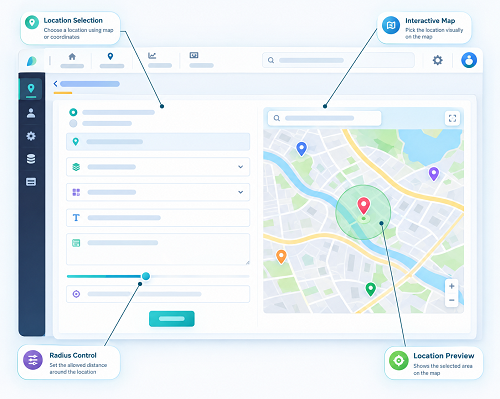
Geofencing allows businesses to create virtual boundaries around locations such as customer premises, offices, warehouses, construction sites and service areas.
When a tracked device enters or leaves a configured zone, the system can generate an alert.
For example, a field service company operating across Singapore may create geofences around customer sites in Jurong, Tampines and Woodlands. When a technician's device records an entry event at a designated site, the system can notify the relevant supervisor or update the job record.
Compare the following capabilities:
- Ability to create and edit multiple geofences.
- Support for different geofence sizes and shapes.
- Separate entry and exit alerts.
- Alerts for specific employees, teams or devices.
- Rules for overlapping geofences.
- Minimum time or distance conditions to reduce false alerts.
- Historical reports of geofence events.
- Options to notify only selected managers.
Businesses should test geofences at actual operating locations. GPS accuracy may vary around high-rise buildings, covered walkways, indoor facilities and underground car parks. A device may appear to cross a virtual boundary even when the employee has not physically entered the intended site.
A good system should provide location timestamps and, where available, accuracy information so managers can review questionable events rather than treating every alert as conclusive proof.
3. Check How Quickly Alerts Are Delivered
An alert is useful only if it reaches the intended person within a timeframe that supports action.
Vendors may describe their notifications as instant or real-time, but actual delivery can depend on several factors:
- Frequency of GPS updates.
- Mobile network availability.
- Device battery and background-app restrictions.
- Server processing time.
- Notification service availability.
- Internet connectivity on the manager's device.
- Third-party SMS or email delivery.
Businesses should distinguish between the time an event occurs, the time the tracking platform detects it and the time the notification reaches the recipient.
For example, if a technician arrives at a customer site at 10:00 AM but the device uploads its location at 10:06 AM, the manager should not be led to believe that the platform detected the arrival at exactly 10:00 AM.
During a demonstration, ask the vendor to show the event timestamp, detection timestamp and notification delivery status wherever these are available.
What to check: Test alert delivery under normal connectivity and temporary network interruptions. Ask the vendor whether it publishes measurable delivery or processing performance commitments and whether these are contractual.
4. Compare Notification Channels
Different teams may prefer different ways to receive alerts. A dispatcher may work primarily from a desktop dashboard, while a field supervisor may need mobile notifications.
Common notification channels include:
| Notification channel | Suitable use |
|---|---|
| In-app notifications | Routine alerts and activity updates |
| Mobile push notifications | Time-sensitive alerts for managers on the move |
| Detailed notifications and non-urgent exceptions | |
| SMS | Important alerts when app-based communication is unavailable, subject to delivery limitations |
| Web dashboard | Central monitoring and alert management |
| API or webhook integration | Sending events to other business applications |
Not every event needs to be delivered through every channel. For example, a routine customer-site arrival may appear on the dashboard, while an emergency alert may trigger a high-priority mobile notification and an escalation workflow.
Compare whether the software allows administrators to choose channels by alert type, recipient, priority and working schedule.
Also check whether SMS, email or messaging integrations involve additional charges or third-party service dependencies.
5. Assess Alert Priority and Severity Levels
A tracking system should help managers distinguish urgent events from routine updates.
If every location change generates an equally prominent notification, important alerts can easily get lost.
A useful system may support priority levels such as:
- Critical: Emergency alerts or serious safety incidents requiring immediate attention.
- High: Missed critical appointments, significant schedule exceptions or important operational disruptions.
- Medium: Delayed job updates, unexpected site departures or incomplete check-outs.
- Low: Routine arrivals, departures and general status changes.
These categories should be configurable according to the organisation's operations.
For example, a security services company may treat an emergency alert as critical, while a sales team may classify a delayed customer visit as medium priority.
The software should also allow different notification rules for different departments. This prevents managers from receiving large volumes of alerts that are irrelevant to their responsibilities.
6. Examine Custom Alert Rules and Thresholds
Preconfigured alerts may be convenient, but businesses often need rules that reflect their schedules, sites and operating procedures.
For example, an organisation may want an alert when:
- A representative has not checked in within a defined appointment window.
- A technician has not updated a job for a specified period.
- A device has stopped transmitting location data.
- An employee leaves an authorised work zone during a designated activity.
- A customer appointment remains incomplete after its scheduled end time.
- An assigned asset moves outside an approved geofence.
Look for settings that allow administrators to define:
- Trigger conditions.
- Time and distance thresholds.
- Working-day and working-hour rules.
- Employee and team groups.
- Geographical zones.
- Alert priority.
- Notification recipients.
- Escalation conditions.
Thresholds should be tested rather than selected arbitrarily. For example, a geofence that is too small may generate false entry and exit alerts, while an excessively large zone may provide little useful site verification.
The system should also allow authorised administrators to modify rules without requiring extensive vendor intervention.
7. Compare Alert Accuracy and False Notifications
A high number of notifications does not necessarily indicate a good tracking system. If alerts are inaccurate, repetitive or triggered by ordinary GPS variations, employees and managers may begin ignoring them.
Common causes of false or misleading alerts include:
- GPS signal fluctuations.
- Incorrect customer-site coordinates.
- Poorly configured geofence boundaries.
- Delayed location updates.
- Duplicate event processing.
- Temporary device disconnections.
- Incorrect employee schedules.
- Overlapping location zones.
Ask vendors how their systems identify duplicate events, handle GPS uncertainty and prevent repeated notifications for the same incident.
For example, if an employee's device moves slightly around a geofence boundary, the system should ideally avoid sending repeated entry and exit alerts within a short period. Some platforms support configurable dwell times, hysteresis or event-suppression rules to reduce this problem.
Businesses should test these behaviours at representative Singapore locations, including indoor and high-rise environments.
8. Evaluate Attendance and Punctuality Alerts
Live tracking software may include attendance-related notifications for mobile employees.
These alerts can help supervisors identify exceptions that need review, such as:
- Missing start-of-day check-ins.
- Late arrivals at scheduled work locations.
- Missed customer visit check-ins.
- Missing check-outs.
- Incomplete attendance records.
- Unusual differences between scheduled and recorded times.
For example, a service technician assigned to a 9:00 AM customer appointment may not record a check-in by the configured time. The application can notify the supervisor so that the manager can contact the employee or check whether the appointment has changed.
However, an alert should not automatically establish that an employee was absent or late. Network problems, forgotten check-ins, schedule changes and location inaccuracies may explain the exception.
Employers should provide a process for employees to explain or correct attendance records and retain an audit trail of approved changes.
9. Check Job and Appointment Exception Alerts
For field service and sales operations, alerts should connect location information with actual work assignments.
A location alert alone may tell a manager that an employee has arrived somewhere, but a job-related alert can explain whether the assigned work is progressing.
Useful job and appointment alerts include:
- Job accepted.
- Job started.
- The technician arrived.
- Customer unavailable.
- Job delayed.
- Job completed.
- Follow-up required.
- Appointment cancelled.
- Work order overdue.
For example, if a technician has not updated a high-priority repair job by the expected time, the system can alert the dispatcher. The dispatcher can then contact the technician, inform the customer or arrange additional support.
Check whether the software allows alerts to be linked to customer records, work orders, appointment schedules and service-level commitments.
This is particularly important for businesses that manage multiple customer appointments across Singapore.
10. Review Emergency and Safety Alerts
Businesses with employees working alone or visiting unfamiliar sites may need safety-related alert capabilities.
Depending on the application and compatible devices, these may include:
- Emergency or SOS button activation.
- Man-down or inactivity alerts.
- Missed safety check-ins.
- Unexpected device disconnection.
- Entry into restricted work zones.
- Alerts from connected safety sensors.
For example, a maintenance employee working alone in a plant room may be able to activate an emergency alert through the mobile application. The system can notify designated supervisors or safety personnel.
However, businesses should check exactly how emergency notifications operate. A software alert is not automatically a substitute for an emergency response plan, reliable communication arrangements or appropriate safety procedures.
Test the complete workflow, including who receives the alert, who acknowledges it, what happens if the first recipient does not respond and how the incident is recorded.
11. Check Device and Connectivity Failure Alerts
A tracking application depends on mobile devices, GPS services and network connectivity. If any of these stop working, managers may receive incomplete or outdated information.
The software should be able to identify and report important technical issues, such as:
- Device battery running low.
- GPS location updates stopping.
- Mobile application going offline.
- Tracking device disconnecting.
- Data synchronisation failing.
- Device not reporting within a configured period.
- Application permissions being disabled.
For example, if a field employee's phone stops transmitting location updates during a scheduled assignment, the system could notify the supervisor that the last known location is outdated.
This is different from an alert confirming that the employee has left a site. A connectivity failure does not establish the employee's actual location or activity.
Compare whether the system displays the last successful update time, device status and reason for the interruption where available.
12. Evaluate Alert Acknowledgement and Escalation
Sending an alert is only the first step. Businesses also need a process to ensure that important notifications are reviewed and acted upon.
A good alert management system should allow authorised users to:
- Open and review an alert.
- Acknowledge receipt.
- Add comments or investigation notes.
- Assign the alert to another manager.
- Mark an issue as resolved.
- Escalate an unacknowledged alert.
- Review the alert's action history.
For example, when a technician triggers an emergency notification, the first assigned supervisor should receive it. If that person does not acknowledge it within the configured period, the system may notify another authorised contact.
Businesses should check whether escalation rules can be configured by alert severity, department and working schedule.
The system should also distinguish between an alert being delivered, acknowledged, investigated and resolved. These are separate stages and should not be represented as the same status.
13. Compare Alert Dashboards and Historical Reports
Managers need a central place to review active and previous alerts. A useful dashboard should make important events easy to identify without overwhelming users with notifications.
Look for features such as:
- Active alert summary.
- Alerts grouped by priority.
- Employee or team filters.
- Location and geofence filters.
- Alert type and date filters.
- Acknowledgement status.
- Resolution status.
- Last known device location.
- Historical event timelines.
- Exportable reports.
Historical reports are particularly useful when investigating recurring operational problems.
For example, a manager may want to identify which customer locations regularly generate missed check-in alerts or whether a particular device frequently loses connectivity.
The system should preserve the original event time, alert creation time and acknowledgement or resolution time wherever these are available.
Reports should also distinguish genuine operational incidents from technical errors and employee-corrected records.
14. Check Integration With Existing Business Applications
Real-time alerts become more useful when they can trigger relevant actions in other business systems.
Depending on the organisation's requirements, live tracking software may integrate with:
- CRM platforms: Update customer visit records and sales follow-up activities.
- Field service management systems: Notify dispatchers about delayed jobs or completed assignments.
- Attendance systems: Flag missed check-ins and incomplete attendance records.
- Payroll systems: Transfer relevant, validated attendance exceptions for review.
- Customer support platforms: Inform service teams about appointment delays.
- Communication tools: Send authorised notifications to designated internal channels.
- Reporting platforms: Combine alert data with operational performance information.
For example, when a technician marks a job as delayed, the tracking platform could update the work order and notify the dispatcher. The dispatcher can then decide whether to inform the customer or reassign the job.
Ask vendors whether integrations are available through standard connectors, APIs or webhooks. Confirm whether integration development, message usage or third-party services involve additional charges.
Also test how the system handles failed integrations, duplicate events and delayed messages.
15. Assess Privacy and Access Controls for Employee Alerts
Real-time tracking alerts may contain employee location information, attendance details and activity records. Singapore employers should therefore evaluate privacy and access controls alongside operational features.
Important safeguards include:
- Clearly defined purposes for collecting and using location information.
- Employee notification about the tracking and alert process.
- Tracking limited to justified business requirements.
- Role-based access to employee and location records.
- Appropriate restrictions on historical location information.
- Secure storage and transmission.
- Suitable retention and deletion practices.
- Audit logs for access and changes.
- Controls over vendor and third-party access.
For example, a dispatcher may need to receive a technician's arrival notification for job coordination, while a payroll administrator may only need access to validated attendance exceptions. Both users do not necessarily require unrestricted access to all employee location records.
Under Singapore's PDPA, organisations must comply with applicable obligations when collecting, using or disclosing personal data. An employment-related exception may apply to certain employee-management activities, but it does not remove other relevant obligations. Employers should assess the actual purpose and operation of their tracking system rather than assume that every monitoring feature is automatically permitted.
The Ministry of Manpower has also highlighted the importance of clear workplace monitoring rules, informing workers about monitoring purposes and implementing appropriate safeguards for collected information.
16. Test Real-Time Alerts Before Selecting a Vendor
A software demonstration should include practical alert tests. Businesses should not rely solely on a vendor's feature list or claims about instant notifications.
Use the following checklist to compare shortlisted solutions:
| Test scenario | What to verify |
|---|---|
| Employee enters a customer geofence | Correct entry alert is generated |
| Employee leaves a designated site | Exit alert is recorded correctly |
| Employee misses a scheduled check-in | Appropriate exception notification is sent |
| Technician delays a job | Relevant supervisor receives the alert |
| Employee completes a work order | Job completion status is updated |
| Device stops sending updates | System identifies stale location information |
| Mobile connectivity is interrupted | System indicates that alert delivery may be delayed |
| Device battery becomes low | Battery warning is generated where supported |
| Emergency button is activated | Designated recipients receive the alert |
| Alert is not acknowledged | Escalation rules operate as configured |
| Multiple events occur together | Alerts are prioritised appropriately |
| GPS fluctuates near a geofence | False or repeated alerts are minimised |
| Manager resolves an alert | Resolution status and audit history are retained |
| Alert report is exported | Event details and timestamps are accurate |
Conduct these tests using the actual mobile devices and network conditions expected in the organisation's operations.
Test locations should include representative customer premises, office buildings, industrial sites and indoor environments. This helps identify differences between a controlled vendor demonstration and everyday field conditions.
17. Use a Weighted Scorecard to Compare Vendors
A weighted scorecard can help Singapore businesses compare alert capabilities objectively.
The following example provides a starting point. Organisations can adjust the weightings based on their operating requirements.
| Evaluation area | Suggested weight |
|---|---|
| Alert accuracy and reliability | 20% |
| Notification speed and delivery | 15% |
| Geofencing and location alerts | 15% |
| Custom rules and thresholds | 10% |
| Alert prioritisation and escalation | 10% |
| Attendance and job exception alerts | 10% |
| Dashboard and historical reporting | 10% |
| Integration capabilities | 5% |
| Privacy and access controls | 5% |
| Total | 100% |
Score each vendor from 1 to 5:
- 1 – Poor: Feature is unavailable or unsuitable.
- 2 – Limited: Basic functionality with significant restrictions.
- 3 – Adequate: Meets essential requirements.
- 4 – Good: Reliable functionality with useful configuration options.
- 5 – Excellent: Strong performance, flexibility and reporting.
Multiply each category's score by its weight to calculate the weighted result. Ask vendors to demonstrate the features that receive the highest scores rather than relying entirely on sales presentations.
Conclusion
Real-time alerts can help Singapore businesses manage field employees, customer visits, service appointments and mobile operations more effectively. However, the value of a tracking system depends on the quality and relevance of its alerts, not simply the number of notifications it generates.
Businesses should compare geofencing, attendance exceptions, job-status updates, safety notifications, device alerts, delivery speed, custom rules and escalation workflows. They should also evaluate historical reporting, integration capabilities and privacy controls.
Before selecting a solution, conduct practical tests using real devices and representative operating conditions. Confirm that important events are detected accurately, notifications reach the right people and managers can acknowledge and resolve alerts through a clear workflow.
The best live tracking software helps managers respond to genuine operational issues without requiring constant dashboard monitoring or unnecessary employee surveillance.
Compare late-arrival, missed-visit and out-of-area alerts using actual operating scenarios. Check that InnBuilt lets managers avoid unnecessary notification noise.