How Can Payroll Software Handle Multiple Singapore Business Entities?
How Can Payroll Software Handle Multiple Singapore Business Entities?
Introduction
Businesses operating through multiple legal entities in Singapore often face additional payroll administration challenges. A corporate group may have several private limited companies, subsidiaries, branches, or business units, each employing different groups of employees. Although these entities may share HR, finance, and management teams, their payroll records and statutory responsibilities cannot always be combined.
For example, a Singapore-based group may operate a retail company, a technology subsidiary, and a logistics company. Each entity may have different employees, salary structures, payroll schedules, cost centres, and approval requirements. Payroll teams must manage these differences while maintaining accurate employee records, CPF contributions, employment income reporting, and accounting information.
Payroll software with multi-entity functionality can simplify this process. It allows a central team to manage payroll activities through one platform while maintaining separate employer profiles, statutory settings, payroll records, and financial reports for each legal entity.
This article explains how payroll software can handle multiple Singapore business entities, which features employers should evaluate, and how to implement a reliable multi-entity payroll process.
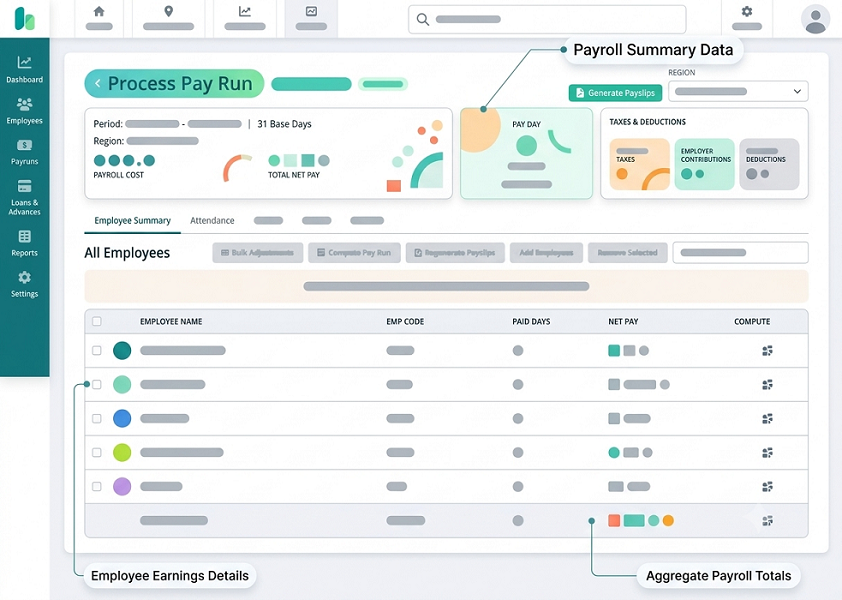
1. Create Separate Employer Profiles for Each Legal Entity
The first requirement for multi-entity payroll is the ability to create a separate employer profile for every legal entity.
Even when companies belong to the same corporate group, each employing entity may have its own:
- Registered business name.
- Unique Entity Number (UEN).
- Registered business address.
- CPF Submission Number (CSN).
- Payroll contact details.
- Bank account and payment arrangements.
- IRAS and statutory reporting information.
Payroll software should allow administrators to configure these details independently.
For example, a group with three Singapore companies should be able to maintain three employer profiles within the same payroll environment. Employees, payroll transactions, statutory information, and reports can then be associated with the correct employer.
This structure helps prevent payroll teams from accidentally processing employees under the wrong company or using another entity's statutory information.
2. Maintain Separate Employee Records Under Each Entity
Employee records must be linked to the correct employing entity. Payroll software should allow HR teams to maintain a central employee directory while clearly identifying the legal employer responsible for each employee.
Important employee information includes:
- Employee name and identification details.
- Employment start date and termination date.
- Employing entities and UEN.
- Job title and department.
- Employment type and salary arrangement.
- CPF eligibility and relevant employee status.
- Bank account and payment information.
- Work location and cost centre.
- Employment contract and salary history.
A central directory can reduce duplicate data entry, but it should not treat all employees as belonging to one legal employer.
For example, an employee working for Company A should not automatically appear in Company B's payroll merely because both companies belong to the same group.
The software should also maintain a clear employment history when an employee transfers from one group entity to another. The transfer date, previous employer, new employer, and relevant payroll changes should be documented.
3. Configure Entity-Specific CPF Settings
CPF administration is one of the most important considerations when managing multiple Singapore employers.
Each legal entity should have the correct CPF employer information and submission arrangements. The Central Provident Fund Board states that an employer needs a CPF Submission Number to transact with CPF Board. It also explains that a new CSN must be applied for when an organisation receives a new UEN.
Payroll software should therefore support:
- Separate CPF employer profiles.
- Entity-specific UEN and CSN details.
- Correct employee-to-employer mapping.
- CPF contribution calculations.
- Ordinary Wage (OW) and Additional Wage (AW) classification.
- Applicable contribution rates and ceilings.
- CPF submission reports.
- Payment and submission status tracking.
For example, if Company A and Company B have separate UENs, the payroll system should not automatically use Company A's CPF submission details for employees employed by Company B.
The system should also preserve the correct employee status and contribution rules, including age, Singapore citizenship or Permanent Resident status, PR year, and applicable wage levels.
Important: A shared payroll platform does not mean that CPF obligations can be merged indiscriminately across different legal employers. Employers should verify the correct CPF registration, contribution, and reporting arrangements for each entity.
4. Apply Different Payroll Policies and Salary Structures
Companies within the same group may follow different compensation policies.
For example:
- A retail company may pay monthly salaries and sales commissions.
- A logistics company may pay shift allowances and overtime.
- A technology subsidiary may provide annual bonuses and flexible benefits.
- A professional services company may use different incentive arrangements.
Payroll software should allow administrators to configure separate salary structures and payroll rules for each entity.
Useful configuration options include:
- Basic salary components.
- Fixed and variable allowances.
- Commission structures.
- Bonus and incentive payments.
- Overtime calculations.
- Shift and public holiday payments.
- Employee deductions.
- Reimbursement categories.
- Benefits and taxable remuneration.
The software should also distinguish between common group-wide policies and entity-specific rules.
For example, all companies may use the same payroll calendar, but only the logistics company may need specific shift allowance calculations.
This flexibility helps standardise administration without forcing every entity to follow an unsuitable salary structure.
5. Support Separate Payroll Calendars and Pay Periods
Not every company in a corporate group will necessarily follow the same payroll schedule.
One entity may process salaries on the last working day of each month, while another may pay employees on a different date. Some businesses may also have separate cut-off dates for overtime, commissions, attendance, or variable payments.
Multi-entity payroll software should support:
- Different payroll periods.
- Entity-specific salary payment dates.
- Separate payroll cut-off dates.
- Different attendance and overtime cut-offs.
- Multiple payroll runs.
- Off-cycle salary payments.
- Retroactive payroll adjustments.
For example, the HR team may close attendance records for Company A on the 25th of each month, while Company B may use the last calendar day.
The software should apply the correct cut-off settings to each entity and identify incomplete or late payroll inputs before processing.
This reduces the risk of missing salary components or including transactions in the wrong payroll period.
6. Manage Payroll Approvals at Entity Level
Multi-entity organisations often have different approval structures.
A group HR manager may supervise payroll across all companies, but salary changes, overtime, bonuses, and final settlements may require approval from the relevant entity's department head or finance manager.
Payroll software should support configurable approval workflows.
For example:
| Payroll activity | Possible approver |
|---|---|
| Salary changes | Entity HR manager |
| Overtime payments | Department manager |
| Bonus and commission | Business head |
| Monthly payroll register | Entity finance manager |
| Final payroll approval | Authorised entity representative |
| Payroll release | Finance or treasury team |
The system should record who created, reviewed, approved, or modified each payroll transaction.
Role-based permissions are particularly important. A manager responsible for Company A should not automatically receive permission to modify Company B's salary records.
Central administrators may need group-wide visibility, while entity managers should have access only to the information required for their responsibilities.
7. Generate Separate Itemised Payslips for Each Employer
Employees should receive payroll documents that correctly identify their employing entity.
Payroll software should generate payslips using the relevant employer profile and employee information.
Each payslip should contain the required information under Singapore's applicable itemised payslip requirements, including:
- Employer and employee details.
- Salary period and payment date.
- Basic salary.
- Allowances and additional payments.
- Overtime hours and payments, where applicable.
- Deductions.
- Net salary payable.
- Other required payment information.
The system should ensure that Company A's employer details are not printed on a payslip for an employee employed by Company B.
Employee self-service functionality can also allow employees to access their payslips securely without contacting HR for every document.
Employers should confirm that the software supports the applicable Employment Act requirements for their employee categories and employment arrangements.
8. Support Entity-Specific IRAS Employment Income Reporting
Annual employment income reporting must be handled carefully when employees work for different legal entities during the year.
Payroll software should maintain separate employer reporting profiles and generate the appropriate employment income information for each organisation.
Useful capabilities include:
- Entity-specific IRAS reporting settings.
- IR8A preparation.
- Appendix 8A and Appendix 8B support, where applicable.
- Annual employment income reconciliation.
- AIS submission preparation.
- Amendment and resubmission tracking.
- Employee income history.
- Submission confirmation records.
IRAS requires AIS employers to submit employment income information electronically by 1 March each year. Payroll software that supports the AIS API can help employers prepare and submit the relevant records electronically.
A particularly important situation arises when an employee transfers between two companies in the same group.
For example, an employee may work for Company A from January to May and transfer to Company B in June. Payroll software should preserve the employment periods and income records under the respective organisations.
IRAS guidance explains that, following a restructuring or employee transfer within a group, employment income information should generally be reported under the respective organisations according to the period of employment, subject to the applicable reporting arrangements and circumstances.
Therefore, payroll teams should not simply combine all annual salary information under the parent company without checking the correct reporting treatment.
9. Allocate Salary Costs to the Correct Entity and Cost Centre
Accurate accounting is another major reason businesses need multi-entity payroll functionality.
Payroll software should allocate salary expenses to the appropriate legal entity, department, location, project, or cost centre.
For example, a company group may want to identify:
- Salary expenses for Company A.
- CPF employer contributions for Company A.
- Overtime expenses for Company B.
- Commission expenses for Company C.
- Recruitment and employee benefit costs by department.
The software should generate entity-specific payroll journals and accounting reports.
It should also support mapping payroll components to the relevant general ledger accounts.
| Payroll component | Example accounting treatment |
|---|---|
| Basic salary | Salary expense |
| Employer CPF | Employer statutory contribution expense |
| Overtime | Overtime expense |
| Sales commission | Commission expense |
| Employee deductions | Relevant payable or liability account |
| Salary payable | Payroll liability |
| Employee reimbursement | Relevant expense account |
The exact accounting treatment should follow the organisation's accounting policies.
A useful feature is the ability to consolidate approved payroll reports at group level while retaining separate entity-level journals. This gives finance teams a group-wide view without losing the detail required for individual company accounts.
10. Manage Salary Payments Through Separate Bank Arrangements
Different legal entities may maintain separate corporate bank accounts. Payroll software should support the correct salary payment arrangements for each employer.
Important features include:
- Entity-specific bank account configuration.
- Separate salary payment files.
- Employee bank account validation.
- Payment approval workflows.
- Payment status tracking.
- Reconciliation reports.
- Failed payment identification.
For example, Company A's salaries should be paid through its authorised bank account, while Company B's salaries should be processed through its own approved payment arrangement.
The software should also prevent accidental mixing of payment files or selecting the wrong bank account during payroll processing.
Before purchasing a system, employers should confirm which banks and payment file formats are supported and whether payment processing is integrated directly or requires a separate banking platform.
11. Provide Consolidated Group-Level Payroll Reports
Although each entity needs separate payroll records, senior management often requires consolidated information.
Payroll software should provide both entity-level and group-level reporting.
Useful reports include:
- Total monthly payroll by entity.
- Employee headcount by company.
- Salary expenses by department.
- Employer CPF costs.
- Overtime and allowance expenses.
- Bonus and commission costs.
- Payroll variance reports.
- New joiners and leavers.
- Leave and absence costs.
- Payroll liabilities.
- Payroll processing status.
For example, a finance director may want to compare monthly payroll expenditure across five subsidiaries. The software should generate a consolidated report while allowing the finance team to drill down into each company's payroll details.
Group-level reports should clearly distinguish between actual legal-entity payroll figures and management reporting summaries.
Consolidated visibility should not change the underlying statutory records or make separate employers appear to be one employer.
12. Handle Employee Transfers Between Group Companies
Employee transfers are a common challenge in organisations with multiple subsidiaries.
An employee may move from one company to another because of restructuring, promotion, business expansion, or changes in operational responsibilities.
Payroll software should support a documented transfer process.
The process should include:
- Record the employee's last working date under the existing entity.
- Confirm the transfer or new employment arrangement.
- Create or update the employee's record under the new entity.
- Record the effective transfer date.
- Update salary, allowances, department, and cost centre.
- Review outstanding leave and other balances.
- Calculate final or transitional payroll amounts correctly.
- Update CPF and tax reporting information as required.
- Preserve historical payslips and employment records.
- Confirm the new payroll setup before the next pay run.
Employers should not assume that an internal transfer automatically has no legal or statutory consequences. The correct treatment depends on whether the arrangement is a transfer of employment, a change of employer, a business transfer, or another restructuring arrangement.
Payroll teams should obtain appropriate HR and legal guidance where necessary.
13. Maintain Strong Data Security and Access Controls
A central payroll platform may contain sensitive employee information from several companies. This makes access control particularly important.
Payroll software should support:
- Role-based access permissions.
- Entity-level data restrictions.
- Multi-factor authentication.
- Encryption of stored and transmitted data.
- Secure payslip delivery.
- Audit trails.
- Controlled payroll exports.
- Backup and recovery procedures.
- Secure access removal for departing employees.
For example, a payroll executive responsible for Company A may need access to its employee records and payroll reports but should not automatically be able to view salary information for Company B.
The software should also help employers meet applicable Personal Data Protection Act (PDPA) obligations. Employers should review the vendor's security practices, data-processing arrangements, retention policies, and safeguards for overseas data transfers.
A shared database should not mean unrestricted access to every company's payroll information.
14. Support Payroll Reconciliation and Audit Trails
Multi-entity payroll requires careful reconciliation because payroll calculations, statutory submissions, salary payments, and accounting entries must agree.
Payroll software should provide reports and audit trails that allow finance and HR teams to verify each stage.
Important reconciliation checks include:
- Payroll register against approved salary changes.
- Gross salary against attendance and variable-pay records.
- Employee CPF deductions against payroll calculations.
- Employer CPF costs against statutory reports.
- Net salary against bank payment files.
- Payroll journals against accounting entries.
- Annual employment income against AIS records.
- Entity-level payroll totals against group reports.
The system should also maintain a record of changes to employee details, salary components, payroll calculations, approvals, and statutory submissions.
These controls help organisations investigate discrepancies and prepare for internal or external audits.
15. Integrate Payroll With HR, Attendance and Accounting Systems
Multi-entity payroll software becomes more effective when it connects with other business systems.
Useful integrations include:
- HR management systems: Synchronise employee details, employment status, salary changes, and department information.
- Attendance systems: Transfer approved working hours, overtime, shift allowances, and absence information.
- Leave management systems: Update paid leave, unpaid leave, and other approved absence information before payroll processing.
- Accounting software: Transfer entity-specific payroll journals and cost allocations.
- Banking platforms: Prepare salary payment files and support payment reconciliation.
- Government submission services: Support eligible CPF and IRAS submission workflows through available integrations.
Singapore's One-Stop Payroll initiative allows participating businesses to submit relevant payroll and employment-related information to CPF Board, IRAS, and MOM through supported payroll software.
Employers should verify whether a vendor supports the required One-Stop Payroll functions and whether those capabilities are available for every entity in the group.
Integrations should also include validation and approval controls. For example, unapproved overtime or incomplete employee changes should not automatically flow into a final payroll run.
16. Support Different Payroll Rules Without Losing Group Consistency
A multi-entity payroll platform should balance standardisation and flexibility.
Some processes should be common across the group, such as:
- Payroll processing checklists.
- Approval standards.
- Data security requirements.
- Payroll cut-off communication.
- Reporting formats.
- Audit procedures.
Other settings may need to remain specific to each legal entity, such as:
- CPF employer details.
- Salary payment arrangements.
- Payroll calendars.
- Salary structures.
- Cost-centre mappings.
- Entity-specific approval workflows.
- IRAS reporting configuration.
A good system allows administrators to create group-wide templates and apply entity-specific variations where required.
This reduces inconsistent processes without forcing all companies to use identical payroll settings.
17. Evaluate Multi-Entity Payroll Software Before Buying
Employers should test the software using realistic scenarios involving multiple legal entities.
A practical evaluation checklist includes:
| Evaluation area | What employers should test |
|---|---|
| Entity setup | Can the system create separate employer profiles and UEN details? |
| Employee management | Can employees be linked to the correct legal employer? |
| CPF | Can each entity maintain its applicable CSN and CPF settings? |
| Payroll rules | Can different salary structures be configured? |
| Payroll calendars | Can each entity use separate cut-off dates and pay periods? |
| Approvals | Can approval workflows be configured by company? |
| Payslips | Are employer details correctly displayed on each payslip? |
| IRAS reporting | Can employment income be prepared and reported under the correct organisation? |
| Accounting | Can separate payroll journals be generated for each entity? |
| Payments | Can the software support different bank arrangements? |
| Reporting | Are entity-level and group-level reports available? |
| Security | Can access be restricted by entity and role? |
| Employee transfers | Can historical employment and payroll information be preserved? |
| Integrations | Can HR, attendance, leave, accounting, and statutory systems connect correctly? |
During the demonstration, employers should ask the vendor to process a complete payroll cycle for at least two entities with different salary structures and approval requirements.
They should also test a transfer of an employee from one company to another and review how the system handles historical records, statutory reporting, and accounting entries.
Conclusion
Payroll software can make multi-entity payroll management more efficient for Singapore business groups by centralising administration while preserving the separate records and responsibilities of each legal employer.
The most useful systems support individual employer profiles, employee-to-entity mapping, separate CPF and IRAS settings, flexible payroll calendars, entity-specific approvals, accurate payslips, separate accounting journals, and consolidated management reporting.
Before selecting a solution, employers should confirm that the software can manage their actual legal structure rather than simply allowing several company names to be added to one account. They should test employee transfers, statutory reporting, salary payments, access restrictions, and financial reconciliation across multiple entities.
A well-configured multi-entity payroll platform helps HR, finance, and management teams reduce manual administration, improve payroll accuracy, and maintain better control over the group's payroll operations.
Test separate entities, bank details, approvers and consolidated reporting. Confirm InnBuilt's configuration options for a multi-entity Singapore employer.