How to Manage Overnight Shift Attendance for Singapore Teams
How to Manage Overnight Shift Attendance for Singapore Teams
Managing overnight shift attendance can be challenging for Singapore businesses that operate beyond standard office hours. Industries such as manufacturing, healthcare, logistics, hospitality, security, retail, and customer support often require employees to work late-night or early-morning shifts.
Unlike regular daytime schedules, overnight shifts may begin on one calendar day and end on the next. For example, an employee may start work at 10:00 PM on Monday and finish at 6:00 AM on Tuesday. If attendance software is not configured correctly, the system may record the shift against two separate days, calculate working hours incorrectly, or generate inaccurate overtime and payroll information.
Singapore employers must also consider applicable employment requirements relating to working hours, overtime, rest days, and employment records. Attendance systems should support these requirements while giving managers reliable visibility into employee attendance.
This article explains how Singapore companies can manage overnight shift attendance, configure attendance software, track working hours, handle exceptions, and maintain accurate payroll and employment records.
1. Understand the Challenges of Overnight Shift Attendance
Overnight shifts require different attendance management practices from standard daytime schedules.
The main challenge is that an employee's working period crosses midnight. A conventional attendance system may interpret the check-in as belonging to one working day and the check-out as belonging to the next.
Common challenges include:
- Cross-midnight attendance: Employees check in before midnight and check out the following morning.
- Incorrect shift allocation: Attendance software may assign the check-out to a new shift instead of the previous night's shift.
- Working-hour calculation errors: Systems may calculate daily hours incorrectly when a shift crosses calendar dates.
- Overtime identification: Additional working hours may not be recognised correctly if shift boundaries are configured incorrectly.
- Break management: Meal and rest breaks may occur at different times during overnight operations.
- Rest-day tracking: Employers need to distinguish between a shift that crosses midnight and work performed on a designated rest day.
- Payroll discrepancies: Incorrect attendance calculations can affect salary, overtime, allowances, and other payroll components.
- Missing punches: Employees may forget to check out after completing an overnight shift.
A well-configured attendance system should treat an overnight shift as one continuous scheduled work period while retaining the actual date and time of each attendance event.
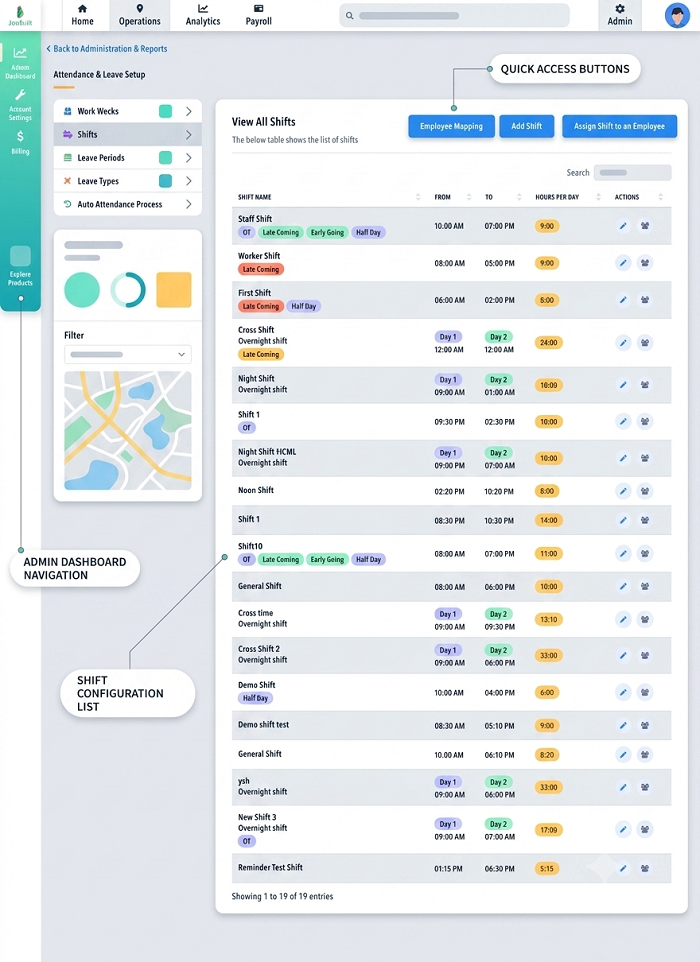
2. Configure Overnight Shifts Across Two Calendar Days
The first step is to configure overnight shifts correctly in the attendance management system.
Employers should create a dedicated shift template with a defined start time, end time, applicable break periods, and assigned working days.
For example:
| Shift Detail | Example Configuration |
|---|---|
| Shift name | Night Shift |
| Shift start | 10:00 PM |
| Shift end | 6:00 AM |
| Shift start date | Monday |
| Shift end date | Tuesday |
| Scheduled duration | 8 hours |
| Break arrangement | Configured according to the applicable schedule |
| Attendance method | Biometric or mobile check-in |
The software should recognise that the end time occurs on the following calendar day.
For example, if an employee checks in at 10:00 PM on Monday and checks out at 6:00 AM on Tuesday, the system should associate both punches with the same scheduled overnight shift.
Employers should avoid manually splitting every overnight shift into separate morning and evening attendance records unless there is a specific operational or reporting requirement.
3. Choose an Attendance System That Supports Cross-Midnight Shifts
Not all attendance platforms handle overnight schedules in the same way.
Some systems automatically recognise shifts that cross midnight, while others require administrators to configure the shift end date or define an overnight shift rule.
Before purchasing attendance software, employers should confirm that it supports:
- Overnight and rotating shift schedules.
- Automatic next-day check-out recognition.
- Shift-based attendance calculations.
- Multiple check-in and check-out records.
- Break deductions and adjustments.
- Overtime identification.
- Rest-day and public holiday work tracking.
- Missing punch notifications.
- Employee attendance corrections.
- Payroll integration.
The system should also allow HR teams to configure different overnight schedules for different departments and locations.
For example, a logistics company may have an overnight warehouse shift from 9:00 PM to 5:00 AM, while its customer support team may work from 11:00 PM to 7:00 AM.
Both schedules should be managed independently without creating confusion in the central attendance records.
4. Define Clear Check-In and Check-Out Rules
Employees working overnight should receive clear instructions about when and how to record attendance.
Companies should establish a standard process for:
- Recording attendance before the shift begins.
- Handling early check-ins.
- Recording the scheduled shift start.
- Recording meal and rest breaks where required.
- Handling extended shifts.
- Recording the final check-out the following morning.
- Correcting missed or inaccurate punches.
For example, an employee scheduled from 10:00 PM to 6:00 AM should record the actual check-in time at the beginning of the shift and the actual check-out time at the end.
The system should not automatically use the previous calendar day's date for every attendance event. It should preserve the actual timestamps while linking the records to the correct scheduled shift.
Companies should also configure appropriate rules for early arrivals and late departures. These rules should support accurate recordkeeping rather than automatically changing an employee's actual attendance time.
5. Track Working Hours Across Midnight
Working-hour calculations are one of the most important parts of overnight attendance management.
The system should calculate the elapsed time between the employee's check-in and check-out timestamps, taking account of any applicable unpaid breaks.
For example:
| Attendance Detail | Time |
|---|---|
| Shift start | 10:00 PM, Monday |
| Actual check-in | 9:55 PM, Monday |
| Break | 2:00 AM–2:30 AM, Tuesday |
| Actual check-out | 6:05 AM, Tuesday |
| Total elapsed time | 8 hours 10 minutes |
| Break duration | 30 minutes |
| Net working time | 7 hours 40 minutes |
This example assumes the stated break is unpaid and deducted from working time. Actual treatment should follow the employee's contractual arrangements and applicable employment requirements.
Attendance software should preserve both the total elapsed time and the calculated working time so HR teams can review how the result was obtained.
For employees with multiple breaks, the system should record each relevant interval separately rather than applying an inaccurate fixed deduction.
6. Configure Breaks and Meal Periods for Night Shifts
Overnight employees may take meal and rest breaks at different times from daytime employees.
For example, a warehouse employee working from 10:00 PM to 6:00 AM may take a meal break at 2:00 AM.
Attendance software should allow employers to configure break arrangements according to the actual shift schedule.
Important features include:
- Scheduled meal breaks.
- Flexible break windows.
- Multiple breaks within one shift.
- Paid and unpaid break settings.
- Break start and end recording.
- Missed-break alerts.
- Break duration reports.
- Manager-approved break adjustments.
Employers should ensure that break deductions are not applied automatically when an employee did not actually take the relevant unpaid break.
For employees covered by the applicable Employment Act provisions, employers should also review the statutory requirements concerning meal intervals and working hours.
The system should be flexible enough to accommodate different break arrangements across departments without compromising accurate timekeeping.
7. Calculate Overtime for Overnight Shift Employees
Overtime calculations require particular attention when employees work overnight or rotating shifts.
Employers should configure attendance software to distinguish between:
- Scheduled working hours.
- Actual working hours.
- Approved additional working hours.
- Overtime hours.
- Work performed on rest days.
- Work performed on public holidays.
For employees covered by Part 4 of Singapore's Employment Act, overtime generally applies when employees work beyond their normal hours of work, subject to the applicable rules.
Shift workers may have different working-hour arrangements. Under the applicable provisions, shifts of up to 12 hours a day may be scheduled, with average working hours not exceeding 44 hours over a continuous three-week period.
MOM also provides a specific method for calculating overtime hours for shift workers. Employers should configure the system to assess the relevant continuous three-week period rather than relying only on a simple weekly calculation.
For eligible employees, overtime pay is generally at least 1.5 times the hourly basic rate of pay. The general monthly overtime limit is 72 hours, subject to applicable exemptions.
Example:
Consider a shift worker whose scheduled shift is from 10:00 PM to 6:00 AM.
| Attendance Detail | Time |
|---|---|
| Scheduled start | 10:00 PM |
| Actual check-in | 9:50 PM |
| Scheduled end | 6:00 AM |
| Actual check-out | 7:00 AM |
| Additional time recorded | 1 hour |
The system should record the additional hour accurately and flag it for review. Whether it is payable overtime depends on the employee's applicable working-hour arrangements, statutory coverage, and whether the employer required the additional work.
Employers should not assume that every late check-out automatically qualifies for overtime, nor should they ignore additional work simply because it was not approved through the normal workflow.
8. Manage Rest Days for Overnight Shift Employees
Rest-day scheduling can become complicated when an overnight shift crosses midnight.
For employees covered by the relevant Part 4 provisions, employers must provide one rest day per week. For shift workers, a rest day can be a continuous period of 30 hours.
This is important because a shift may begin on one calendar day and finish on the following morning.
For example, an employee completes a night shift at 6:00 AM on Sunday. The next scheduled shift should be planned with the employee's applicable rest-day entitlement and required rest period in mind.
Attendance software should support:
- Weekly rest-day schedules.
- Shift-worker rest-day arrangements.
- Continuous rest-period tracking.
- Monthly rest-day rosters.
- Rest-day work records.
- Manager approval for schedule changes.
- Alerts for insufficient rest periods.
For shift workers, the system should not rely solely on calendar-day labels to determine whether a rest-day requirement has been met.
Employers should review the actual start and end times of work and rest periods, as well as the applicable statutory conditions.
9. Handle Public Holidays and Overnight Shifts Correctly
Overnight shifts can also overlap with public holidays.
For example, an employee may start a scheduled shift at 10:00 PM on the day before a public holiday and finish at 6:00 AM on the public holiday itself.
The attendance system should retain the actual timestamps and clearly identify the dates and hours involved.
Employers should configure the system to support:
- Singapore public holiday calendars.
- Shift schedules crossing public holidays.
- Actual hours worked on each calendar date.
- Public holiday work records.
- Applicable contractual and statutory payment arrangements.
- Manager-approved schedule changes.
Payroll teams should review the applicable employment terms and statutory rules when determining public holiday entitlements and payments.
Employers should not assume that the entire overnight shift automatically qualifies for the same public holiday treatment merely because part of the shift falls on a public holiday. The relevant rules and employment arrangements should be assessed for the particular employee and working schedule.
10. Set Up Automated Alerts for Attendance Exceptions
Overnight operations often have fewer supervisors available than daytime operations.
Automated notifications can help managers identify attendance problems without constantly checking the attendance dashboard.
Useful alerts include:
- Employee has not checked in by the expected time.
- Employee arrives late for the night shift.
- Employee has not checked out after the scheduled shift.
- Employee records duplicate attendance punches.
- Employee works beyond the scheduled shift.
- Employee exceeds an internal overtime threshold.
- Employee checks in at an unauthorised location.
- Employee has an incomplete attendance record.
- Shift coverage falls below the required staffing level.
For example, if a manufacturing employee is scheduled to start at 10:00 PM but has not recorded attendance by the company's configured notification time, the system can alert the shift supervisor.
Similarly, if an employee has not checked out by 7:00 AM, the system can generate a reminder or flag the record for review.
Alerts should be configurable so that managers receive relevant notifications without being overwhelmed by unnecessary messages.
11. Use Biometric and Mobile Attendance for Night Shifts
Companies can use different attendance technologies depending on their workplace environment and security requirements.
Biometric Attendance Devices
Fingerprint and facial recognition terminals can be installed at factory entrances, warehouse access points, or staff areas.
They help verify employee identity and reduce the possibility of proxy attendance.
Before selecting biometric attendance, employers should assess device reliability, hygiene, accessibility, employee privacy, and the applicable PDPA obligations.
Mobile Attendance Applications
Mobile attendance apps allow employees to record attendance using authorised smartphones.
Depending on the software, they may support:
- GPS-based location verification.
- Geofencing.
- Mobile check-in and check-out.
- Shift-based attendance.
- Offline attendance capture, where supported.
- Manager approval for attendance corrections.
This option may be useful for security personnel, field technicians, logistics employees, and workers moving between locations.
RFID and Access Cards
Employees can tap an access card on a reader to record their attendance.
This approach may be suitable for workplaces that already use access cards for entry management.
However, employers should distinguish between a building access event and an actual working-time record. Entering a building does not necessarily mean that an employee has started working.
Regardless of the method selected, the system should correctly associate check-in and check-out records with the scheduled overnight shift.
12. Manage Missing Punches and Attendance Corrections
Missing attendance punches are common during overnight operations.
Employees may forget to check out after completing a shift, or a device may fail to record an attendance event because of technical problems.
Employers should establish a consistent correction procedure.
A suitable process may include:
- The system identifies a missing check-in or check-out.
- The employee receives a notification to submit the missing information.
- The employee provides the actual attendance time and an explanation.
- The supervisor reviews the request.
- The manager approves or rejects the correction.
- The system records the final attendance entry and maintains an audit trail.
For example, an employee scheduled from 10:00 PM to 6:00 AM may forget to check out at the end of the shift.
The employee should be able to request a correction using the actual departure time. The supervisor can verify the information using available records, such as access logs or shift reports.
Attendance corrections should never silently overwrite the original record. The system should retain the original entry, the corrected information, the reason for the change, and the identity of the approving person.
13. Connect Overnight Attendance with Payroll Software
Overnight attendance information must be transferred accurately to payroll.
If attendance software records a shift incorrectly, the error may affect salary calculations, overtime, shift allowances, and other payroll components.
An integrated attendance and payroll system should support:
- Cross-midnight working-hour calculations.
- Approved overtime hours.
- Break deductions.
- Unpaid leave and absence records.
- Rest-day work information.
- Public holiday work records.
- Contractual night-shift allowances.
- Employee and department details.
- Attendance correction histories.
For example, a company may pay an additional night-shift allowance according to its employment contracts or internal compensation policy.
The attendance system should identify the relevant shift and provide the necessary information to payroll. The payroll platform should then apply the configured allowance rules.
Employers should remember that a night-shift allowance is not automatically the same as statutory overtime pay. The applicable contractual terms, company policy, and employment legislation should be considered separately.
Before processing payroll, the HR or payroll team should reconcile attendance records and review unusual entries.
14. Maintain Employment Records for Overnight Shifts
Singapore employers should ensure that overnight attendance records meet applicable employment recordkeeping requirements.
Under MOM requirements, employers must maintain detailed employment records for employees covered by the Employment Act.
These records include:
- Working hours.
- Duration of meal and tea breaks.
- Leave information.
- Public holiday records.
- Salary details.
- Overtime hours and overtime pay, where applicable.
MOM generally requires employers to retain the latest two years of records for current employees. For former employees, the last two years of records must generally be retained for one year after the employee leaves.
Attendance software should therefore allow employers to:
- Store actual check-in and check-out timestamps.
- Link overnight punches to the correct shift.
- Record break durations.
- Generate daily and monthly attendance summaries.
- Maintain overtime records.
- Export information for payroll processing.
- Retrieve historical attendance records.
- Maintain an audit trail of corrections.
Employers should also assess which employees are covered by Part 4 of the Employment Act. Its working-hour and overtime provisions do not apply to every employee, and managers and executives are excluded from Part 4.
The attendance platform should support different employee categories and applicable employment arrangements.
15. Consider Employee Fatigue and Workplace Safety
Overnight work can affect employee alertness, concentration, and general well-being.
Employers should consider fatigue risks when planning shift schedules, particularly in industries involving machinery, transportation, security, healthcare, and other safety-sensitive activities.
Attendance software can support fatigue management by helping managers review:
- Consecutive overnight shifts.
- Extended working hours.
- Frequent overtime.
- Short intervals between shifts.
- Repeated last-minute shift changes.
- Inadequate staffing levels.
- Patterns of excessive working hours.
For example, if an employee repeatedly works beyond the scheduled night shift, the system can flag the pattern for managerial review.
Employers should also consider appropriate staffing levels, break arrangements, shift rotation practices, and sufficient rest between shifts.
MOM's 2025 parliamentary response on shift work sleep disorder highlights the importance of mitigating workplace factors such as prolonged shifts without adequate breaks and rest. Employers should consider relevant fatigue-management guidance when designing overnight work arrangements.
16. Generate Overnight Shift Attendance Reports
Reporting helps HR teams and managers understand how overnight operations are performing.
Attendance software should provide reports that distinguish overnight shifts from standard daytime schedules.
Useful reports include:
| Report | Purpose |
|---|---|
| Overnight shift attendance | Review employee attendance for each night shift |
| Cross-midnight attendance | Identify shifts beginning on one date and ending on another |
| Late arrival report | Monitor employees who start after scheduled shift times |
| Early departure report | Identify employees leaving before shift completion |
| Missing punch report | Find incomplete check-in and check-out records |
| Overtime report | Review additional working hours |
| Break compliance report | Review recorded break durations |
| Rest-day report | Monitor weekly rest-day arrangements |
| Public holiday work report | Identify shifts overlapping public holidays |
| Shift coverage report | Review staffing availability during overnight operations |
| Monthly attendance summary | Support payroll and HR reconciliation |
Managers should be able to filter reports by department, location, employee, shift type, and date range.
These reports can also help management identify recurring attendance issues and adjust workforce schedules.
17. Test Overnight Shift Attendance Software Before Implementation
Before deploying attendance software, employers should test how it handles different overnight scenarios.
A practical demonstration should include:
| Test Scenario | Expected System Behaviour |
|---|---|
| Employee checks in before midnight | Record is linked to the correct overnight shift |
| Employee checks out after midnight | Check-out is associated with the previous scheduled shift |
| Employee works beyond scheduled hours | Additional time is recorded and flagged |
| Employee forgets to check out | System generates a missing-punch alert |
| Employee takes multiple breaks | Break durations are recorded correctly |
| Employee works across a public holiday | Actual timestamps and relevant dates are retained |
| Employee works on a rest day | The system identifies the relevant work period |
| Employee works rotating shifts | Attendance is compared against the correct roster |
| Employee changes shifts | Approved schedule changes are reflected |
| Payroll data is exported | Working hours and approved overtime transfer accurately |
| Manager corrects an attendance record | Original and corrected entries remain auditable |
Companies should test the system using actual shift patterns rather than relying only on standard daytime examples.
A pilot involving HR, payroll, IT, supervisors, and overnight employees can help identify configuration issues before organisation-wide deployment.
18. Common Mistakes to Avoid When Managing Overnight Attendance
Employers should avoid the following mistakes:
Treating midnight as the end of every shift: This can split attendance records incorrectly and create inaccurate working-hour calculations.
Using separate attendance records without linking them: Check-in and check-out entries should be associated with the correct scheduled shift.
Applying incorrect break deductions: Employers should not deduct breaks automatically if the employee did not take the relevant unpaid break.
Ignoring additional working hours: Late departures and extended shifts should be reviewed and recorded accurately.
Calculating overtime only by calendar week: Certain shift-worker arrangements require overtime calculations over a continuous three-week period.
Overlooking rest-day arrangements: Employers should consider the applicable rest-day requirements and actual rest periods when preparing overnight rosters.
Failing to configure public holidays: Shifts that cross public holidays need appropriate date and payroll treatment.
Not maintaining an audit trail: Attendance corrections should retain the original record and approval history.
Ignoring employee fatigue: Repeated extended shifts and insufficient rest can affect employee safety and performance.
Failing to test payroll integration: Incorrect overnight shift calculations can create salary and overtime discrepancies.
Conclusion
Managing overnight shift attendance requires more than recording employee check-in and check-out times. Singapore companies need an attendance system that understands cross-midnight schedules, calculates working hours accurately, handles breaks, identifies overtime, and supports appropriate rest-day arrangements.
A properly configured system helps HR teams maintain reliable attendance records while giving supervisors visibility into overnight operations. Integration with payroll software also reduces manual work and helps prevent errors involving overtime, allowances, and working-hour calculations.
Employers should pay particular attention to applicable Employment Act requirements, employee recordkeeping, and fatigue management when designing overnight schedules.
By selecting suitable attendance technology, establishing clear attendance procedures, and testing real overnight scenarios, Singapore businesses can manage night-shift teams more consistently and efficiently.
Test shifts crossing midnight, handovers and payroll cut-offs using sample schedules. Check whether InnBuilt preserves accurate times for overnight Singapore teams.