What Payroll Checks Should Singapore Teams Run Before CPF Submission?
What Payroll Checks Should Singapore Teams Run Before CPF Submission?
Introduction
Preparing Central Provident Fund (CPF) contributions is an important part of monthly payroll processing in Singapore. Before submitting contributions, payroll teams must verify employee information, confirm CPF eligibility, review salary components, classify wages correctly and check that the applicable contribution rates and ceilings have been applied.
Even a small payroll error can lead to incorrect CPF contributions, employee account discrepancies, additional administrative work and potential late-payment interest. Errors involving employee details, contribution months, wage classifications or payment amounts can also make it difficult for employers to reconcile payroll records with CPF submissions.
A structured pre-submission review helps HR, payroll and finance teams identify problems before contributions are sent to the CPF Board. Payroll software can automate calculations and generate reports, but employers remain responsible for ensuring that the information submitted is accurate.
This article explains the essential payroll checks Singapore employers should complete before submitting monthly CPF contributions.
1. Verify Employee Details and CPF Eligibility
The first step is to confirm that the employee information in the payroll system is accurate and up to date.
CPF contributions generally apply to Singapore Citizens and Singapore Permanent Residents employed under a contract of service. Foreign employees who are not Singapore Citizens or Permanent Residents are generally not subject to CPF contributions, although other statutory obligations may apply.
Before submission, payroll teams should review:
- Employee's full name and identification details.
- Singapore Citizenship or Permanent Resident status.
- Date of birth and age.
- Employment commencement date.
- Employment termination date, where applicable.
- CPF contribution eligibility.
- CPF Submission Number (CSN) and relevant employer account details.
Check whether any employee became a Singapore Permanent Resident, changed citizenship status or left the organisation during the contribution period. These changes may affect CPF eligibility or contribution rates.
Example: An employee who obtained Singapore Permanent Resident status during the year may have different CPF contribution requirements depending on the applicable PR year and any approved contribution arrangements. Payroll teams should update the employee's status and apply the correct rates rather than continuing to use the previous payroll configuration.
2. Confirm the Correct Contribution Month
Before preparing the submission, verify that the selected contribution month matches the wages being declared.
Payroll teams sometimes select the wrong month when processing delayed salary payments, off-cycle payrolls, bonuses or corrections to previous submissions.
For example, salary earned for October should generally be declared under the October contribution month, even if the salary is paid in November.
Check the following:
- Correct contribution month and year.
- Salary period covered by the payroll run.
- Whether the submission relates to regular monthly payroll or an additional payment.
- Whether any earlier submission has already been made for the same employee and month.
- Whether corrections or additional contributions are required.
This check is particularly important when processing payroll across multiple entities, business locations or CPF Submission Numbers.
3. Review Employee Status Changes
Employee status changes can affect CPF eligibility, contribution calculations and payroll records.
Before submission, check for employees who:
- Joined during the contribution month.
- Resigned or were terminated.
- Changed from part-time to full-time employment.
- Changed from full-time to part-time employment.
- Became Singapore Permanent Residents.
- Changed from Permanent Resident to Singapore Citizen.
- Moved into a different age-based CPF contribution category.
- Received a salary revision or change in employment terms.
Payroll teams should ensure that these changes have been reflected in the payroll system before generating the CPF contribution report.
Practical tip: Maintain a monthly employee-change report from HR. Compare it with the active employee list in the payroll system to identify missing updates before submission.
4. Check the Correct CPF Contribution Rates
CPF contribution rates depend on several factors, including the employee's age, citizenship or Permanent Resident status, wages and applicable contribution rules.
For Singapore Citizens and third-year-onwards Permanent Residents earning monthly wages above S$750, the standard 2026 contribution rates are:
| Employee age group | Employer contribution | Employee contribution | Total |
|---|---|---|---|
| 55 and below | 17% | 20% | 37% |
| Above 55 to 60 | 16% | 18% | 34% |
| Above 60 to 65 | 12.5% | 12.5% | 25% |
| Above 65 to 70 | 9% | 7.5% | 16.5% |
| Above 70 | 7.5% | 5% | 12.5% |
These are standard rates for the stated employee categories. They should not be applied automatically to first- or second-year Permanent Residents, employees with lower wages or other special cases.
Payroll teams should verify:
- Employee's age for the relevant contribution period.
- Citizenship or Permanent Resident status.
- Applicable Permanent Resident year.
- Whether graduated or other approved contribution arrangements apply.
- Correct employer and employee contribution percentages.
- Whether the payroll system has updated rates effective from the relevant date.
Example: If an eligible Singapore Citizen employee is aged 35 and earns S$4,000 in Ordinary Wages, the employer contribution is S$680 and the employee contribution is S$800, making a total contribution of S$1,480, before considering any other relevant wage components.
5. Review Salary and Wage Components
Not every payment made to an employee is automatically subject to CPF contributions. Payroll teams must identify whether a payment qualifies as wages under CPF rules before including it in the wage declaration.
Review the employee's complete payroll record, including:
- Basic salary.
- Fixed monthly allowances.
- Overtime payments.
- Commissions.
- Incentives.
- Bonuses.
- Leave pay.
- Other employment-related payments.
- Reimbursements and expense payments, where relevant.
The treatment of a payment depends on its nature and the applicable CPF rules. For example, genuine business expense reimbursements are generally treated differently from salary or allowances.
Payroll teams should avoid classifying every payment under a generic salary or allowance code. Each payroll component should have an appropriate configuration for CPF treatment.
Practical tip: Maintain a payroll component register that identifies whether each earning type is CPF-payable and, where applicable, whether it is Ordinary Wages or Additional Wages.
6. Classify Ordinary Wages and Additional Wages Correctly
Correct wage classification is one of the most important checks before CPF submission.
CPF wages are generally classified into two categories:
Ordinary Wages (OW)
Ordinary Wages are wages due or granted wholly and exclusively for employment in that month and payable by the 14th day of the following month.
Examples include:
- Monthly basic salary.
- Qualifying fixed monthly allowances.
- Other qualifying monthly payments.
Additional Wages (AW)
Additional Wages are wages that are not granted wholly and exclusively for employment in that month.
Examples can include:
- Annual bonuses.
- Performance bonuses.
- Certain incentive payments.
- Other qualifying non-monthly payments.
Payroll teams should review the nature and payment timing of each earning component before assigning it to OW or AW.
Incorrect classification can affect the applicable CPF ceilings and result in underpayment or overpayment.
For example, treating an annual bonus as Ordinary Wages instead of Additional Wages may cause the system to calculate contributions incorrectly.
7. Verify the Ordinary Wage and Additional Wage Ceilings
CPF contribution calculations are subject to Ordinary Wage and Additional Wage ceilings.
For 2026, the key limits are:
| CPF ceiling | 2026 limit |
|---|---|
| Monthly Ordinary Wage ceiling | S$8,000 |
| Annual salary ceiling | S$102,000 |
The Ordinary Wage ceiling determines the maximum monthly OW amount that attracts CPF contributions.
The Additional Wage ceiling is calculated using the following formula:
AW ceiling = S$102,000 − Total OW subject to CPF for the year
The AW ceiling is calculated separately for each employer and employee for the relevant calendar year. Payroll teams should consider the employee's OW already subject to CPF when calculating contributions on bonuses or other Additional Wages.
At the time of an AW payment, employers estimate the available AW ceiling using the year's OW information. The calculation should be reviewed again at year-end or when the employee leaves employment, using the actual relevant wage figures.
Example: Suppose an employee has received S$72,000 in Ordinary Wages subject to CPF during the year. The indicative remaining AW ceiling is S$102,000 − S$72,000 = S$30,000.
If the employee receives a qualifying bonus of S$40,000, only the portion within the available AW ceiling attracts CPF contributions, subject to the applicable rules.
An important distinction is that employers must declare the employee's actual wages, not the ceiling-capped amounts. If actual OW is S$9,500 or total annual wages are S$130,000, the wage declaration should show S$9,500 and S$130,000 respectively. The ceilings are applied when calculating contributions, not when reporting actual wages.
8. Check Employer and Employee Contribution Calculations
After verifying employee information, contribution rates, wages and ceilings, payroll teams should review the calculated CPF amounts.
The review should include:
- Employer CPF contribution.
- Employee CPF contribution.
- Total CPF contribution.
- Applicable contribution rates.
- OW and AW amounts.
- Monthly and annual wage ceilings.
- Rounding and calculation results.
- Any approved special contribution arrangements.
Compare the calculations with the applicable CPF Board tables or official contribution calculator where necessary.
A payroll system may calculate contributions automatically, but the payroll team should still investigate unusual results.
For example, if an employee's salary increases significantly but the CPF amount remains unchanged, the team should check whether the correct wage components, contribution month and ceilings have been applied.
A comparison between the current month's contribution and the previous month's contribution can also help identify unexpected differences.
9. Review Skills Development Levy and Other Applicable Contributions Separately
CPF submission preparation may involve other statutory payroll contributions, including the Skills Development Levy (SDL) and applicable Self-Help Group (SHG) contributions.
These should not be confused with CPF contribution rates.
Skills Development Levy (SDL)
Employers generally need to pay SDL for employees working in Singapore, including foreign employees, subject to the applicable rules and exemptions.
The standard SDL rate is 0.25% of monthly remuneration, subject to a minimum of S$2 and a maximum of S$11.25 per employee per month.
Self-Help Group contributions
Depending on the employee's eligibility, payroll may also need to account for contributions to organisations such as:
- Chinese Development Assistance Council (CDAC).
- Eurasian Association (EA).
- Singapore Indian Development Association (SINDA).
- Yayasan MENDAKI.
These contributions have their own eligibility criteria and deduction rules. Payroll teams should verify the employee's applicable category and any valid exemption or opt-out arrangements.
Before submission, check whether the payroll system has calculated the relevant SDL and SHG amounts correctly and whether the applicable amounts are reflected in the submission.
10. Compare the Payroll Register With the CPF Submission Summary
A payroll register provides a detailed record of employee earnings, deductions and employer contributions. The CPF submission summary shows the wage and contribution information prepared for the CPF Board.
Comparing these records before submission helps identify discrepancies.
Payroll teams should compare:
| Payroll information | What to verify |
|---|---|
| Employee details | Names and identification information match |
| Contribution month | Correct month and year selected |
| Ordinary Wages | Actual OW amount is accurate |
| Additional Wages | Actual AW amount is accurate |
| Employer CPF | Contribution amount is correct |
| Employee CPF | Deduction amount is correct |
| SDL | Applicable levy amount is accurate |
| SHG contributions | Correct eligibility and deduction |
| Total payable | Submission total agrees with payroll records |
Investigate differences before proceeding.
For example, if the payroll register shows an employee's monthly OW as S$5,000, while the CPF submission summary shows S$4,500, the team should identify the reason. It may be caused by a missing allowance, incorrect wage classification or incomplete payroll update.
11. Check the CPF Submission Number and Employee Records
Employers should ensure that the CPF submission is being made under the correct CPF Submission Number (CSN).
Businesses with multiple entities or separate CPF accounts should take particular care when selecting the correct CSN.
Before submission, verify:
- Correct CSN.
- Correct employer or business entity.
- Correct employee identification details.
- Employee name and other required particulars.
- New employee records have been added.
- Inactive or departed employees are handled correctly.
- No employee has been accidentally included twice.
A wrong CSN can cause administrative and reconciliation problems even when the contribution calculations themselves are correct.
Payroll teams should also check that the employee information in the submission agrees with the employer's HR and payroll records.
12. Check for Duplicate or Incorrect CPF Submissions
Duplicate submissions can occur when payroll teams process corrections, off-cycle payments or multiple payroll runs for the same contribution month.
Before submitting, review the CPF EZPay records to determine whether a submission has already been made for the relevant employees and month.
Check for:
- Duplicate employee entries.
- Duplicate submissions for the same contribution month.
- Previous submissions that need correction.
- Additional payments that have not been included.
- Incorrect wage declarations from earlier submissions.
- Contributions submitted under another CSN.
If multiple submissions are required for the same employee and contribution month, ensure that each submission reflects the employee's actual wage information for that month. Do not simply repeat an earlier submission without checking what has already been declared.
Where an earlier submission contains an error, follow the CPF Board's applicable amendment or correction process.
13. Review the Submission Status Before Assuming It Is Complete
Submitting payroll information does not necessarily mean that CPF payment has been completed.
Employers using CPF EZPay should check the submission and payment status after completing the submission process.
Common submission statuses include:
| Status | Meaning | Action |
|---|---|---|
| Draft | Submission is incomplete and has not been received by CPF Board | Complete and submit the record |
| Submitted | Submission has been sent and is awaiting processing | Monitor the status and check for errors |
| Processed | Submission has been successfully processed | Verify the payment status separately |
For PayNow QR payments, employers should also check the payment status.
- Paid: Payment has been successful.
- Pending Payment: Payment has not yet been received.
- Not Paid: Payment was not received within the permitted period; a new submission and payment may be required.
For Direct Debit, check that the deduction has been completed successfully.
A payroll team should retain the CPF submission acknowledgement and payment confirmation as evidence of completion.
14. Verify the Payment Amount and Payment Method
Before authorising payment, compare the total payable amount with the approved payroll and CPF reports.
Check:
- Total employer and employee CPF contributions.
- SDL and other applicable amounts included in the submission.
- Any outstanding contribution amounts.
- Available bank balance.
- Direct Debit authorisation status.
- PayNow QR payment limits, where applicable.
- Required internal payment approvals.
For PayNow QR payments, the QR code has a limited validity period. Personal bank account users should scan the QR code before 23:59 on the day of submission. For corporate accounts, the assigned Maker must scan it before expiry and the Authoriser should approve the payment promptly.
For Direct Debit submissions, payroll teams should monitor the payment status and ensure that the required bank deduction is successful.
This is especially important when the organisation has separate payroll preparation, approval and payment responsibilities.
15. Confirm CPF Payment Deadlines
Singapore employers must understand the difference between the CPF contribution due date and the date by which enforcement action may be taken.
The CPF contribution due date is the last day of the calendar month. Employers who fail to pay by the 14th of the following month, or the next working day if the 14th falls on a Saturday, Sunday or public holiday, may face enforcement action.
Late payment interest is charged at 1.5% per month, commencing from the first day after the due date. Other enforcement measures may also apply.
For example, CPF contributions for October are due by 31 October. Employers should ensure that payment is made by 14 November, subject to the applicable working-day adjustment.
Payroll teams should not wait until the final payment date to start checking their submissions. Allow sufficient time for payroll reconciliation, management approval, payment processing and correction of errors.
16. Maintain Supporting Payroll and CPF Records
After completing the pre-submission review, employers should retain the relevant records to support payroll reconciliation and future audits.
Useful records include:
- Monthly payroll register.
- Employee wage details.
- CPF contribution calculation report.
- OW and AW classification records.
- Employee status change records.
- CPF submission acknowledgement.
- Payment confirmation.
- Payroll approval records.
- Records of amendments and corrections.
- Supporting documents for bonuses and other variable payments.
These records help HR and finance teams investigate employee queries, verify historical contributions and demonstrate that payroll checks were performed.
Employers should also follow applicable Ministry of Manpower record-keeping requirements for prescribed employment records. These requirements should not be confused with a general obligation to retain every type of payroll or system data for the same period.
17. Use Payroll Software to Automate Pre-Submission Checks
Payroll software can reduce manual work by automating contribution calculations, consolidating employee wage information and identifying potential errors before CPF submission.
Useful software capabilities include:
Automated CPF calculations
The system should apply the appropriate contribution rates based on employee age, citizenship or Permanent Resident status, wages and applicable rules.
OW and AW classification
Payroll teams should be able to configure earning types correctly and identify whether payments are Ordinary Wages or Additional Wages.
Ceiling validation
The system should support the applicable monthly OW ceiling and annual AW ceiling, including year-to-date wage tracking.
Employee information alerts
Notifications can highlight missing identification details, outdated employee status information or changes that may affect CPF eligibility.
Payroll reconciliation reports
Reports should allow users to compare payroll earnings, deductions, employer contributions and CPF submission amounts.
Submission integration
Where supported, payroll software can connect to CPF EZPay or a One-Stop Payroll arrangement to submit employment and wage-related information to relevant agencies.
Approval workflows
The software should allow payroll staff to prepare contributions while authorised managers or finance personnel review and approve the submission.
However, automation does not remove the employer's responsibility to verify employee data, wage declarations and payment completion.
Conclusion
Pre-submission payroll checks are essential for accurate CPF contributions and reliable payroll administration in Singapore. Employers should verify employee eligibility, review changes in employment status, classify wages correctly, apply the appropriate contribution rates and ceilings, and reconcile payroll figures with the CPF submission summary.
They should also check the correct contribution month, CPF Submission Number, duplicate records and payment arrangements before finalising the submission. Reviewing the final payment status is just as important as checking the initial contribution calculations.
Payroll software can support these activities through automated CPF calculations, wage classification, validation alerts, reconciliation reports and submission integrations. However, employers should maintain clear approval procedures and review the information before payment.
By following a consistent monthly checklist, Singapore businesses can reduce CPF submission errors, improve payroll accuracy and make statutory contribution processing more efficient.
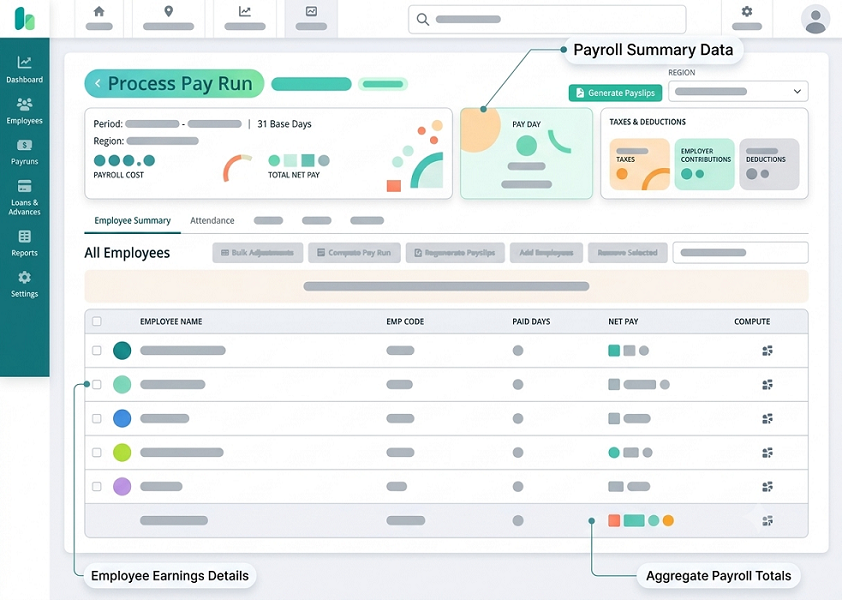
Reconcile employee details, pay components and exception reports before preparing contributions. Test InnBuilt payroll outputs against a sample Singapore payroll register.