What Payroll Reports Help Singapore HR and Finance Teams Prepare for Audit?
What Payroll Reports Help Singapore HR and Finance Teams Prepare for Audit?
Introduction
Payroll is one of the most important areas that auditors review because it involves employee compensation, statutory contributions, business expenses, personal data and financial transactions. Singapore employers must maintain accurate payroll information and be able to explain how salaries were calculated, approved, reported and paid.
When preparing for an internal audit, external financial audit or regulatory review, HR and finance teams need more than a collection of payslips. They should be able to produce reports that connect employee records, payroll calculations, CPF contributions, salary payments, tax reporting and accounting entries.
Payroll software can make this process easier by generating payroll registers, statutory contribution summaries, employee movement reports, audit trails and reconciliation statements. However, the usefulness of these reports depends on whether the underlying information is accurate, complete and supported by appropriate documentation.
This article explains the payroll reports Singapore HR and finance teams should prepare for audit, what each report should contain and how businesses can use payroll software to organise their audit documentation.
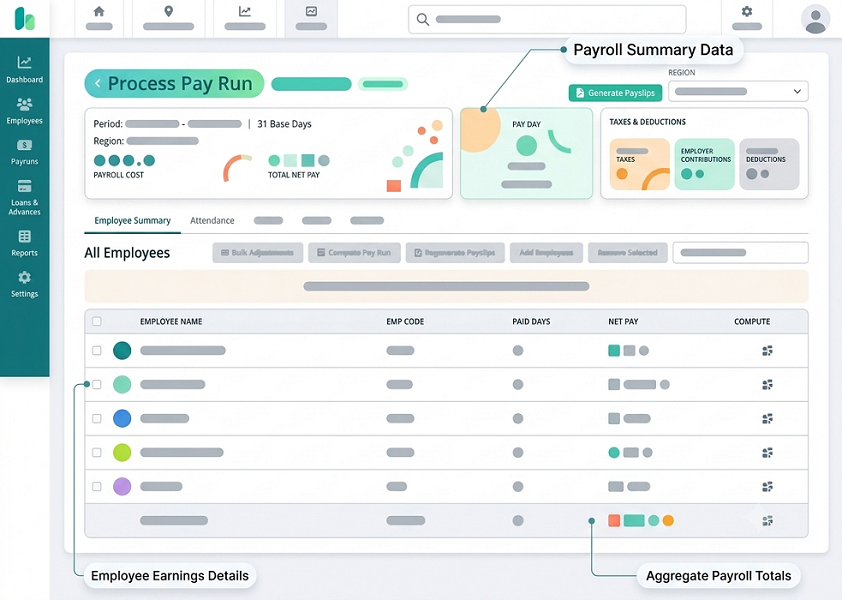
1. Understand Why Payroll Reports Are Important for Audits
Payroll reports provide evidence that employee payments and related financial transactions have been processed correctly.
Auditors may examine payroll information to verify:
- Whether employees recorded in payroll are genuine employees.
- Whether salary payments agree with employment terms.
- Whether payroll calculations are accurate.
- Whether salary changes were properly authorised.
- Whether CPF contributions were calculated and paid correctly.
- Whether statutory deductions and levies were handled appropriately.
- Whether salary payments agree with bank records.
- Whether payroll expenses are correctly recorded in the general ledger.
- Whether employment income was reported accurately to IRAS.
- Whether payroll records are maintained and accessible.
Different audits may require different documents. An external financial audit may focus on salary expenses, payroll liabilities and year-end accruals, while a compliance review may examine employment records, payslips, CPF contributions and statutory reporting.
Therefore, businesses should prepare a structured payroll audit file rather than assuming that one standard report will satisfy every audit requirement.
2. Employee Master Data Report
The employee master data report provides a consolidated view of the employees registered in the payroll system.
It helps auditors understand the company's workforce and verify whether payroll records agree with HR documentation.
The report should include:
- Employee ID.
- Employee name.
- Department and job title.
- Employment start date.
- Employment end date, where applicable.
- Employment status.
- Basic salary.
- Salary frequency.
- Fixed allowances.
- Bank payment information, suitably masked.
- CPF-related employee classification, where relevant.
- Work pass or identification information, with access restricted appropriately.
Auditors may compare the employee master data report with employment contracts, HR records and payroll registers.
For example, if an employee's salary increased from S$4,000 to S$4,500 during the year, the auditor may request the approved salary revision letter and verify whether payroll applied the new amount from the correct effective date.
HR preparation tip: Maintain a record of employee master data changes, including the previous value, revised value, effective date, person making the change and approval details.
3. Monthly Payroll Register
The monthly payroll register is one of the most important reports for audit preparation.
It provides a detailed record of salary calculations for each employee during a particular payroll period.
A useful payroll register should show:
| Payroll information | Details to include |
|---|---|
| Employee details | Employee ID, name and department |
| Basic salary | Contractual basic salary |
| Allowances | Fixed and ad-hoc allowances |
| Additional payments | Bonuses, commissions and incentives |
| Overtime | Approved overtime hours and payments, where applicable |
| Gross salary | Total gross wages |
| Employee CPF | Employee contribution deduction, where applicable |
| Other deductions | Applicable deductions |
| Net salary | Amount payable to employee |
| Employer CPF | Employer contribution amount, where applicable |
| Payment status | Prepared, approved or paid status |
Finance teams should reconcile the monthly payroll register with the salary payment records and accounting entries.
Auditors may also compare monthly payroll registers to identify unusual salary movements, unexplained changes or recurring adjustments.
HR and finance preparation tip: Export a final approved payroll register for every salary period and retain the version used for salary payment.
4. Salary Variance Report
A salary variance report compares payroll figures across different periods.
It helps identify significant changes in employee compensation and directs auditors towards transactions that may require additional explanation.
The report can compare:
- Current month versus previous month.
- Current month versus the same month last year.
- Actual salary versus budgeted salary.
- Department-level payroll expenses.
- Employee-level gross and net salary.
- Overtime and variable pay movements.
For example:
| Employee | Previous month gross salary | Current month gross salary | Difference |
|---|---|---|---|
| Employee A | S$4,000 | S$4,000 | S$0 |
| Employee B | S$4,200 | S$4,500 | +S$300 |
| Employee C | S$3,800 | S$5,300 | +S$1,500 |
The increase for Employee C may be due to a bonus, commission, salary revision or additional payment. HR should be able to explain the reason and provide supporting approval documents.
A variance report does not prove that a transaction is incorrect. It helps identify transactions that need investigation.
5. Employee Joiner and Leaver Report
The joiner and leaver report identifies employees who joined or left the organisation during the audit period.
It is particularly useful for verifying whether payroll payments were made only for the appropriate employment periods.
The report should include:
- Employee name and ID.
- Employment start date.
- Employment end date.
- Department.
- Last salary period.
- First salary payment date.
- Final salary payment date.
- Salary proration details.
- Outstanding leave balances.
- Final settlement amount.
- Relevant approval status.
Auditors may use this report to identify payments made before an employee joined or after employment ended.
For employees who left during the year, finance teams should retain supporting documents for final salary calculations, outstanding leave payments, authorised deductions and other settlement components.
Preparation tip: Reconcile the joiner and leaver report with HR records, employment contracts, resignation letters and final settlement statements.
6. Itemised Payslip Report
Itemised payslips provide evidence of the salary components paid to employees.
For employees covered by the relevant Employment Act requirements, employers must issue itemised payslips and maintain copies.
Payslips should contain applicable information such as:
- Employer and employee names.
- Payment date.
- Salary period.
- Basic salary.
- Allowances.
- Additional payments.
- Deductions.
- Overtime hours and payments, where applicable.
- Net salary paid.
MOM generally requires itemised payslips to be provided together with salary payment or, if that is not possible, within three working days after payment. Special timing applies when employment is terminated or an employee is dismissed with outstanding salary.
Auditors may sample individual payslips and compare them with the payroll register, employment terms and bank payment records.
Preparation tip: Maintain an organised payslip archive by employee and salary period. Ensure that corrected payslips and adjustments can be identified without losing the original record.
7. CPF Contribution Report
The CPF contribution report is important for verifying statutory contributions for eligible Singapore Citizens and Permanent Residents.
It should show the employee-level and employer-level contribution details for each relevant contribution month.
Useful information includes:
- Employee name and identification reference.
- Contribution month.
- Ordinary Wages (OW).
- Additional Wages (AW).
- Employer CPF contribution.
- Employee CPF contribution.
- Total CPF payable.
- Applicable contribution category.
- Submission status.
- Payment status.
CPF contribution calculations depend on factors such as employee age, citizenship or PR status, relevant PR year, wages and applicable ceilings.
Auditors may compare CPF reports with payroll registers, CPF submission records and bank payment evidence.
For 2026, the monthly Ordinary Wage ceiling is S$8,000, and the annual total wage ceiling is S$102,000. The applicable contribution rates vary according to employee category and other relevant conditions.
Important: Employers should retain actual wage declarations and supporting payroll details. The wage ceilings are applied when calculating contributions; employers should not simply replace actual wage amounts with ceiling-capped figures in the underlying wage records.
Preparation tip: Generate CPF reports by contribution month and reconcile them with the corresponding CPF submission and payment records.
8. CPF Submission and Record of Payment Report
A payroll system may calculate CPF contributions, but auditors may also need evidence that the contributions were submitted and paid.
Employers should prepare:
- CPF submission summaries.
- Employee-level contribution details.
- Submission confirmation.
- Record of Payment (ROP).
- Relevant bank payment evidence.
- Details of amendments or corrections.
- Outstanding contribution records, if any.
CPF EZPay allows employers to view electronic Records of Payment for up to 24 months. CPF Board recommends saving copies because older records may not be retrievable through the online service.
Payroll teams should not treat a submitted contribution declaration as proof of successful payment. The payment status and corresponding evidence should also be checked.
Preparation tip: Download and archive CPF Records of Payment regularly, rather than waiting until an audit begins.
9. SDL and Self-Help Group Contribution Reports
In addition to CPF, payroll teams should prepare supporting information for other applicable payroll-related statutory amounts.
Skills Development Levy report
The SDL report should show the relevant employee wage information, calculated levy amounts, reporting period and payment status.
Auditors may compare the levy figures with payroll records and the employer's payment evidence.
Self-Help Group contribution report
Where applicable, the report should identify employee deductions and amounts payable to the relevant Self-Help Group.
It should include:
- Employee identification.
- Contribution or deduction amount.
- Relevant payroll period.
- Applicable scheme or fund.
- Total amount payable.
- Remittance details.
These reports should be maintained separately from employee net salary reports so that the different liabilities can be identified clearly.
10. Overtime and Working Hours Report
Overtime reports help auditors verify additional salary payments and assess whether payroll calculations are supported by attendance and working-hour records.
The report should include:
- Employee name and ID.
- Department.
- Date of overtime work.
- Normal working hours.
- Overtime hours.
- Applicable overtime rate.
- Calculated overtime payment.
- Approval status.
- Payment period.
For employees covered by Part 4 of the Employment Act, statutory overtime requirements may apply. These provisions do not apply identically to every employee, so businesses should verify employee coverage before assessing statutory overtime calculations.
Auditors may compare overtime reports with:
- Attendance records.
- Approved timesheets.
- Shift schedules.
- Supervisor approvals.
- Payroll registers.
- Itemised payslips.
Preparation tip: Retain the original attendance records and approval history. A payroll overtime summary alone may not explain how the hours were established.
11. Leave and Unpaid Absence Report
Leave records can affect salary calculations, employee entitlements and year-end financial reporting.
HR teams should prepare a report showing:
- Employee name and ID.
- Annual leave entitlement.
- Leave taken.
- Leave balance.
- Carry-forward balance.
- Sick leave.
- Hospitalisation leave.
- Other applicable statutory leave.
- Unpaid leave.
- Leave adjustments.
- Approval status.
Finance teams may also need an annual leave liability schedule for financial reporting purposes, depending on the company's accounting policy and applicable financial reporting framework.
For example, if employees have unused annual leave that can be carried forward or paid out under the company's policy, the business may need to assess the related liability at the reporting date.
The calculation should be supported by accurate leave balances, employee salary information and the applicable leave policy.
Preparation tip: Reconcile leave balances between the HR system and payroll before preparing year-end reports.
12. Bonus, Commission and Variable Pay Report
Variable compensation can create audit risks because amounts may depend on performance targets, sales results, management decisions or incentive schemes.
The report should identify:
- Employee name and ID.
- Payment type.
- Performance period.
- Approved bonus or commission amount.
- Calculation basis.
- Department or business unit.
- Approval date.
- Payroll payment period.
- Tax and CPF classification, where applicable.
For example, a sales employee may receive a commission of S$2,000 based on an approved sales performance report. Auditors may request the incentive policy, sales calculation and manager approval to verify the payment.
HR and finance teams should also review whether variable payments were correctly classified for CPF and employment income reporting.
Preparation tip: Keep supporting documents for each major bonus or commission payment, particularly where the calculation is not automatically generated by payroll software.
13. Employee Salary Revision Report
Salary revision reports help auditors verify whether changes to employee compensation were properly authorised and implemented.
The report should contain:
- Employee name and ID.
- Previous salary.
- Revised salary.
- Percentage increase or decrease.
- Effective date.
- Reason for revision.
- Approving manager.
- Supporting document reference.
- Payroll period in which the change was applied.
Auditors may select employees from the report and compare the revised salary with employment letters, promotion documents or management approvals.
The report can also identify salary changes entered after payroll cut-off or changes that were not applied from the intended effective date.
Preparation tip: Retain the approved salary revision document and payroll system change history together.
14. Payroll Deduction Report
The payroll deduction report explains amounts withheld from employee salaries.
It may include:
- Employee CPF contributions.
- Approved unpaid leave deductions.
- Absence-related deductions.
- Other permitted salary deductions.
- Loan or salary advance repayments, where legally and contractually appropriate.
- Other applicable deductions.
The report should identify the amount, reason, relevant payroll period and supporting approval or documentation.
Singapore employers must comply with the Employment Act provisions on salary deductions, including the rules on permitted deductions and applicable limits.
Auditors may examine whether deductions were supported by proper documentation and applied consistently.
Preparation tip: Maintain a separate record of the reason and authorisation for each non-routine deduction. Do not rely only on the final deduction amount shown in the payroll register.
15. Bank Salary Payment and Payroll Reconciliation Report
The bank reconciliation report helps finance teams confirm that approved net salaries were transferred successfully.
It should compare:
- Approved net salary by employee.
- Total salary payment file.
- Bank transaction amounts.
- Successful payments.
- Failed or rejected payments.
- Returned payments.
- Duplicate transfers.
- Replacement payments.
- Outstanding payment differences.
For example:
| Reconciliation item | Amount |
|---|---|
| Approved net salary | S$120,000 |
| Successful bank transfers | S$118,500 |
| Failed or outstanding transfers | S$1,500 |
| Unexplained difference | S$0 |
The report should include explanations and supporting evidence for outstanding transactions.
Auditors may compare the payroll register with bank statements, payment confirmations and the company's accounting records.
Preparation tip: Reconcile payments at both employee and total payroll levels. A matching batch total does not necessarily prove that every employee received the correct amount.
16. Payroll General Ledger and Journal Report
The payroll journal report connects payroll calculations with the company's financial statements.
It shows how salary expenses, employer contributions and payroll liabilities are recorded in the accounting system.
Typical accounts include:
- Basic salary expense.
- Allowance expense.
- Bonus and commission expense.
- Overtime expense.
- Employer CPF expense.
- Net salary payable.
- Employee CPF payable.
- Employer CPF payable.
- SDL payable.
- SHG payable.
- Bank account.
A payroll journal should include the accounting period, account codes, debit amounts, credit amounts and relevant references.
Auditors may compare payroll journal entries with monthly payroll registers, payment records and the general ledger.
For example, if the payroll register records S$150,000 in gross wages, the accounting entries should explain how that amount is allocated between salary expenses, deductions and net salary liabilities.
Preparation tip: Reconcile payroll journal totals with the final payroll register every month and investigate differences before year-end.
17. IRAS Employment Income and AIS Reconciliation Report
Employment income reporting is another important part of payroll audit preparation.
Employers participating in the Auto-Inclusion Scheme (AIS) must submit applicable employee employment income information electronically to IRAS.
The reporting process may involve:
- Form IR8A information.
- Appendix 8A for applicable benefits-in-kind.
- Appendix 8B for applicable gains from employee stock option plans or other share ownership plans.
- Taxable allowances.
- Bonuses and commissions.
- Other reportable employment income.
Payroll software should support reports that help employers verify the information before submission.
Useful reports include:
- AIS submission summary.
- Employee employment income report.
- Taxable and non-taxable remuneration report.
- CPF and employment income reconciliation.
- AIS submission status report.
- Amendment or correction report.
IRAS specifically identifies summary, reconciliation and verification reports as useful payroll software controls. These help employers check submitted information, compare remuneration paid with remuneration reported for tax and review the classification of remuneration items.
AIS employers must generally submit employment income records to IRAS by 1 March each year.
Preparation tip: Compare annual payroll totals with the AIS submission records and investigate differences before finalising year-end reporting.
18. Employee Benefits and Reimbursements Report
Employee benefits and reimbursements may need separate review because they can have different accounting, CPF and tax treatments.
The report may include:
- Transport benefits.
- Meal allowances.
- Housing benefits.
- Insurance benefits.
- Company vehicle benefits.
- Reimbursement of business expenses.
- Other benefits-in-kind.
- One-time employee benefits.
Auditors may request supporting documents to establish whether payments were salary, taxable benefits or genuine business expense reimbursements.
For example, a payment described as a transport reimbursement should be supported by the relevant expense policy and documentation. Its payroll, CPF and tax treatment should not be determined solely by the label used in the payroll system.
Preparation tip: Maintain a clear classification for each benefit and reimbursement category, together with the supporting policy or source document.
19. Payroll Approval and Audit Trail Report
Payroll approval reports demonstrate whether payroll transactions were reviewed and authorised.
They are particularly useful when auditors assess internal controls and the risk of unauthorised payroll changes.
The report should show:
- Payroll period.
- Payroll preparer.
- Payroll reviewer.
- Final approver.
- Approval date and time.
- Rejected transactions.
- Rejection reasons.
- Reapproval history.
- Changes made after approval.
- User access or role changes, where relevant.
Auditors may examine whether the same individual could prepare, approve and release payroll without independent review.
They may also select salary changes or exceptional payments and trace them through the approval workflow.
Preparation tip: Retain approval logs and supporting documents together. A payroll status marked as approved is less useful if the business cannot identify who approved it and when.
20. Payroll Accrual and Outstanding Liability Report
At the end of a financial year, payroll teams may need to provide finance with information about expenses incurred but not yet paid.
Depending on the accounting policy and applicable accounting standards, these may include:
- Outstanding salary.
- Unpaid overtime.
- Earned bonuses.
- Commissions payable.
- Employer CPF liabilities.
- Unpaid statutory contributions.
- Leave-related liabilities.
- Other employee benefit obligations.
The report should identify the amount, relevant period, calculation basis, payment status and supporting documentation.
For example, an employee may have earned a performance bonus during the financial year, but the payment may be scheduled for the following year. Finance should assess whether an accrual is required under the applicable accounting framework and the company's policy.
HR should provide the underlying employee entitlement and calculation details, while finance should review the accounting treatment.
Preparation tip: Prepare a year-end payroll accrual schedule and reconcile it with subsequent payments where relevant.
21. Payroll Exception and Error Report
A payroll exception report identifies unusual transactions and potential errors that need further investigation.
Examples include:
- Employees with zero or unusually high net salary.
- Duplicate employee payment records.
- Salary changes without approval.
- Missing bank details.
- Unusual CPF amounts.
- Unexpected negative payroll values.
- Unapproved overtime.
- Unusual deductions.
- Employees paid after their recorded termination date.
- Payroll transactions changed after final approval.
The report should identify the issue, affected employee, payroll period, investigation result and corrective action.
Auditors may use exception reports to understand how the company identifies and resolves payroll errors.
Preparation tip: Do not delete exceptions once resolved. Retain the original issue and its resolution history to demonstrate how the control operated.
22. How Payroll Software Can Help Prepare Audit Reports
Payroll software can reduce the time needed to collect, organise and reconcile audit information.
Businesses should evaluate whether their payroll platform supports the following capabilities:
- Centralised report generation: Users should be able to generate payroll reports by employee, department, payroll period and legal entity.
- Historical payroll access: The system should allow authorised users to retrieve past payroll registers, payslips and adjustment records.
- Automated statutory reports: The software should support relevant CPF and AIS reporting workflows and produce reviewable summaries.
- Payroll-to-accounting integration: Payroll journals should be transferable to the accounting system with appropriate references and reconciliation controls.
- Approval history: The system should record payroll preparation, review, approval and changes.
- Exception reporting: Users should be able to identify unusual salary changes, missing information and potentially duplicate payments.
- Document attachments: Supporting documents such as salary revision letters, bonus approvals and adjustment explanations should be linked to the relevant records where supported.
- Secure access controls: Only authorised users should be able to view sensitive employee and salary information.
- Exportable audit files: Reports should be available in practical formats such as PDF or spreadsheets, with clear reporting periods and generation dates.
- Data backup and retrieval: The business should be able to retrieve historical payroll records even after a system migration or vendor change.
IRAS publishes recommended controls for payroll software, including controls over authorised access, data backup and reports used to verify employment income submissions. Businesses should consider these controls when evaluating payroll software.
Conclusion
Payroll reports help Singapore HR and finance teams demonstrate that employee compensation has been calculated accurately, approved appropriately, paid successfully and recorded correctly in the company's financial statements.
Important audit reports include employee master data, monthly payroll registers, salary variance reports, joiner and leaver reports, itemised payslips, CPF contribution summaries, bank reconciliation reports, payroll journals, AIS reports, approval histories and payroll accrual schedules.
However, reports should not be treated as standalone proof. Each important figure should be traceable to supporting documents such as employment contracts, approved salary revisions, attendance records, CPF payment confirmations and bank statements.
Payroll software can simplify audit preparation by centralising records, automating reports, maintaining historical data and supporting reconciliation workflows. Singapore businesses should therefore evaluate not only the payroll calculation features but also the system's reporting, audit trail, access control and data retention capabilities.
By reviewing payroll reports regularly throughout the year, HR and finance teams can reduce audit preparation time, identify discrepancies earlier and maintain stronger payroll governance.
Request registers, change logs, approvals and contribution summaries in a consistent format. Evaluate InnBuilt reporting for Singapore HR and finance review.