How Can Payroll Software Help Singapore Employers Prepare CPF Contributions?
How Can Payroll Software Help Singapore Employers Prepare CPF Contributions?
Preparing Central Provident Fund (CPF) contributions is an essential part of payroll management for Singapore employers. Every month, employers must determine the correct CPF contributions for eligible employees, calculate the employer and employee shares, prepare contribution details and submit the payment to the CPF Board within the required timeframe.
The process can become complicated when a business employs people of different ages, citizenship statuses and salary structures. Bonuses, commissions, allowances, salary adjustments and changes in CPF contribution rates can also affect calculations.
Payroll software can simplify this process by automating contribution calculations, maintaining employee information, identifying applicable wage ceilings, generating reports and supporting CPF submission workflows.
However, employers should understand that payroll software does not remove their responsibility for checking contribution accuracy and ensuring payment is completed on time.
This article explains how payroll software can help Singapore employers prepare CPF contributions, the features to look for, the calculations the system should support and how businesses can use it to improve their monthly payroll process.
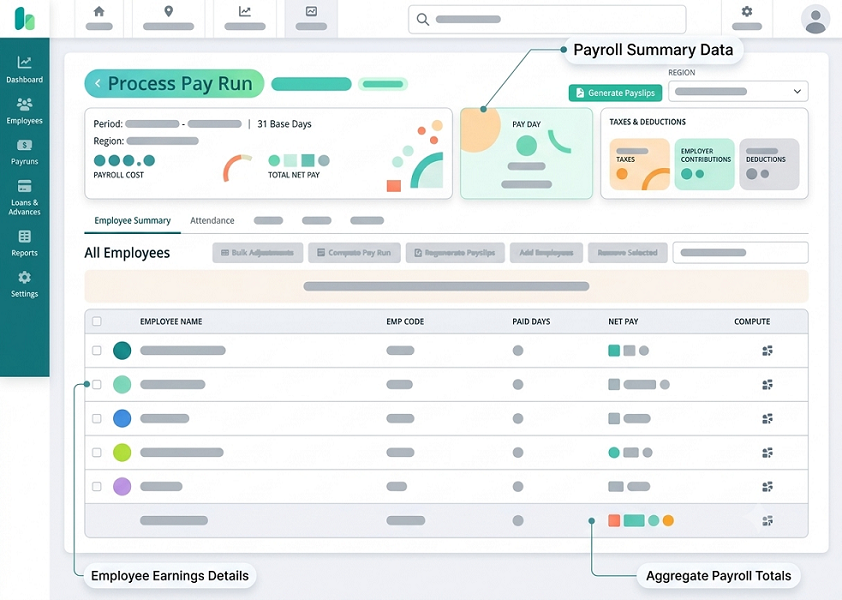
1. Automatically Identify Employees Who Require CPF Contributions
The first step in preparing CPF contributions is identifying which employees are subject to CPF requirements.
CPF contributions generally apply to employees who are Singapore Citizens or Singapore Permanent Residents working under a contract of service, subject to the applicable CPF rules and exceptions.
The contribution requirements can differ according to an employee's citizenship or residency status and, for Permanent Residents, the number of years since obtaining PR status.
Payroll software can help employers maintain the information needed for these calculations.
A suitable system should record:
- Employee citizenship status.
- Singapore Permanent Resident status and relevant PR year.
- Date of birth and age group.
- Employment start and end dates.
- Monthly salary and wage components.
- CPF contribution settings.
- Applicable contribution rate arrangements.
For example, a company may employ Singapore Citizens, first-year Permanent Residents, second-year Permanent Residents and foreign employees. The payroll system should apply the appropriate contribution treatment to each category rather than using the same settings for everyone.
Employers should also be able to update employee profiles when citizenship, residency or other relevant information changes.
How software helps: It reduces repeated manual classification and helps payroll administrators identify employee records that require review before CPF calculations begin.
2. Calculate Employer and Employee CPF Contributions Automatically
One of the most valuable functions of payroll software is automatically calculating the employer and employee CPF contributions.
CPF contribution rates depend on factors such as employee age, citizenship or PR status, wages and applicable contribution limits.
For example, from 1 January 2026, the standard CPF contribution rates for Singapore Citizens and third-year-and-onwards Permanent Residents earning monthly wages above S$750 are:
| Employee age | Employer contribution | Employee contribution | Total |
|---|---|---|---|
| 55 and below | 17% | 20% | 37% |
| Above 55 to 60 | 16% | 18% | 34% |
| Above 60 to 65 | 12.5% | 12.5% | 25% |
| Above 65 to 70 | 9% | 7.5% | 16.5% |
| Above 70 | 7.5% | 5% | 12.5% |
Rates shown are for the specified employee category and monthly wage range. Other rates and graduated contribution arrangements may apply.
Payroll software should automatically select the appropriate rate based on the employee's profile and payroll period.
For example, consider an eligible Singapore Citizen aged 35 earning S$4,000 in monthly Ordinary Wages. Using the standard 2026 rates:
- Employer CPF contribution: S$680.
- Employee CPF contribution: S$800.
- Total CPF contribution: S$1,480.
The software should calculate the employer and employee portions separately and display the total amount payable to the CPF Board.
It should also apply the prescribed rounding rules. Under CPF rules, the total contribution is rounded to the nearest dollar, while the employee's share is rounded down to the nearest dollar.
How software helps: Automated calculations reduce manual work and help payroll teams apply the correct contribution rates consistently.
3. Distinguish Between Ordinary Wages and Additional Wages
CPF contributions are calculated using an employee's Total Wages, which consist of Ordinary Wages (OW) and Additional Wages (AW).
Correctly classifying these payments is important because different contribution ceilings apply.
Ordinary Wages (OW)
Ordinary Wages generally refer to wages due or granted wholly or exclusively for an employee's employment in that month and payable by the 14th of the following month.
Examples include:
- Monthly basic salary.
- Fixed monthly allowances that qualify as wages.
- Regular monthly payments for employment.
Additional Wages (AW)
Additional Wages are wages that do not fall under the Ordinary Wages classification.
Examples include:
- Annual bonuses.
- Performance bonuses.
- Certain commissions.
- Other qualifying non-monthly wage payments.
Payroll software should allow employers to configure salary components and classify them correctly as Ordinary or Additional Wages.
For example, an employee may receive a monthly basic salary of S$6,000. The system should identify the monthly salary as Ordinary Wages and assess the bonus under the Additional Wages rules.
It should not automatically classify every allowance, reimbursement or payment as CPF-payable wages. Employers should configure payment categories according to CPF Board's rules.
How software helps: Correct wage classification makes it easier to apply the appropriate ceilings and prepare accurate CPF contribution records.
4. Apply the Correct Ordinary Wage and Additional Wage Ceilings
CPF contribution ceilings limit the amount of wages subject to CPF contributions.
Payroll software should automatically apply the relevant ceilings for the contribution year.
For 2026, the main ceilings for employees covered by the standard CPF rules include:
| Ceiling | 2026 limit |
|---|---|
| Monthly Ordinary Wage ceiling | S$8,000 |
| Annual salary ceiling for CPF | S$102,000 |
| Additional Wage ceiling | S$102,000 minus total Ordinary Wages subject to CPF for the year |
How software helps: It tracks cumulative wages and reduces the risk of calculating CPF contributions on amounts above the applicable ceilings.
5. Handle Bonuses, Commissions and Variable Payments
Variable payments can make CPF preparation more complicated, especially when employees receive different amounts throughout the year.
Examples include:
- Annual bonuses.
- Sales commissions.
- Performance incentives.
- Project completion payments.
- Other qualifying Additional Wages.
Payroll software should identify the nature of each payment and determine whether it is Ordinary or Additional Wages under CPF rules.
It should also consider the employee's previous wages and the remaining Additional Wage ceiling.
For example, a sales employee may receive S$12,000 annual performance bonus. The software should calculate CPF contributions on the eligible Ordinary Wages and separately assess the bonus against the remaining Additional Wage ceiling.
The system should maintain cumulative wage information so that payroll administrators can review previous payments and avoid exceeding the applicable limits.
Another important feature is the ability to process late adjustments. If a bonus is revised after the initial payroll calculation, the software should recalculate the relevant CPF contribution and produce an updated record.
How software helps: It provides a consistent way to handle variable earnings and reduces the need for separate spreadsheets to monitor annual wage ceilings.
6. Automatically Update CPF Contribution Rates and Rules
CPF contribution rates and wage ceilings can change over time. Payroll software should support these changes so that employers do not continue using outdated calculations.
For example, CPF contribution rates for certain senior employees increased from 1 January 2026. Further increases for certain older employees are scheduled from 1 January 2027.
A suitable payroll system should:
- Maintain contribution rates by effective date.
- Apply the correct rate for the relevant salary period.
- Support changes in employee age categories.
- Update applicable wage ceilings.
- Support graduated contribution rates for eligible Permanent Residents.
- Maintain historical payroll calculations.
- Provide information about statutory updates.
The system should also allow administrators to review changes before the next payroll run.
Employers should not assume that every vendor automatically updates statutory rules. Ask whether updates are included in the subscription, how they are communicated and whether any manual configuration is required.
How software helps: Effective-dated statutory settings help prevent outdated CPF rates from being used in new payroll calculations.
7. Integrate Attendance, Leave and HR Information With Payroll
CPF preparation depends on accurate salary information. If employee working hours, unpaid leave, allowances or salary adjustments are maintained in separate systems, manual data entry can introduce errors.
Payroll software integrated with attendance, leave and HR systems can help transfer approved information into the monthly payroll process.
Useful integrations include:
| Connected system | Information transferred to payroll |
|---|---|
| Attendance software | Approved working hours, overtime and shift information |
| Leave management | Approved unpaid leave and other relevant absence records |
| HR management | Employee profiles, age, residency status and salary details |
| Claims management | Approved payments and reimbursements |
| Commission system | Sales commissions and variable earnings |
| Accounting software | Payroll expenses and contribution entries |
For example, an employee may receive a salary adjustment in the HR system. Once approved, the revised salary information can be transferred to payroll for the relevant pay period.
Similarly, approved overtime or unpaid leave information can be imported before payroll processing.
However, integration should not automatically treat every attendance exception or unapproved absence as a salary deduction. Employers should establish approval controls before information reaches payroll.
How software helps: Integration reduces repeated data entry and provides a more consistent source of employee wage information for CPF calculations.
8. Generate CPF Contribution Reports for Verification
Before submitting CPF contributions, employers should review the calculated amounts.
Payroll software should generate reports that help HR and finance teams verify individual employee contributions and overall payment totals.
Important reports include:
- Employee-wise CPF contribution reports.
- Employer contribution summaries.
- Employee contribution summaries.
- Total CPF payable reports.
- Ordinary Wage and Additional Wage breakdowns.
- Wage ceiling utilisation reports.
- Employee age-group contribution reports.
- Monthly and year-to-date contribution summaries.
- Payroll variance reports.
- Previous submission comparison reports.
For example, a payroll manager should be able to compare the current month's CPF contribution with the previous month's amount and identify significant changes.
If an employee's CPF contribution increases unexpectedly, the report should help the reviewer check whether the reason was a salary revision, bonus, change in age category or correction to employee information.
The software should also allow reports to be exported for internal verification and accounting purposes.
How software helps: Detailed reports make it easier to identify discrepancies before CPF contributions are submitted.
9. Support CPF EZPay and One-Stop Payroll Submission Workflows
Calculating CPF contributions and submitting them to CPF Board are separate activities. Employers should check whether their payroll software supports a suitable submission workflow.
CPF Board provides CPF EZPay, which allows employers to submit contribution details and make payments. Its auto-computation feature can calculate CPF contributions and applicable SDL amounts when the required employee and wage information is entered.
CPF EZPay also supports file uploads and recurring payment arrangements through Electronic Standing Instruction (ESI), subject to the applicable setup and conditions.
Some payroll systems also support One-Stop Payroll (OSP), allowing businesses to submit employment and wage-related information to multiple government agencies, including CPF Board, IRAS and MOM, through supported payroll system connections.
When evaluating payroll software, check whether it supports:
- CPF contribution file preparation.
- Direct CPF submission through an available supported connection.
- CPF EZPay-compatible file formats, where applicable.
- One-Stop Payroll connectivity, if available.
- Submission status tracking.
- Error and rejection notifications.
- Correction and resubmission workflows.
- Payment confirmation records.
Importantly, a system that generates a CPF report or file does not necessarily submit contributions directly to the CPF Board.
Employers should confirm the actual submission method and whether additional steps are required through CPF EZPay or another approved process.
How software helps: Supported submission workflows reduce manual preparation and make it easier to track the progress of monthly CPF contributions.
10. Monitor CPF Payment Deadlines and Avoid Late Contributions
Employers must manage CPF payment deadlines carefully.
CPF contributions are due by the last day of the calendar month. Enforcement action may be taken if payment is not made by the 14th of the following month, or the next working day if the 14th falls on a Saturday, Sunday or public holiday.
Late payment interest is charged at 1.5% per month, commencing from the first day after the due date.
Payroll software can help employers manage this responsibility through:
- Monthly CPF processing reminders.
- Payroll completion notifications.
- Contribution approval workflows.
- Payment deadline alerts.
- Submission status tracking.
- Payment reconciliation.
- Outstanding contribution reports.
For example, after monthly payroll is approved, the system can generate the CPF contribution summary and notify the responsible finance employee to complete submission and payment.
However, a reminder or generated payment file does not mean the contribution has been successfully paid.
Employers should verify the actual submission and payment status through the relevant CPF service.
How software helps: Automated reminders and workflow tracking help payroll teams manage deadlines and reduce the risk of overlooking monthly contributions.
11. Maintain CPF and Payroll Records for Auditing
Employers should maintain accurate payroll information and supporting records to explain how CPF contributions were calculated.
Payroll software can provide a central record of:
- Employee salary details.
- CPF contribution calculations.
- Employer and employee contribution shares.
- Ordinary and Additional Wage classifications.
- Payroll adjustments.
- Contribution reports.
- Submission records.
- Payment confirmations.
- Approval histories.
- Changes to employee information.
It should also allow authorised users to retrieve previous payroll information when employees, auditors or relevant authorities request supporting records.
MOM requires employers to maintain specified employment records, including salary and payslip information. For current employees, the latest two years of records must be retained; for former employees, the last two years of records must be retained for one year after the employee leaves. These requirements relate to the prescribed employment records and should not be treated as a universal retention period for every type of system data.
How software helps: Centralised payroll records make it easier to review previous calculations, investigate discrepancies and provide supporting information when required.
12. Provide Payroll Approval Controls and Error Detection
Automated CPF calculations still need proper review. Employers should not assume that software-generated figures are always correct.
A good payroll system should provide controls that help identify unusual or incomplete information before CPF contributions are finalised.
Useful features include:
- Missing employee information alerts.
- Incorrect CPF category notifications.
- Unusual salary change alerts.
- Wage ceiling validation.
- Duplicate employee checks.
- Payroll variance reports.
- Separate preparation and approval responsibilities.
- Audit trails for changes.
- Payroll period locking.
- Controlled correction workflows.
For example, if an employee's citizenship status or date of birth is entered incorrectly, the system may apply the wrong contribution rate. A validation process can help payroll administrators identify missing or inconsistent information before submission.
Employers should also ensure that only authorised employees can change CPF settings or approve contribution reports.
How software helps: Approval workflows and validation checks strengthen payroll controls and reduce the possibility of incorrect CPF submissions.
Example: How Payroll Software Prepares CPF Contributions for an Employee
Consider a hypothetical Singapore company employing a Singapore Citizen aged 35 with the following monthly salary details:
| Salary component | Amount |
|---|---|
| Basic monthly salary | S$4,000 |
| Qualifying monthly allowance | S$300 |
| Total Ordinary Wages | S$4,300 |
Assuming the full S$4,300 qualifies as Ordinary Wages, is within the applicable ceiling and the employee is subject to the standard 2026 CPF rates:
| Contribution | Calculation | Amount |
|---|---|---|
| Employer CPF | S$4,300 × 17% | S$731 |
| Employee CPF | S$4,300 × 20% | S$860 |
| Total CPF payable | S$731 + S$860 | S$1,591 |
The payroll software can perform these calculations automatically, record the employer and employee portions separately and include the total in the CPF contribution report.
If the employee later receives a qualifying annual bonus, the system should assess the bonus separately as Additional Wages and apply the remaining annual Additional Wage ceiling.
This example is illustrative. Actual CPF treatment depends on the employee's eligibility, wage classification and applicable contribution rules.
Features to Look for in Payroll Software for CPF Preparation
When selecting payroll software, Singapore employers should check whether the system provides the following capabilities.
| Feature | Why it matters |
|---|---|
| Employee classification | Applies the appropriate CPF settings |
| Automatic CPF calculation | Calculates employer and employee shares |
| OW and AW classification | Supports correct wage treatment |
| Wage ceiling management | Applies monthly and annual limits |
| Statutory updates | Reflects effective-date changes |
| Variable pay processing | Handles bonuses and commissions |
| Attendance and leave integration | Imports approved payroll information |
| CPF reports | Supports calculation review |
| CPF EZPay or OSP support | Simplifies contribution submission workflows |
| Deadline reminders | Helps manage monthly payment dates |
| Audit trails | Records payroll changes and approvals |
| Employee record management | Supports historical payroll verification |
Conclusion
Payroll software can help Singapore employers prepare CPF contributions more efficiently by automating employee classification, contribution calculations, wage ceiling management, reporting and submission workflows.
It can also reduce manual data entry, support payroll approvals, identify calculation discrepancies and maintain records for future verification.
However, employers should select software that supports Singapore's current CPF requirements and test it using realistic employee profiles, salary structures, bonuses and different contribution categories.
The most effective approach combines automated calculations with regular payroll reviews, appropriate approval controls and verification of successful CPF submission and payment.
By using suitable payroll software and maintaining proper oversight, Singapore employers can improve CPF contribution accuracy, reduce administrative work and manage their monthly payroll responsibilities with greater confidence.
Review how employee pay and contribution-related inputs are organised for checking. Confirm InnBuilt's available CPF workflow against the current process used by your Singapore team.