What Should Singapore Employers Test in a Payroll Software Demo?
What Should Singapore Employers Test in a Payroll Software Demo?
Choosing payroll software is an important decision for Singapore employers. A system may look impressive during a sales presentation, but its real value depends on how accurately it processes salaries, calculates CPF contributions, handles statutory reporting and manages employee payroll records.
A payroll software demonstration gives employers an opportunity to test these capabilities before committing to a subscription or implementation project. Instead of focusing only on dashboards and advertised features, HR and finance teams should ask vendors to demonstrate actual payroll activities using realistic employee scenarios.
For Singapore businesses, this is particularly important because payroll involves local requirements such as Central Provident Fund (CPF) contributions, Skills Development Levy (SDL), itemised payslips, employment income reporting to IRAS and employment recordkeeping.
A structured demonstration can help identify calculation errors, missing features, integration limitations and hidden operational costs before they affect a live payroll cycle.
This article explains what Singapore employers should test in a payroll software demo, including statutory calculations, salary processing, approval workflows, reporting, integrations, security and vendor support.
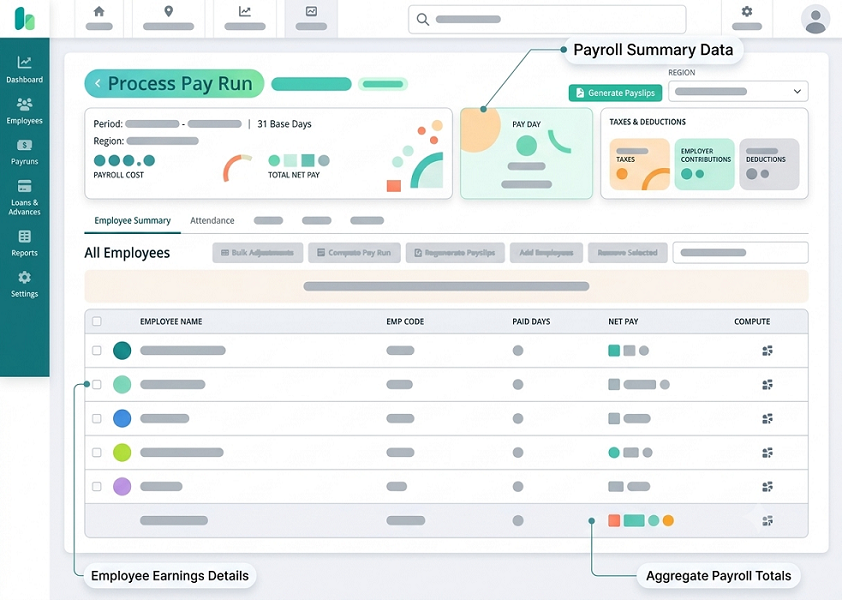
1. Test Employee Setup and Payroll Configuration
Start the demonstration by asking the vendor to create employee profiles and configure payroll information. Employee data forms the foundation of every payroll calculation, so incorrect setup can lead to recurring errors.
Ask the vendor to demonstrate how the software records:
- Employee name and identification details.
- Employment start and end dates.
- Citizenship and Permanent Resident status.
- Date of birth and applicable age category.
- Employment type and job designation.
- Monthly, daily or hourly salary arrangements.
- Bank account and salary payment details.
- CPF contribution eligibility and relevant settings.
- Department, cost centre and work location.
- Fixed allowances and recurring deductions.
Test different employee categories rather than creating only one standard monthly-paid employee.
For example, use sample profiles for a Singapore Citizen, a Singapore Permanent Resident, a foreign employee, a part-time employee and an hourly-rated worker. Check whether the system applies the appropriate payroll settings to each profile.
Also test what happens when an employee changes salary, department, employment status or bank account information. The system should preserve relevant historical information and record important changes.
What to ask the vendor: Can the system maintain different employee categories and salary structures without requiring separate manual payroll calculations?
2. Test CPF, SDL and Other Statutory Calculations
Statutory calculations are among the most important areas to test during a Singapore payroll software demonstration.
Ask the vendor to process payroll for employees with different ages, citizenship statuses, residency categories and salary levels. Check whether the system applies the correct contribution rules and wage ceilings.
Test the following:
- Employer and employee CPF contributions.
- CPF calculations for different employee age groups.
- CPF treatment for Singapore Citizens and Permanent Residents.
- Ordinary Wages (OW) and Additional Wages (AW).
- Applicable CPF wage ceilings.
- Skills Development Levy (SDL).
- Applicable Self-Help Group (SHG) contributions.
- Rounding and contribution summaries.
- Changes to statutory rates and contribution rules.
For example, ask the vendor to process salary for a Singapore Citizen aged 35 and another aged 58. Compare the resulting CPF calculations and confirm that the software applies the correct rates for the relevant payroll period.
Also ask the vendor to demonstrate how statutory updates are implemented. This is important because contribution rates and other payroll requirements can change.
What to ask the vendor: Can the software automatically apply current statutory rates and show how each CPF and other statutory contribution amount was calculated?
3. Test Salary, Overtime and Allowance Calculations
A payroll system should support the different ways employees are paid. During the demo, test whether the software can handle regular salary processing as well as variable payments and deductions.
Ask the vendor to demonstrate:
- Monthly, daily and hourly salary calculations.
- Fixed and variable allowances.
- Overtime payments.
- Rest-day payments.
- Public-holiday payments.
- Shift and night-work allowances.
- Sales commissions.
- Bonuses and incentives.
- Unpaid leave deductions.
- Salary adjustments and arrears.
- Final salary calculations for departing employees.
Use a realistic scenario.
For example, create a monthly-paid employee with a basic salary of S$150, approved overtime and an unpaid leave adjustment. Ask the vendor to process the payroll and explain how each component affects gross salary, deductions and net pay.
Also test employees with different working arrangements. A part-time retail employee paid by the hour may need different calculations from a full-time office employee.
For overtime, confirm that the software can apply the relevant rules to eligible employees. Singapore Employment Act Part 4 provisions on hours of work, overtime and rest days do not apply identically to all employees.
What to ask the vendor: Can the system process different salary structures and apply configurable rules for overtime, allowances, bonuses and deductions?
4. Test Itemised Payslip Generation
Singapore employers covered by the Employment Act must issue itemised payslips containing the applicable salary and payment information.
During the demonstration, ask the vendor to generate payslips for employees with different salary arrangements.
Check whether the payslip displays:
- Employer and employee names.
- Salary period and payment date.
- Basic salary or applicable basic pay rate.
- Total hours or days worked, where relevant.
- Fixed and ad hoc allowances.
- Bonuses and additional payments.
- CPF deductions and other applicable deductions.
- Overtime hours and overtime pay, where applicable.
- Net salary paid.
Also check whether employees can receive payslips electronically through email, a secure portal or a mobile application.
The vendor should demonstrate how payslips are stored and retrieved when employees request older records.
MOM requires employers to provide itemised payslips together with salary payment or, if that is not possible, within three working days of payment. Employers must also retain the relevant payslip records for the prescribed periods.
What to ask the vendor: Can the software generate itemised payslips automatically and retain accessible historical records for the required periods?
5. Test IRAS AIS Reporting and Tax-Related Features
Annual employment income reporting is another important function to evaluate.
If your business participates in the Auto-Inclusion Scheme (AIS), the payroll system should support the preparation and submission of employment income information to IRAS.
Ask the vendor to demonstrate:
- Preparation of Form IR8A information.
- Relevant Appendices 8A and 8B, where applicable.
- Classification of taxable and non-taxable remuneration.
- Mapping of salary components to the correct tax reporting fields.
- Validation of employee income records.
- Submission through the IRAS AIS API.
- Amendment of previously submitted records.
- Submission status and acknowledgement tracking.
Use a sample employee record containing basic salary, bonus, allowances and benefits-in-kind, where applicable. Check whether the software maps the information to the appropriate reporting fields.
Do not assume that a system supports direct submission simply because it can generate IR8A reports. Ask the vendor to demonstrate the actual submission workflow.
IRAS publishes a list of AIS payroll software vendors for the relevant Year of Assessment. However, being listed is not an endorsement of the product. IRAS validates whether the software can submit employment income records in the required technical format.
What to ask the vendor: Does the software support the latest AIS requirements, and can it demonstrate successful submission and amendment workflows?
6. Test Payroll Approval Workflows and Audit Trails
Payroll software should provide clear controls over who can prepare, review and approve salary payments.
During the demo, ask the vendor to demonstrate a complete payroll approval process.
Test these activities:
- An HR executive prepares the monthly payroll.
- The system generates a payroll summary.
- A payroll manager reviews salary changes and deductions.
- A finance manager approves the payroll.
- The payroll period is locked after approval.
- An authorised user makes a correction through the approved process.
Check whether the system supports:
- Role-based user permissions.
- Multiple approval levels.
- Separate preparation and approval responsibilities.
- Salary revision approvals.
- Overtime and allowance approvals.
- Payroll variance alerts.
- Audit trails showing who changed information.
- Date and time stamps for important actions.
- Payroll period locking and controlled reopening.
For example, if an HR employee changes an employee's basic salary, the system should record the original amount, revised amount, user responsibility and approval status.
IRAS recommends controls for payroll software covering data preparation, validation and reporting. Employers should examine these controls rather than assuming that automated calculations alone provide adequate protection.
What to ask the vendor: Can the system prevent unauthorized payroll changes and provide a complete audit trail of salary preparation, review and approval?
7. Test Attendance, Leave and HR Integrations
Payroll accuracy often depends on information stored in other business systems.
If attendance, leave and payroll are managed separately, HR teams may have to transfer information manually. This can result in missed overtime, incorrect deductions and duplicated records.
Ask the vendor to demonstrate integrations with:
- Attendance management software.
- Leave management systems.
- HR management platforms.
- Claims and reimbursement applications.
- Accounting software.
- Banking and salary payment platforms.
During the demo, test a complete workflow.
For example, create an employee attendance record with approved overtime. Transfer the information into payroll and check whether the overtime hours appear correctly.
Next, record an approved unpaid leave request. Confirm that the payroll system receives the relevant information and calculates the deduction according to the configured rules.
Also test how the software handles incomplete or rejected data transfers. It should provide a clear error message rather than silently ignoring missing information.
What to ask the vendor: Are integrations available through built-in connectors or APIs, and how does the software identify and resolve failed data synchronisation?
8. Test Employee Self-Service and Mobile Features
Employee self-service can reduce routine HR queries and improve access to payroll information.
During the demo, ask the vendor to show the employee-facing portal or mobile application, not just the administrator dashboard.
Test whether employees can:
- Download monthly payslips.
- View salary payment history.
- Access relevant CPF information.
- Review approved claims and reimbursements.
- Check leave balances.
- Submit personal information update requests.
- Access employment documents.
- Receive payroll notifications.
Also check whether employees can access their own records without seeing other employees' confidential information.
Test the mobile application on a representative device and examine its usability, login process and navigation.
For SMEs with retail, warehouse, construction or field employees, mobile access may be particularly valuable because employees may not regularly use desktop computers.
What to ask the vendor: Is employee self-service included in the quoted package, and can employees securely access their payroll information through mobile devices?
9. Test Payroll Reports and Reconciliation Features
Payroll reports help HR and finance teams verify salary calculations, monitor payroll expenses and prepare financial records.
Ask the vendor to generate reports using the sample payroll data entered during the demonstration.
Important reports include:
| Report | What to verify |
|---|---|
| Payroll summary | Gross salary, deductions and net pay |
| CPF contribution report | Employer and employee contributions |
| SDL report | Applicable levy calculations |
| Allowance report | Fixed and variable payments |
| Overtime report | Hours and overtime payments |
| Deduction report | Unpaid leave and other deductions |
| Department cost report | Payroll expenses by department |
| Employee salary history | Previous salary records |
| Payroll variance report | Changes compared with previous payroll |
| General ledger report | Payroll journal entries for accounting |
Check whether reports can be filtered by employee, department, location, salary period and payroll entity.
Also test whether the system allows reports to be exported in commonly used formats such as Excel, CSV or PDF.
A useful payroll system should help users identify differences between payroll periods. For example, if an employee's net salary increases significantly compared with the previous month, a variance report should make it easier to identify the reason.
What to ask the vendor: Can the system generate detailed payroll reports and reconcile salary payments, statutory contributions and accounting entries?
10. Test Salary Payment and Bank File Generation
Calculating salaries correctly is only one part of payroll processing. Businesses must also arrange salary payments through their banking or approved payment channels.
Ask the vendor to demonstrate how approved payroll data moves into the payment process.
Check whether the software supports:
- Salary payment summaries.
- Bank payment file generation.
- Supported bank formats.
- Employee bank account validation.
- Payment approval workflows.
- Payment status tracking, where supported.
- Reconciliation between approved payroll and payment records.
- Reprocessing of failed or rejected payments.
Use a test employee with a sample bank account and ask the vendor to generate a payment file in the required format.
Confirm whether the software supports your company's actual bank and payment arrangements. Do not assume that a vendor's claim of bank integration means it supports every bank or provides direct payment execution.
What to ask the vendor: Can the system generate payment files for our bank, and what additional steps are required to approve and complete salary payments?
11. Test Data Security, Access Controls and Backup
Payroll information includes sensitive personal and financial data. Employers should test the vendor's security features rather than relying solely on marketing statements.
Ask the vendor to demonstrate:
- Role-based access controls.
- Multi-factor authentication, where available.
- Encryption of stored and transmitted information.
- Login and activity logs.
- Restrictions on payroll report downloads.
- Secure employee account access.
- Data backup and recovery arrangements.
- Data export and deletion procedures.
- Controls over vendor personnel access.
Test whether an ordinary employee can access only their own payslips and whether a department manager can view only the information permitted by their role.
Also ask where the data is stored, whether overseas processing is involved and what contractual safeguards apply.
Singapore's Personal Data Protection Act requires organisations to protect personal data and manage its retention appropriately. Employers should understand their responsibilities and the vendor's role in processing employee information.
What to ask the vendor: What security controls protect payroll data, how frequently is information backed up, and how can the business retrieve its records if it changes providers?
12. Test Payroll Exceptions and Error Handling
A good payroll demonstration should include situations where something goes wrong. Normal salary processing alone does not reveal how well the software handles exceptions.
Ask the vendor to demonstrate the following:
- Missing employee bank details.
- Duplicate employee records.
- Incorrect salary components.
- Missing attendance information.
- Unapproved overtime.
- Incorrect CPF settings.
- Failed data integrations.
- Rejected AIS submissions.
- Payroll changes after approval.
- Employee resignation during a payroll period.
The system should identify problems clearly and guide authorised users towards correction.
For example, if an employee's bank account information is missing, the software should flag the issue before the payment file is finalised.
Similarly, if an AIS submission is rejected, users should be able to identify the affected record, correct the source information and follow the appropriate resubmission process.
What to ask the vendor: Can the software detect common payroll errors before finalisation, and does it provide clear correction and resubmission workflows?
13. Test Implementation, Training and Customer Support
The software may perform well during a demo, but successful implementation also depends on the vendor's onboarding and support capabilities.
Ask the vendor to explain how the company will move from its existing payroll process to the new system.
Review the following:
- Employee data migration.
- Salary structure configuration.
- CPF and statutory settings.
- Historical payroll record migration.
- Integration setup.
- Payroll testing before launch.
- HR and finance user training.
- Employee self-service training.
- Support during the first live payroll cycle.
Also ask about customer support availability, response targets, escalation procedures and additional support charges.
A useful demonstration should include an explanation of what happens when a payroll issue arises close to the monthly salary processing deadline.
What to ask the vendor: Who will support implementation, how long will setup take, and what assistance is available during the first live payroll run?
Conclusion
A payroll software demo should be treated as a practical evaluation, not simply a vendor presentation. Singapore employers should test employee setup, CPF and statutory calculations, salary processing, itemised payslips, AIS reporting, approval workflows, integrations, security and error handling.
The most effective approach is to prepare a standard set of employee profiles and payroll scenarios before inviting vendors to demonstrate their systems. Ask every vendor to process the same examples and explain the results.
This allows HR and finance teams to compare calculation accuracy, workflow efficiency, reporting capabilities and overall usability. It also helps identify limitations before the business commits to implementation.
A structured demonstration gives employers greater confidence that the selected payroll software can support their current requirements, maintain reliable payroll records and adapt as the organisation grows.
Run a sample pay cycle with joiners, variable pay, leave and corrections. Ask InnBuilt to show review, approvals, payslips and exports.