How Can Singapore Sales Teams Track Customer Visits Without Intrusive Monitoring?
How Can Singapore Sales Teams Track Customer Visits Without Intrusive Monitoring?
Introduction
Customer visits are an important part of sales operations in Singapore. Sales representatives may travel between customer offices, retail outlets, construction sites, business premises and other locations to conduct meetings, demonstrate products, provide consultations, collect feedback and maintain business relationships. For sales managers, knowing whether planned visits are taking place helps with territory planning, customer coverage, productivity reviews and follow-up activities.
However, tracking customer visits does not require employers to monitor employees continuously. Constant GPS surveillance, unnecessary location-history collection and excessive activity monitoring can affect employee trust and create privacy concerns. They may also collect more personal data than the business needs.
A more balanced approach is to use visit-based tracking. Employees record their arrival and departure at relevant customer locations, while the system captures only the information needed to verify the visit and manage the sales process. GPS, QR codes, digital forms and customer meeting records can support this approach without requiring continuous monitoring throughout the working day.
Singapore businesses should also consider their obligations under the Personal Data Protection Act (PDPA), including transparency, appropriate purposes, data protection and retention practices.
This article explains how Singapore sales teams can track customer visits effectively while respecting employee privacy and avoiding intrusive monitoring.
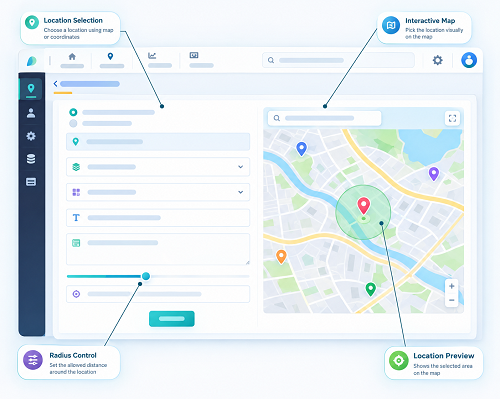
1. Use Customer Visit Check-Ins Instead of Continuous GPS Tracking
One of the simplest ways to reduce intrusive monitoring is to record location only when a sales representative performs a customer visit check-in or check-out.
Instead of continuously collecting an employee's location, the mobile application can allow the representative to:
- Open the assigned customer visit.
- Check in when arriving at the customer location.
- Record the meeting purpose or visit category.
- Add relevant notes about the discussion.
- Check out after completing the visit.
- Submit the visit record for reporting.
The system may capture the employee's location at the time of check-in and check-out, depending on the company's policy and the application's configuration.
For example, a sales representative visiting three customers in Singapore during the day can record three separate visit events. The manager can review whether the planned visits took place without viewing the employee's movements between those appointments.
This approach provides useful operational information while limiting unnecessary location collection.
2. Define a Clear Business Purpose for Customer Visit Tracking
Before introducing tracking software, employers should identify exactly why customer visits need to be recorded.
Possible business purposes include:
- Confirming that scheduled customer appointments took place.
- Improving customer coverage across assigned territories.
- Reviewing missed or delayed appointments.
- Planning follow-up calls and future meetings.
- Understanding customer engagement activity.
- Coordinating sales representatives across different locations.
- Maintaining accurate visit records for sales reporting.
The tracking method should be proportionate to these objectives. If the purpose is simply to confirm that a representative visited a customer, collecting their location every few minutes may be unnecessary.
A clearly defined purpose also helps managers decide what information the system should collect, who should access it and how long records should be retained.
Employers should explain these purposes to employees before implementing the system.
3. Use GPS Verification Only at Relevant Customer Locations
GPS-based check-ins can help confirm whether a sales representative was near the intended customer location when recording a visit.
When the employee checks in, the application can capture:
- Customer or business location.
- Check-in date and time.
- GPS coordinates, where enabled.
- Location accuracy information, if available.
- Employee identity.
- Visit status.
A similar record can be captured when the representative checks out.
However, GPS should be treated as supporting evidence rather than absolute proof that a meaningful customer meeting occurred. Location accuracy can vary because of high-rise buildings, indoor environments, device settings and network conditions.
For Singapore sales teams operating in areas such as the Central Business District, Marina Bay, Orchard Road and industrial estates, businesses should test GPS performance at actual customer locations before relying on it for visit verification.
Managers should also be able to review location exceptions without automatically treating every inaccurate reading as employee misconduct.
4. Allow QR Code or NFC Check-Ins at Customer Sites
GPS is not the only way to record a customer visit. QR codes and Near Field Communication (NFC) can provide alternative check-in methods.
A business may use these methods when customer sites have unreliable GPS reception or when a more deliberate check-in process is appropriate.
For example:
- A customer displays a QR code at its reception area.
- The sales representative scans the code through the company application.
- The system records the visit time and customer reference.
- The representative adds meeting notes and submits the visit.
NFC can work in a similar way when compatible devices and tags are available.
These methods can reduce the need to track an employee's location continuously. However, businesses should consider practical limitations. A QR code may be shared or photographed, while NFC requires compatible devices and properly installed tags. Neither method independently proves that a full meeting took place.
For customer sites where installing codes or tags is impractical, GPS-based event check-ins may be more suitable.
5. Let Employees View and Manage Their Own Visit Records
Employee self-service is an important part of transparent visit tracking.
Sales representatives should be able to review their own visit history through the mobile application. This helps them confirm that customer visits have been recorded correctly and identify errors before managers use the information in reports.
A useful employee interface should show:
- Scheduled customer appointments.
- Completed visits.
- Pending visits.
- Check-in and check-out times.
- Customer location details.
- Visit notes and follow-up actions.
- Failed or incomplete check-ins.
- Options to report or correct errors.
For example, if a representative forgets to check out after a meeting, the application should provide a correction or exception process. The employee can explain the situation, and an authorised manager can approve the adjustment.
Corrections should retain an audit trail showing the original entry, the revised information, the person making the change and the approval details.
This reduces disputes and makes the tracking process more transparent.
6. Separate Customer Visit Tracking From Personal Movement Monitoring
A sales visit application should focus on business activities rather than attempting to observe every movement made by an employee.
Employers can establish clear rules such as:
- Location is collected only when an employee checks in or checks out of a customer visit.
- Background location tracking is disabled unless a specific, justified operational need requires it.
- Tracking does not continue outside authorised working periods.
- Personal breaks and non-work activities are not routinely monitored.
- Managers cannot use visit records to reconstruct unrelated personal movements.
- Location information is not shared with people who do not need it for their roles.
If a business has a genuine need for live location visibility during a particular activity, such as coordinating urgent customer appointments, it should define the purpose, duration, access permissions and employee notification requirements separately.
The system should not use continuous tracking simply because the feature is available.
7. Record Visit Details That Are More Useful Than Location Alone
A GPS coordinate can show that an employee's device was near a customer site, but it cannot explain what happened during the meeting.
Sales teams should therefore combine visit check-ins with relevant business information.
Useful visit details include:
| Visit information | Business value |
|---|---|
| Customer name | Identifies the account visited |
| Appointment date and time | Supports scheduling and visit history |
| Check-in and check-out | Records the visit event |
| Meeting purpose | Explains why the representative visited |
| Contact person | Identifies the customer representative, where appropriate |
| Discussion notes | Records important conversation points |
| Customer requirements | Helps identify sales opportunities |
| Follow-up action | Supports future engagement |
| Next appointment | Helps maintain the sales schedule |
| Visit outcome | Records the result of the interaction |
For example, a representative visiting a customer in Jurong may record that the meeting covered product pricing, delivery timelines and a request for a revised quotation. The manager can use this information to coordinate the next sales activity without needing to monitor the representative's movements throughout the day.
Businesses should collect only the customer and employee information necessary for these purposes.
8. Use Appointment Scheduling and Visit Statuses
A structured appointment workflow can reduce the need for managers to check employees' live locations.
Sales representatives can receive their daily customer appointments through a mobile application. Each appointment can have a status such as:
- Scheduled.
- Confirmed.
- On the way, if the employee chooses to update it.
- Checked in.
- Visit completed.
- Rescheduled.
- Cancelled.
- Follow-up required.
Managers can review these statuses to understand the progress of the day's sales activities.
For example, if a representative has five scheduled appointments and one customer cancels, the system can record the cancellation and allow the representative to update the schedule. The manager does not need to track the employee continuously to understand why the original plan changed.
Appointment-based reporting is particularly useful for businesses with sales teams serving different customer territories across Singapore.
9. Give Managers Access to Visit Reports, Not Unrestricted Location Histories
Sales managers need enough information to supervise customer coverage and support their teams. However, unrestricted access to detailed location histories may be unnecessary.
A role-based dashboard can provide relevant information without exposing more personal data than required.
A manager's dashboard may display:
- Number of planned customer visits.
- Number of completed visits.
- Missed or rescheduled appointments.
- Customer accounts visited.
- Visit completion times.
- Follow-up actions pending.
- Territory-wise customer coverage.
- Visit records requiring review.
Managers may need access to individual visit details when investigating a specific business issue. Such access should be limited to authorised roles and legitimate purposes.
For example, a sales manager may need to investigate why a high-priority customer appointment was not completed. That does not automatically justify access to every location record generated by the employee during the week.
Role-based access, audit logs and clear internal procedures help prevent unnecessary monitoring.
10. Establish Clear Employee Notification and Privacy Policies
Transparency is essential when introducing customer visit tracking.
Singapore employers should explain how the system works before requiring employees to use it. A written policy can describe the purpose of tracking, the information collected, when location data is captured, who can access it and how long records are retained.
The policy should address:
- Purpose: Explain why customer visits are recorded and how the information supports sales operations.
- Data collected: Identify whether the application records GPS coordinates, timestamps, customer details, photographs or other information.
- Tracking periods: Explain when location information is collected and whether background tracking is used.
- Access: Identify which managers or departments can view individual visit records.
- Retention: Explain how long visit and location records are kept.
- Corrections: Describe how employees can report inaccurate or incomplete records.
- Security: Explain the safeguards used to protect employee and customer information.
- Vendor access: Clarify whether the software provider processes or stores the information.
Under Singapore's PDPA, organisations must comply with applicable obligations when collecting, using and disclosing personal data. Depending on the circumstances, an employment-related exception may apply to certain activities without consent, but it does not remove other relevant obligations, including notification and protection requirements.
Employers should not assume that installing a tracking application or including a general monitoring clause in an employment contract automatically resolves every privacy obligation.
11. Set Appropriate Data Retention and Security Controls
Customer visit records may contain personal information about employees and customer contacts. Businesses should protect these records against unauthorised access, accidental disclosure, loss and misuse.
Practical safeguards include:
- Role-based access permissions.
- Strong authentication for managers and administrators.
- Encryption during transmission and storage, where supported.
- Audit logs for access and record changes.
- Secure mobile application sessions.
- Appropriate device security requirements.
- Vendor security reviews.
- Documented data breach response procedures.
- Periodic reviews of access permissions.
Employers should also establish a retention schedule. Visit records should not be kept indefinitely simply because the software can store them.
Under the PDPA's retention limitation obligation, organisations should cease retaining personal data or remove the means by which it can be associated with particular individuals when the purpose for which it was collected is no longer served and retention is no longer necessary for legal or business purposes.
If a software provider stores or processes the data, the employer should understand the provider's responsibilities, hosting arrangements, subcontractors, access controls and data deletion procedures. Where data is transferred outside Singapore, the organisation must also address the PDPA's requirements for overseas transfers.
12. Avoid Using Visit Counts as the Only Measure of Sales Performance
Visit tracking can help managers understand customer coverage, but the number of recorded visits should not become the only measure of an employee's performance.
A representative may complete fewer visits because they handle complex accounts, conduct longer product demonstrations or travel to customers with more demanding requirements.
A balanced performance review may consider:
- Quality of customer interactions.
- Sales opportunities generated.
- Conversion rates.
- Revenue and account growth.
- Customer retention.
- Follow-up completion.
- Customer feedback.
- Accuracy of visit records.
- Territory coverage.
For example, a representative who completes four detailed meetings with major customers may contribute more business value than another representative who records ten short visits with limited outcomes.
Visit records should provide operational context, not replace professional judgement or customer relationship measures.
13. Choose Software With Privacy-Friendly Tracking Features
When evaluating live tracking or field sales management software, Singapore businesses should look beyond GPS functionality. The system should offer controls that help organisations collect only the information they need.
Important features include:
| Software feature | Why it matters |
|---|---|
| Event-based GPS check-in | Captures location at relevant visit events |
| Optional background tracking controls | Helps prevent unnecessary continuous monitoring |
| QR code or NFC check-in | Provides alternative visit verification methods |
| Employee visit history | Allows staff to review their own records |
| Visit notes and outcomes | Connects location events with actual sales activity |
| Appointment scheduling | Helps managers coordinate customer meetings |
| Role-based access | Limits who can view employee information |
| Audit trail | Records changes and access to visit data |
| Data retention settings | Supports appropriate record management |
| Secure data handling | Helps protect employee and customer information |
| Reporting dashboard | Shows visit activity without requiring unrestricted tracking |
During a software demonstration, employers should ask vendors to show how location collection can be limited to check-in and check-out events. They should also test employee permissions, correction workflows, data exports and deletion procedures.
14. Introduce the System Through a Controlled Pilot
Before deploying visit tracking across the entire sales department, businesses should conduct a pilot with a small group of representatives.
A pilot can help identify technical and operational issues before they affect the wider team.
A practical pilot may include the following steps:
- Select a small group of sales representatives from different territories.
- Explain the tracking purpose and privacy policy.
- Configure customer locations and appointment schedules.
- Test GPS, QR code or NFC check-ins where applicable.
- Verify check-in and check-out timestamps.
- Test indoor and high-rise customer locations.
- Review how employees correct missed or inaccurate records.
- Check whether managers can access only the information required for their roles.
- Collect feedback from representatives and managers.
- Adjust the workflow before wider implementation.
The pilot should assess both technical performance and employee experience. A system that records locations accurately but creates unnecessary administrative work or reduces employee trust may not be suitable for long-term use.
15. Common Mistakes to Avoid
Singapore businesses should avoid the following practices when implementing customer visit tracking:
- Tracking employees continuously without a defined need: Use visit-based location events wherever they meet the business objective.
- Collecting location outside authorised work activities: Configure tracking periods and explain any exceptions clearly.
- Treating GPS as conclusive proof of a meeting: Combine location evidence with appointment and visit records.
- Ignoring employee access to their records: Provide a way to review and report inaccurate entries.
- Giving every manager unrestricted access: Apply role-based permissions.
- Retaining location history indefinitely: Establish and review appropriate retention periods.
- Using visit counts as the sole performance measure: Consider customer outcomes and sales quality.
- Failing to review vendor arrangements: Check data storage, security, subcontractors and deletion procedures.
- Introducing the system without communication: Explain its purpose and operation before rollout.
Conclusion
Singapore sales teams can track customer visits effectively without relying on intrusive employee surveillance. Event-based GPS check-ins, QR codes, NFC, appointment scheduling and digital visit reports can provide useful information about customer coverage and sales activity while limiting unnecessary location collection.
Employers should define a clear business purpose, inform employees about the tracking process, restrict access to authorised users and establish appropriate security and retention controls. They should also give employees access to their own visit records and provide a fair process for correcting errors.
The most effective approach is to measure customer engagement and sales outcomes rather than continuously observe employee movements. By choosing privacy-conscious software and introducing transparent tracking practices, Singapore businesses can improve sales coordination while maintaining employee trust.
Focus on completed visits, client outcomes and transparent check-in policies rather than constant surveillance. Assess InnBuilt for appropriate Singapore sales-team reporting.