How Can Singapore Security Teams Monitor Patrol Coverage Across Sites?
How Can Singapore Security Teams Monitor Patrol Coverage Across Sites?
Introduction
Security teams responsible for multiple buildings, commercial premises, industrial facilities, residential developments and other locations need to ensure that every assigned site receives the required patrol coverage. However, monitoring patrols across several sites can be difficult when supervisors depend on paper logbooks, phone calls, manual reports or occasional physical inspections.
A security officer may complete a patrol at one location while another site has missed checkpoints, delayed rounds or an unreported incident. Without reliable records, managers may struggle to confirm whether patrols were completed, identify coverage gaps and respond quickly to operational problems.
Live tracking software and guard tour management systems can help security agencies monitor patrol activity across multiple sites. By combining GPS location records, digital checkpoints, patrol schedules, incident reporting and centralised dashboards, these systems give supervisors a clearer view of field operations.
For Singapore security agencies, technology should complement established operational procedures and applicable regulatory recordkeeping requirements. The aim is not simply to track an officer's movements, but to verify planned patrol coverage, identify missed activities and maintain reliable records.
1. Create a Digital Patrol Plan for Every Site
The first step is to establish a clear patrol plan for each deployment location. Different premises have different security risks, layouts and operating requirements. A patrol schedule suitable for a shopping centre may not be appropriate for a warehouse, office building or residential development.
Managers should define the following for every site:
- Required patrol routes and checkpoints.
- Patrol frequency and scheduled time windows.
- Areas that require additional attention.
- Security officers assigned to each shift.
- Required checks at entrances, exits and restricted areas.
- Procedures for reporting suspicious activity or incidents.
- Escalation contacts and response responsibilities.
For example, an industrial facility may require patrols around loading bays, perimeter fencing, equipment rooms and storage areas. An office building may prioritise reception areas, stairwells, parking facilities and restricted-access floors.
A digital patrol plan allows supervisors to configure site-specific requirements rather than applying one generic route to every deployment.
2. Use GPS Tracking to Monitor Officer Locations
GPS-enabled mobile applications can help supervisors understand where officers are during authorised patrol periods. Location information can be displayed on a central dashboard, allowing managers to review officer positions across several deployment sites.
Useful tracking capabilities include:
- Current or most recently reported officer location.
- Location update timestamps.
- Patrol route history.
- Movement between assigned checkpoints.
- Alerts when an officer deviates from an approved route.
- Visibility of officers assigned to different sites.
For example, a security agency managing five commercial properties can use a central dashboard to check whether deployed officers are reporting locations consistent with their assigned patrol activities.
However, GPS tracking has limitations. Indoor positioning may be inaccurate in basements, enclosed corridors, lift lobbies and areas surrounded by tall buildings. A location displayed on a map should therefore not be treated as conclusive proof that an officer physically inspected a particular room or completed a patrol.
GPS works best when combined with digital checkpoint verification and supervisor review.
3. Install Digital Checkpoints at Important Patrol Locations
Digital checkpoints help security teams verify that officers have visited designated locations during a patrol. Instead of relying only on GPS movement, the system records a specific check-in event at each checkpoint.
Common checkpoint technologies include:
- QR codes: Officers scan a site-specific code using their mobile application.
- NFC tags: Officers tap a compatible smartphone against a tag installed at the checkpoint.
- RFID-based checkpoints: Compatible readers or devices record checkpoint visits.
- Bluetooth beacons: A mobile application detects a beacon when an officer comes within its configured range.
- GPS geofences: The system records whether an officer's device enters a defined geographical area.
For example, a patrol route in a commercial building might include the main entrance, loading bay, car park, emergency exit and rooftop access point. Each checkpoint can be recorded with a timestamp and officer identity.
The selected method should reflect the physical environment. QR or NFC checkpoints may be more dependable than GPS alone for verifying visits to specific indoor locations.
4. Compare Planned Patrols With Completed Patrols
Monitoring patrol coverage requires more than knowing where officers are. Managers need to compare the patrols that were scheduled with the patrols that were actually completed.
A patrol management system should provide a clear view of:
- Planned patrols for each site and shift.
- Patrols started and completed.
- Checkpoints successfully recorded.
- Missed or incomplete checkpoints.
- Delayed patrols.
- Patrols completed outside the assigned time window.
- Patrols that require supervisor verification.
For example, a site may require four patrol rounds during a night shift, with each round covering six checkpoints. If an officer records only four checkpoints during the second round, the dashboard should flag the incomplete round for review.
This helps supervisors distinguish between a fully completed patrol, a partially completed patrol and a patrol that has not been recorded.
A missed digital checkpoint does not automatically prove that an officer failed to conduct the physical inspection. Device problems, damaged tags, network interruptions or approved operational changes may explain the missing record. Managers should investigate exceptions before drawing conclusions.
5. Monitor Patrol Coverage Across Multiple Sites From One Dashboard
A centralised dashboard is particularly useful for security agencies managing officers across different buildings, customers and geographical areas.
Instead of contacting each site separately, supervisors can review patrol activity from one system.
A useful multi-site dashboard should show:
| Dashboard information | How it helps supervisors |
|---|---|
| Site deployment status | Shows which sites have active officer deployments |
| Officer availability | Helps identify available, deployed or unconfirmed officers |
| Current or last reported location | Provides location visibility with update timestamps |
| Patrol completion status | Shows completed, ongoing and missed patrol rounds |
| Checkpoint records | Identifies which checkpoints have been visited |
| Late patrol alerts | Highlights rounds that have not started on schedule |
| Incident reports | Shows reported security issues across sites |
| Shift handover status | Helps supervisors review outstanding duties |
| Exception notifications | Draws attention to incomplete or unusual activity |
Managers should be able to filter information by site, officer, shift, customer, date and patrol status.
For example, an operations manager overseeing several office buildings may first review an overall coverage summary, then open an individual site to investigate a missed patrol or an unresolved incident.
6. Set Alerts for Missed and Delayed Patrols
Automated alerts help supervisors identify potential coverage problems without continuously checking every site dashboard.
Security teams can configure notifications for situations such as:
- A patrol has not started within its scheduled time window.
- An assigned checkpoint has not been recorded.
- A patrol remains incomplete after its expected end time.
- An officer has not submitted a required check-in.
- A device has stopped sending location updates.
- An incident report requires supervisor attention.
- A shift handover has not been acknowledged.
Alerts should include useful context, such as the site, officer, shift, patrol round, event time and last successful location update.
For example, if a patrol is due to start at 10:00 PM but no check-in has been received by the configured deadline, the system can notify the duty supervisor. The supervisor can contact the officer, check the deployment roster and arrange a replacement or investigate a technical issue.
Alert rules should be configurable. A brief network interruption should not necessarily trigger the same escalation as a missed high-risk checkpoint.
7. Use Geofencing to Monitor Site Entry and Exit
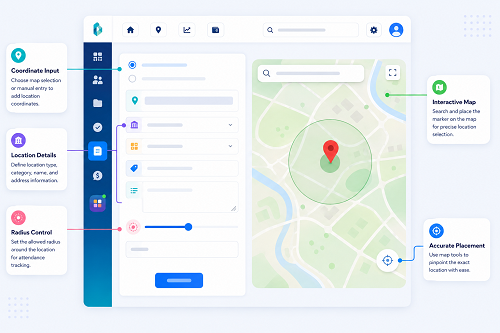
Geofencing creates a virtual boundary around a defined geographical area. When a tracked device enters or leaves that boundary, the system can record an event or generate an alert.
Security agencies can use geofencing to support:
- Confirmation that an officer has reached an assigned deployment site.
- Monitoring of entry into or departure from an authorised patrol zone.
- Alerts when an officer's device leaves a designated area during a patrol.
- Site-level attendance and deployment records.
- Notifications when a scheduled deployment has no recorded arrival.
For example, a security agency may configure a geofence around a warehouse. When the assigned officer arrives, the system can record the event and notify the supervisor.
However, a geofence confirms that a device was detected within a geographical boundary; it does not necessarily confirm that the officer entered the building or inspected a particular location. GPS accuracy, building density and boundary size can affect results.
For indoor patrol verification, geofencing should be supplemented with QR codes, NFC tags or other checkpoint technologies.
8. Record Patrol Times and Checkpoint History
Reliable timestamps help supervisors understand when patrol activities took place and whether they followed the planned schedule.
A patrol record should ideally include:
- Officer identification.
- Deployment site.
- Shift and patrol assignment.
- Patrol start and end times.
- Checkpoint identification.
- Checkpoint scan or verification time.
- Incident or exception details.
- Supervisor review or correction history.
The system should distinguish between the time an event occurred on the device and the time it was uploaded to the central server. This is important when officers work in basements, remote areas or locations with unreliable mobile connectivity.
For example, an officer may scan an NFC checkpoint at 11:15 PM while offline. The application may upload the record at 11:40 PM after connectivity returns. Both timestamps are useful: one indicates the recorded patrol event, while the other indicates when the server received it.
Digital records should also preserve an audit trail when supervisors correct or approve exceptions.
9. Monitor Patrol Coverage During Shift Changes
Shift handovers are important because patrol responsibilities move from one officer or team to another. Poor handovers can result in missed rounds, unattended checkpoints or unresolved incidents.
A patrol monitoring system can support shift changes by recording:
- Outgoing officer's completed patrols.
- Incoming officer's acknowledgement of deployment.
- Outstanding checkpoints or inspections.
- Open incident reports.
- Equipment or access-card handovers.
- Unresolved safety or security concerns.
- Supervisor approval where required.
For example, an outgoing officer may report that a service entrance was found unsecured during the final patrol. The incoming officer should receive the information and acknowledge the issue before beginning the next round.
This creates continuity between shifts and helps prevent important security information from being lost in verbal communication.
10. Link Patrol Records With Incident Reporting
Patrol coverage monitoring becomes more useful when officers can report incidents directly from the mobile application.
A digital incident report may capture:
- Incident category.
- Site and checkpoint.
- Date and time.
- Officer submitting the report.
- Description of the incident.
- Photographs or supporting attachments, where appropriate.
- Immediate action taken.
- Person or department notified.
- Follow-up status.
For example, an officer conducting a parking-area patrol may discover a damaged access gate. The officer can record the checkpoint, submit photographs and notify the control room through the application.
Supervisors can then review the incident alongside the relevant patrol record instead of searching through separate paper logs and messages.
Access to incident details and attachments should be restricted to authorised personnel, particularly where reports contain personal or sensitive information.
11. Maintain Reliable Records for Singapore Security Operations
Security agencies in Singapore should ensure that digital patrol tools support, rather than undermine, their applicable regulatory and operational recordkeeping responsibilities.
The Singapore Police Force's security agency licensing conditions include requirements for occurrence books and attendance books at each deployment site, unless an exemption applies. These records may be maintained electronically, but appropriate measures must be adopted to prevent tampering. The July 2026 licensing conditions also state that the books must be kept for at least 18 months from the date of the last entry and made available to the service buyer or relevant authorities upon request. Agencies should check the current conditions and required fields when configuring their systems.
A patrol application should therefore support:
- Reliable occurrence and attendance records.
- Clear identification of the deployment site.
- Accurate and traceable timestamps.
- Restricted editing permissions.
- Audit trails for corrections.
- Secure storage and retrieval.
- Export or access for authorised reviews.
- Retention settings that meet applicable requirements.
A digital patrol log should not automatically be assumed to replace every required record. Agencies should confirm that their system captures the prescribed fields and satisfies the applicable licensing conditions.
12. Protect Officer Location Data and Respect Privacy
Live tracking and patrol verification involve information about employees' movements and activities. Security agencies should establish clear rules for collecting, accessing, using and retaining this information.
Practical safeguards include:
- Explain the purpose of patrol tracking to officers.
- Define when location tracking is active.
- Limit tracking to legitimate operational requirements.
- Restrict access to authorised supervisors and managers.
- Use role-based permissions.
- Protect stored records and data transmitted between devices and servers.
- Establish retention and deletion procedures.
- Review vendor access and third-party data handling.
- Provide a process for correcting inaccurate patrol records.
Singapore's Personal Data Protection Act (PDPA) applies to organisations' collection, use and disclosure of personal data, subject to its provisions and applicable exceptions. Employment-related exceptions may be relevant in some circumstances, but they do not remove the need to consider notification and other applicable data protection obligations.
The Ministry of Manpower has also advised that workplace monitoring devices should be used under clear rules, deployed where there are safety or security concerns, and accompanied by appropriate worker notification and data protection safeguards. Its 2025 parliamentary reply explains that employees who believe monitoring practices breach their privacy can raise concerns through company grievance channels, their union where applicable, or TAFEP.
Agencies should avoid unnecessary tracking outside authorised working periods and should not treat a location record as automatic proof of misconduct.
13. Evaluate Patrol Coverage With Useful Performance Reports
Reports help managers identify recurring coverage gaps and improve deployment planning.
Useful patrol performance indicators include:
| Metric | What it measures |
|---|---|
| Patrol completion rate | Percentage of scheduled patrols recorded as completed |
| Checkpoint completion rate | Percentage of required checkpoints successfully verified |
| Missed patrol count | Number of patrols not completed or not recorded |
| Late patrol rate | Patrols started outside their scheduled time windows |
| Average patrol duration | Time taken to complete patrol rounds |
| Checkpoint delay | Difference between planned and actual checkpoint times |
| Incident reporting rate | Incidents recorded during patrol operations |
| Exception resolution time | Time taken to investigate and close patrol exceptions |
| Site coverage consistency | Whether required patrols are completed across deployment locations |
Managers should interpret these figures in context. A longer patrol duration may reflect a larger site, an incident investigation or additional inspection requirements rather than poor performance.
Similarly, a low checkpoint completion rate may result from faulty tags, application problems or an approved route change. Reports should help managers investigate and improve operations, not encourage decisions based solely on automated scores.
14. Choose Software That Supports Multi-Site Security Operations
Not every GPS tracking or workforce management application is designed for security patrol management. Agencies should evaluate whether a platform can support the actual requirements of guard tours and multi-site deployments.
Important capabilities include:
- Multiple site and customer profiles.
- Configurable patrol routes and schedules.
- QR, NFC, RFID or beacon-based checkpoints.
- GPS location tracking with update timestamps.
- Digital attendance and shift management.
- Missed patrol and delayed checkpoint alerts.
- Incident reporting with attachments.
- Centralised multi-site dashboards.
- Offline data capture and later synchronisation.
- Audit trails and controlled record corrections.
- Role-based access and data security.
- Report generation and export.
- Integration with existing security operations systems.
During a vendor demonstration, agencies should test realistic scenarios. For example, ask the vendor to demonstrate a missed checkpoint, an officer working in a basement without connectivity, a shift handover, a site with multiple patrol routes and a supervisor reviewing an incident.
The system should make it easy to identify incomplete patrols and investigate exceptions without requiring managers to navigate several unrelated screens.
15. Run a Pilot Before Introducing the System Across All Sites
A controlled pilot helps an agency confirm that the software works in its actual operating environment.
Start with a small number of sites that have different layouts and security requirements. Include at least one indoor-heavy location, one outdoor or perimeter patrol route and one site with multiple shifts, where applicable.
During the pilot, evaluate:
- Whether officers can complete patrol check-ins easily.
- Whether checkpoint tags are correctly positioned and reliably detected.
- Whether GPS updates are sufficiently useful for the site's environment.
- Whether offline records synchronise correctly.
- Whether missed patrol alerts reach the right supervisors.
- Whether incident reports are complete and easy to review.
- Whether shift handovers are recorded consistently.
- Whether reports match actual patrol activity.
- Whether officers understand the tracking and privacy procedures.
- Whether the system supports required recordkeeping.
Collect feedback from officers, site supervisors, control-room staff and operations managers. Resolve problems with checkpoint placement, device compatibility, alert settings and training before expanding the system.
16. Common Mistakes to Avoid When Monitoring Patrol Coverage
Security agencies should avoid the following implementation mistakes:
- Relying only on GPS: Location tracking does not confirm that every checkpoint was physically inspected.
- Using identical routes for every site: Patrol plans should reflect each property's layout and security risks.
- Setting unrealistic patrol schedules: Officers need sufficient time to complete inspections and respond to incidents.
- Ignoring offline conditions: Basements and enclosed areas may have weak mobile connectivity.
- Treating every missed scan as misconduct: Technical issues and authorised operational changes should be investigated.
- Creating too many alerts: Excessive notifications can make important exceptions harder to identify.
- Allowing unrestricted record editing: Corrections should be traceable and properly authorised.
- Ignoring privacy controls: Location and patrol data should only be accessible for legitimate purposes.
- Measuring performance by patrol counts alone: Managers should consider site conditions, incidents, route complexity and service requirements.
Conclusion
Singapore security teams can monitor patrol coverage across multiple sites more effectively by combining digital patrol schedules, GPS visibility, checkpoint verification, automated alerts, incident reporting and centralised dashboards.
The most reliable approach uses different technologies for different purposes. GPS helps supervisors understand officer location and movement, while QR codes, NFC tags or other checkpoint methods provide stronger evidence that designated patrol points were visited. Digital records and reports help managers identify missed rounds, review incidents and maintain continuity between shifts.
Security agencies should also ensure that their systems support applicable Singapore Police Force recordkeeping requirements and protect officers' personal data under relevant privacy obligations.
By testing the system across different site environments and involving officers and supervisors in implementation, agencies can improve patrol visibility, identify coverage gaps earlier and maintain more consistent security operations across their deployments.
Check scheduled patrol stops, missed-site alerts and supervisor visibility. Trial InnBuilt workflows with a representative Singapore security route.