How Can Face Recognition Attendance Help Thailand Worksites Manage Check-Ins?
How Can Face Recognition Attendance Help Thailand Worksites Manage Check-Ins?
Introduction
Managing employee attendance at worksites can be challenging for businesses in Thailand, particularly those operating factories, warehouses, construction projects, logistics facilities, industrial plants and multiple office locations. Large workforces, rotating shifts, multiple entry points and employees arriving at different times can make traditional attendance methods difficult to manage.
Paper registers, punch cards and manual attendance sheets often create problems such as proxy check-ins, missing records, long queues and inaccurate working-hour calculations. Face recognition attendance systems offer an alternative by allowing employees to record their arrival and departure through facial verification.
These systems can help employers automate check-ins, improve attendance visibility and reduce administrative work. However, businesses must also consider system accuracy, employee privacy, Thailand's Personal Data Protection Act (PDPA), working-hour requirements and integration with payroll.
Understanding how face recognition attendance works can help Thailand employers decide whether the technology is appropriate for their worksites.
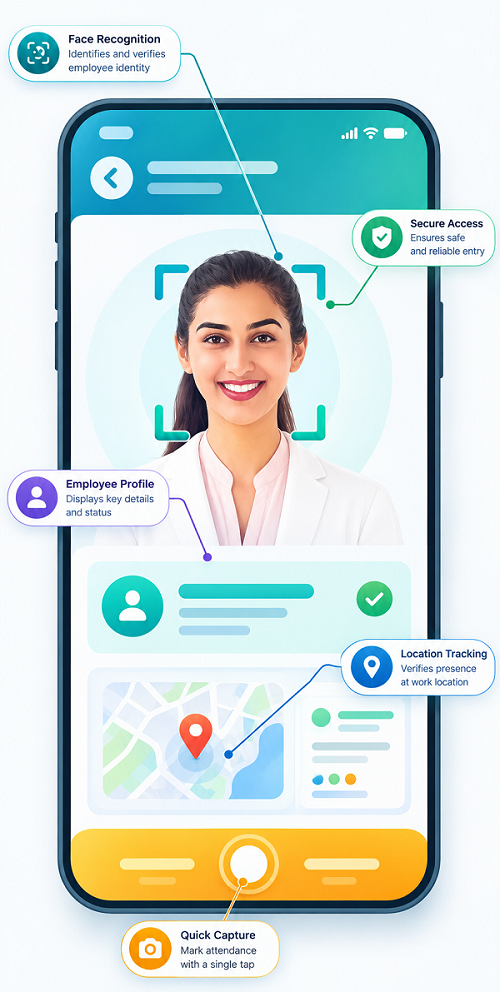
1. Understanding Face Recognition Attendance
Face recognition attendance is a biometric attendance method that verifies an employee's identity using facial characteristics.
Employees generally register their facial information in the attendance system during onboarding. When they arrive at a worksite, they stand in front of a compatible terminal, kiosk, tablet or camera-enabled device. The system captures an image or facial representation and compares it with the registered information.
If the system successfully verifies the employee, it records the attendance event with a timestamp.
A typical process includes:
- Employee registration and identity verification.
- Secure enrollment of facial information.
- An employee approaches the attendance terminal.
- The camera captures the employee's face.
- The system compares the captured information with the registered template.
- The system confirms or rejects the match.
- A successful check-in or check-out is recorded.
- Attendance information is transferred to the central management system.
Depending on the software, the system may also support liveness detection, access control, shift identification and real-time attendance reporting.
2. Reduce Proxy Attendance and Buddy Punching
One common attendance problem at large worksites is buddy punching. This occurs when one employee records attendance on behalf of another employee.
For example, an employee who is running late may ask a colleague to punch an attendance card or enter a PIN on their behalf. This creates a difference between the recorded attendance and the employee's actual arrival time.
Face recognition can reduce this risk because the system checks the person presenting themselves against the registered facial information.
Potential benefits include:
- Reducing attendance entries made using another employee's card.
- Making identity verification more consistent.
- Improving confidence in attendance records.
- Reducing manual identity checks by supervisors.
- Supporting more reliable attendance reports.
However, facial recognition is not completely foolproof. Poor lighting, camera positioning, changes in appearance, spoofing attempts and technical limitations can affect verification. Employers should test anti-spoofing features and maintain a manual verification procedure for unsuccessful scans.
3. Speed Up Check-Ins at Factory and Industrial Worksites
Factories and industrial facilities may have hundreds or thousands of employees reporting for duty around the same shift-change period.
If employees use paper registers or shared attendance terminals with slow identification processes, queues can develop at entry points. This may delay shift handovers and create uncertainty about actual reporting times.
Face recognition terminals can help streamline the process by verifying employees without requiring them to search for cards, enter employee numbers or sign paper registers.
For example, a factory operating three shifts may configure attendance terminals at designated entrances. Employees arriving for each shift can complete facial verification, while the system records the event automatically.
Employers can improve check-in efficiency by:
- Installing enough terminals for expected employee traffic.
- Positioning devices at convenient entry points.
- Configuring terminals for the correct shift schedules.
- Testing recognition speed under peak arrival conditions.
- Providing alternative check-in methods when a device fails.
The goal should be to make attendance recording quick without compromising security or creating unnecessary queues.
4. Manage Attendance Across Multiple Worksite Entry Points
Large worksites may have separate entrances for production employees, office staff, contractors, visitors and delivery personnel.
Using a single attendance terminal for all employees may not be practical. Face recognition attendance systems can support multiple devices connected to a central platform.
Employers can configure terminals at:
- Main employee entrances.
- Factory production gates.
- Warehouse access points.
- Administrative buildings.
- Designated staff entrances.
- Remote project offices.
- Other approved employee check-in locations.
Centralised attendance management allows HR teams to view check-in information from different locations in one system.
For example, a manufacturing company with production facilities in several Thai provinces can review attendance records across its branches through a central dashboard.
However, employers should define which locations are authorised for attendance recording. A check-in at a general entrance does not necessarily prove that an employee has reached their assigned workstation or started their duties.
5. Support Rotating and Multiple Shift Schedules
Many Thailand worksites operate rotating shifts to maintain continuous production or service delivery.
Common arrangements include:
- Morning shifts.
- Afternoon shifts.
- Night shifts.
- Rotating weekly shifts.
- Weekend shifts.
- Split shifts.
- Extended operational shifts.
Face recognition attendance software can connect check-in records with employee shift schedules.
For example, a manufacturing business may assign employees to morning, evening and night shifts. The system can compare their actual check-in and check-out times against the scheduled shifts.
Useful features include:
- Employee-specific shift assignment.
- Shift-based attendance reports.
- Overnight shift recognition.
- Late-arrival alerts.
- Early-departure identification.
- Missing check-out notifications.
- Shift-change approval workflows.
Overnight shifts require particular attention. If a shift starts at 10 p.m. and ends at 6 a.m. the following day, the system should associate both attendance events with the correct scheduled shift while preserving their actual calendar dates and timestamps.
Employers should not automatically classify every post-midnight hour as overtime. The applicable schedule, actual hours and legal requirements must be reviewed.
6. Improve Real-Time Attendance Visibility
Manual attendance registers often require supervisors to collect information and send it to HR before management can understand who has reported for work.
Face recognition systems can make attendance information available much faster.
A central dashboard may show:
- Employees who have checked in.
- Employees who have not yet reported.
- Late arrivals.
- Early departures.
- Missing attendance events.
- Attendance by department.
- Attendance by worksite.
- Shift-wise attendance status.
For example, a warehouse manager can review whether the required loading team has arrived before dispatch operations begin.
Real-time visibility can help managers arrange replacement staff, redistribute tasks and contact employees who have not reported.
However, an attendance dashboard should be treated as an operational tool rather than proof of an employee's complete working activity. A check-in confirms an attendance event, not continuous presence throughout the shift.
7. Help Supervisors Monitor Attendance Across Departments
Large worksites often have different departments with separate reporting structures.
A factory, for example, may include:
- Production.
- Quality control.
- Maintenance.
- Warehouse.
- Security.
- Administration.
- Dispatch.
- Engineering.
Face recognition attendance systems can organise employee records by department, team, shift and location.
Supervisors can review attendance for their assigned teams without accessing every employee record in the organisation.
This can help managers identify staffing shortages and coordinate shift handovers.
A good system should provide role-based access so that supervisors can view relevant attendance information while HR retains broader administrative control.
8. Record Actual Check-In and Check-Out Times
Accurate timestamps are essential for calculating working hours and preparing payroll inputs.
A face recognition attendance system can record the exact time when an employee successfully checks in or checks out.
For example:
| Employee | Scheduled shift | Actual check-in | Actual check-out |
|---|---|---|---|
| Employee A | 8:00 AM–5:00 PM | 7:54 AM | 5:03 PM |
| Employee B | 8:00 AM–5:00 PM | 8:18 AM | 5:00 PM |
| Employee C | 8:00 AM–5:00 PM | 7:59 AM | 4:35 PM |
HR teams can use these records to investigate late arrivals, early departures and missing attendance events.
The system should preserve original timestamps even when an authorised correction is made. Any adjustment should include the reason, approval details and date of modification.
This creates a clearer audit trail and helps prevent unauthorised changes to attendance records.
9. Reduce Manual Attendance Administration
HR teams at large worksites may spend considerable time collecting attendance sheets, checking employee names, correcting handwritten entries and preparing monthly attendance summaries.
Automated attendance systems can reduce these repetitive activities.
Potential administrative benefits include:
- Automatic recording of check-in and check-out events.
- Reduced manual data entry.
- Faster attendance report preparation.
- Easier identification of missing punches.
- Centralised employee attendance records.
- Faster transfer of attendance information to payroll.
- More consistent attendance review procedures.
HR teams can spend more time investigating exceptions and supporting employees rather than repeatedly consolidating attendance sheets.
Automation does not eliminate the need for human review. Unsuccessful scans, device outages, shift changes and genuine attendance corrections still require an established process.
10. Integrate Attendance With Payroll Processing
Attendance information often forms part of the payroll calculation process.
For Thailand employers, accurate attendance data can support the review of working days, working time, overtime and holiday work.
Face recognition attendance software can transfer verified attendance events to payroll or HR systems.
A typical integration process may involve:
- Capturing employee check-in and check-out events.
- Matching attendance events with assigned shifts.
- Calculating recorded working time.
- Identifying late arrivals and early departures.
- Flagging missing punches.
- Separating approved overtime and holiday work.
- Sending reviewed attendance data to payroll.
- Reconciling attendance with payroll results.
Employers should configure payroll rules in accordance with the Labour Protection Act B.E. 2541 (1998).
For example, Section 23 generally limits normal working hours to eight hours per day and 48 hours per week, with lower limits for prescribed hazardous work. Sections 24–26 address overtime requirements and limits, while Sections 61–63 cover relevant overtime and holiday-work payment rates.
A biometric check-in does not independently establish that all recorded time is payable overtime. HR must review the applicable schedule, approval requirements, employee category and actual work performed.
11. Support Attendance Management at Remote and Restricted Worksites
Some businesses operate across locations where traditional attendance administration is difficult.
Examples include:
- Construction projects.
- Mining and industrial facilities.
- Remote warehouses.
- Infrastructure projects.
- Large manufacturing campuses.
- Utility and maintenance facilities.
Where suitable connectivity and infrastructure are available, face recognition devices can record attendance at designated locations and synchronise records with a central platform.
For remote worksites, employers should consider:
- Stable power supply.
- Internet availability.
- Device protection against dust and moisture.
- Suitable lighting.
- Secure device installation.
- Offline attendance capture.
- Data synchronisation after connectivity returns.
- Local procedures for device failure.
Offline functionality is particularly useful where connectivity is intermittent. However, employers should verify how the system timestamps events, prevents duplicate records and handles delayed synchronisation.
12. Improve Worksite Access Coordination
Some face recognition attendance solutions can integrate with access-control systems.
This allows employers to coordinate employee identity verification with access permissions for designated areas.
For example, a factory may use access control to restrict entry to authorised production areas, laboratories, warehouses or other controlled zones.
Potential benefits include:
- Verifying employee identity at designated access points.
- Applying access permissions based on job responsibilities.
- Supporting security reviews.
- Maintaining entry and exit records.
- Coordinating attendance and access-management systems.
However, attendance and access control serve different purposes.
An employee may be authorised to enter a building without necessarily being scheduled to work. Similarly, a successful attendance check-in does not automatically prove that the employee has entered every required work area.
Employers should define the purpose of each system and avoid using access records as a substitute for properly maintained working-time records.
13. Consider Thailand PDPA Requirements for Facial Recognition
Privacy and data protection are among the most important considerations when introducing face recognition attendance in Thailand.
Under Thailand's Personal Data Protection Act B.E. 2562 (2019), biometric data used to uniquely identify an individual is sensitive personal data.
Facial recognition information used to identify employees therefore requires particular care.
Section 26 generally restricts the collection of sensitive personal data unless an applicable legal exception or valid legal basis applies. Explicit consent is one possible basis, but the Act also provides specific exceptions, including certain employment-protection and legal-obligation circumstances subject to safeguards.
Employers should not assume that collecting employee consent is always the only possible legal route, or that an ordinary attendance policy automatically makes biometric processing lawful.
Before introducing the system, businesses should:
- Identify and document the purpose of facial recognition.
- Determine the applicable legal basis under the PDPA.
- Provide appropriate privacy notices.
- Explain what facial information is collected and why.
- Identify who can access the information.
- Restrict use to the stated purpose.
- Establish appropriate retention and deletion rules.
- Secure biometric templates and related records.
- Review vendor access and data-processing arrangements.
- Assess whether a less intrusive attendance method is appropriate.
Employers should also consider an alternative check-in method for employees who cannot or do not use facial recognition, where appropriate.
The organisation should obtain advice from a qualified Thai data-protection professional when assessing its specific biometric-processing arrangements.
14. Protect Facial Templates and Attendance Records
A face recognition system may store facial images, biometric templates or other technical representations used for identity verification.
These records should receive stronger protection than ordinary operational information.
Recommended safeguards include:
Encryption: Protect biometric information and attendance records during transmission and storage.
Access restrictions: Limit biometric-data access to authorised personnel who need it for legitimate business purposes.
Secure authentication: Require strong authentication for administrators and system operators.
Audit logs: Record access, exports, changes and administrative activities.
Retention controls: Retain biometric information only for an appropriate period and delete it when it is no longer necessary, subject to applicable legal obligations.
Vendor controls: Review the service provider's security practices, subprocessors, storage arrangements and incident-response procedures.
Data separation: Where technically feasible, separate biometric templates from general employee and payroll records.
Employers should also establish procedures for responding to suspected data breaches and employee requests concerning personal data.
15. Evaluate Recognition Accuracy at Actual Worksites
Face recognition accuracy can vary depending on the physical environment.
A system that works well in a controlled office may perform differently at a busy factory entrance.
Common factors affecting recognition include:
- Poor or uneven lighting.
- Direct sunlight.
- Dust and dirt on camera lenses.
- Employee movement during scanning.
- Crowded check-in areas.
- Camera height and positioning.
- Protective equipment.
- Face coverings.
- Changes in employee appearance.
- Camera quality and recognition algorithms.
For example, workers entering a construction site may wear helmets, safety glasses, masks or other protective equipment. Employers should test whether the selected device can handle the actual conditions without creating excessive failed scans.
A pilot should measure successful recognition rates, false rejection rates, check-in time and the frequency of manual intervention.
Vendors should explain how their systems handle unsuccessful verification and whether employees can complete attendance through an alternative method.
16. Provide Alternative Check-In Methods
No biometric system should be treated as completely reliable in every situation.
Employees may experience verification failures because of technical problems, environmental conditions, accessibility needs or changes in appearance.
Employers should establish an alternative attendance process, such as:
- RFID or employee access cards.
- Secure PIN-based attendance.
- Supervisor-approved attendance entries.
- A designated manual attendance register.
- An authorised mobile attendance application.
The alternative method should follow the same attendance policy and recordkeeping standards.
For example, if a production employee cannot complete facial verification because the terminal is malfunctioning, a supervisor can verify the employee's identity and record the attendance event through an approved exception process.
The system should retain the reason for the alternative check-in and identify the person who authorised it.
17. Train Employees and Supervisors
Introducing face recognition attendance requires clear communication.
Employees should understand how the system works, what information is collected and what to do if verification fails.
Training should cover:
- How to stand in front of the terminal.
- Where to look during verification.
- How to complete check-in and check-out.
- How to report failed scans.
- How to request attendance corrections.
- How to use alternative check-in methods.
- Who to contact for technical support.
- How their personal information is handled.
Supervisors should receive additional training on attendance exceptions, approval workflows, shift assignments and employee privacy.
Communication is particularly important when moving from paper registers or card-based attendance to biometric systems.
18. Choose Software With the Right Worksite Features
Not every face recognition attendance solution is suitable for large or operationally complex worksites.
Before purchasing software, employers should compare the following capabilities:
| Feature | Why it matters |
|---|---|
| Fast facial verification | Helps reduce queues during shift changes |
| Liveness detection | Helps detect certain spoofing attempts |
| Multiple terminals | Supports large facilities and multiple entry points |
| Centralised dashboard | Gives HR visibility across locations |
| Shift management | Supports rotating and overnight shifts |
| Offline functionality | Helps maintain attendance capture during network interruptions |
| Payroll integration | Reduces manual transfer of attendance data |
| Exception management | Supports failed scans and missing punches |
| Role-based access | Restricts access to employee information |
| Audit trails | Records corrections and administrative changes |
| PDPA safeguards | Supports responsible biometric-data management |
| Alternative check-in methods | Helps employees when facial verification is unavailable |
| Technical support | Helps maintain reliable worksite operations |
Employers should also check device durability, warranty coverage, installation requirements, software updates and vendor support response times.
19. Conduct a Pilot Before Full Deployment
A pilot helps employers understand whether face recognition attendance is practical in their actual work environment.
Rather than installing terminals across every location immediately, businesses can start with one department, building or worksite.
A useful pilot should test:
- Employee registration and facial enrolment.
- Recognition speed during peak arrival periods.
- Accuracy under different lighting conditions.
- Performance with relevant protective equipment.
- Multiple shifts and overnight schedules.
- Network interruptions and offline operation.
- Failed verification procedures.
- Alternative attendance methods.
- Payroll data transfer.
- Employee feedback and privacy concerns.
Employers should define measurable success criteria before the pilot begins.
For example, they can monitor average check-in time, failed verification frequency, queue length, manual correction volume and the accuracy of payroll attendance inputs.
The pilot should also include a review of PDPA compliance and vendor security arrangements before the system is expanded.
Conclusion
Face recognition attendance can help Thailand worksites improve employee check-ins, reduce proxy attendance, streamline shift-based recording and provide HR teams with faster attendance visibility. It can be particularly useful for factories, warehouses, industrial facilities and businesses managing large workforces across multiple locations.
However, successful implementation requires more than installing cameras and attendance terminals. Employers must evaluate recognition accuracy, device capacity, shift configuration, payroll integration, alternative check-in procedures and employee training.
Most importantly, facial recognition data used to identify employees is sensitive personal data under Thailand's PDPA. Businesses should establish an appropriate legal basis, provide transparent information and implement strong security and retention controls before collecting biometric information.
By combining suitable technology with clear attendance policies and responsible data practices, Thailand employers can make worksite check-ins more efficient while maintaining accurate records and protecting employee rights.
At a busy worksite, individual check-ins can be hard to verify using a paper log. InnBuilt Face Attendance Software can help Thailand managers evaluate identity-linked attendance and exception review.