How Can Thailand Field Service Managers Track Technician Arrival and Job Completion?
How Can Thailand Field Service Managers Track Technician Arrival and Job Completion?
Introduction
Field service businesses in Thailand often manage technicians who travel between customer premises, factories, warehouses, construction sites and other service locations. Their responsibilities may include equipment installation, preventive maintenance, machinery repairs, electrical work, technical inspections and emergency service visits.
For field service managers, knowing whether a technician has arrived at the assigned location and completed the required job is essential. However, when employees work across multiple provinces and customer sites, verifying their activities through telephone calls, paper job sheets or messaging applications can become difficult.
A technician may report that a job has started, but the manager may not know the actual arrival time. Similarly, a job may be marked as completed without sufficient information about the work performed, parts used or customer acknowledgement.
Mobile workforce management software, GPS location verification, geo-fenced check-ins and digital job cards can help businesses establish a more consistent process. These technologies allow managers to coordinate assignments, verify arrival events, monitor job progress and maintain digital service records.
For Thailand businesses, an effective approach should also account for working hours, overtime, employee privacy under the Personal Data Protection Act B.E. 2562 (2019), and appropriate recordkeeping under the Labour Protection Act B.E. 2541 (1998).
This article explains how Thailand field service managers can track technician arrival and job completion, which technologies are useful, what information to record and how to implement a reliable field service monitoring process.
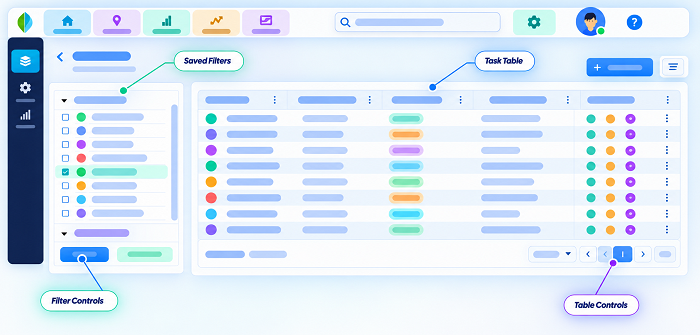
1. Why Is Tracking Technician Arrival and Job Completion Important?
Field service managers need visibility into technician activities to ensure that customer requests are handled on time and service commitments are met.
When technicians work independently across different locations, managers may face several operational challenges.
Uncertain arrival times
A technician may be delayed by traffic, travel distances, customer access restrictions or an earlier job that takes longer than expected. Without reliable arrival information, managers may struggle to update customers.
Limited visibility into job progress
A technician may have started an installation or repair, but the manager may not know whether the work is progressing as planned.
Incomplete job completion records
Paper-based job sheets may be submitted late or contain insufficient information about the work performed.
Difficulty coordinating multiple assignments
Technicians may receive several service requests in one day. Managers need to know which jobs are pending, in progress, completed or delayed.
Customer service disputes
Customers may question whether a technician arrived at the agreed time or whether the requested work was completed. Reliable service records can help resolve these issues.
Payroll and working-time administration
Field attendance records may also support the review of working hours, overtime and attendance exceptions. These records should be accurate and reviewed before being used for payroll calculations.
A structured tracking process helps managers improve service coordination while maintaining reliable operational records.
2. What Is Technician Arrival Tracking?
Technician arrival tracking is the process of recording and verifying when a field employee reaches an assigned customer location or service site.
A typical arrival record may contain:
- Technician identification.
- Customer or job reference number.
- Assigned service location.
- Scheduled arrival time.
- Actual check-in time.
- Available GPS coordinates.
- Geo-fence verification status.
- Arrival status.
- Any delay or exception reason.
For example, a technician assigned to repair industrial equipment at a factory in Chonburi may check in through a mobile application after reaching the customer's premises.
The system records the check-in timestamp and available location information. The field service manager can then see that the technician has reported arrival.
This is more consistent than relying only on a telephone call or a manually entered arrival time.
However, a location check-in confirms an attendance event at a particular place and time. It does not automatically prove that the technician entered the work area, met the customer or started the assigned repair.
Businesses should combine location verification with job status updates and service documentation.
3. How Can GPS Tracking Help Managers Verify Technician Arrival?
GPS-enabled mobile applications can capture a technician's reported location when the employee records arrival at a service site.
Depending on the application, location information may be collected when an employee checks in, periodically during a job or continuously during authorised working periods.
A typical GPS-based arrival workflow includes:
- The manager assigns a service request to a technician.
- The technician receives the customer address and job details.
- The technician travels to the service location.
- The technician opens the mobile application.
- The application captures the available device location.
- The technician submits an arrival check-in.
- The system records the timestamp and location information.
- The manager reviews the arrival status through a central dashboard.
For example, a maintenance company with technicians serving customers in Bangkok, Samut Prakan and Nonthaburi can use GPS-based check-ins to review reported arrival events across its service territory.
Benefits of GPS arrival verification
- Provides location information linked to arrival events.
- Reduces dependence on manually reported arrival times.
- Helps managers identify possible delays.
- Supports customer appointment coordination.
- Creates a digital history of technician attendance at service locations.
- Helps supervisors review exceptions across multiple branches.
GPS accuracy can vary depending on the device, network connection, satellite visibility and surrounding environment. Indoor industrial facilities and large commercial buildings may produce less reliable readings.
Managers should therefore treat GPS information as supporting evidence rather than conclusive proof of work performed.
4. How Can Geo-Fenced Check-Ins Verify Arrival at Customer Sites?
Geo-fencing allows businesses to create virtual geographical boundaries around approved customer locations.
When a technician reaches a service site, the mobile application checks whether the device is within the configured boundary.
If the device meets the location requirements, the technician can submit an arrival check-in.
For example, a company providing equipment maintenance services may create geo-fences around customer factories in Rayong, Chonburi and Ayutthaya.
Technicians assigned to these locations can record arrival through the mobile application without needing a supervisor to be physically present.
How to configure geo-fenced arrival verification
Administrators should:
- Register the customer name and service address.
- Add accurate geographical coordinates.
- Configure an appropriate geo-fence radius.
- Assign the customer location to the correct service territory.
- Link the location to relevant technicians and job orders.
- Define check-in and exception rules.
- Test the boundary at the actual service site.
Why location boundaries need testing
A very small boundary may reject legitimate check-ins because of GPS inaccuracies. A very large boundary may include nearby buildings or unrelated premises.
Managers should test the boundary at different points around the customer's property, particularly where several buildings or businesses are close together.
For large factories, industrial estates and construction sites, the appropriate boundary may need to account for the actual site layout.
5. How Can Managers Assign Jobs and Track Technician Schedules?
Technician arrival tracking becomes more effective when it is connected to a central job assignment system.
Managers should be able to create service requests and assign them according to technician availability, technical skills, location and job priority.
A service assignment may contain:
- Job identification number.
- Customer name.
- Service address.
- Contact person.
- Equipment or asset details.
- Job description.
- Required technical skills.
- Scheduled service date.
- Expected arrival window.
- Job priority.
- Assigned technician.
- Special instructions.
- Expected completion time.
For example, a technician responsible for air-conditioning maintenance may receive three assignments in one day:
| Job | Location | Planned activity | Status |
|---|---|---|---|
| Job 001 | Bangkok | Equipment inspection | Scheduled |
| Job 002 | Nonthaburi | Air-conditioning repair | Scheduled |
| Job 003 | Pathum Thani | Preventive maintenance | Scheduled |
The manager should be able to view the assigned schedule and identify which jobs have been accepted, started, delayed or completed.
When an urgent service request arrives, the system may also help managers identify available technicians with the appropriate qualifications.
6. How Can a Real-Time Dashboard Help Managers Monitor Field Technicians?
A central dashboard gives managers a consolidated view of service operations across locations.
Depending on the software, it may display:
- Assigned technicians.
- Scheduled customer appointments.
- Reported technician arrival times.
- Jobs currently in progress.
- Completed service requests.
- Delayed or overdue jobs.
- Cancelled assignments.
- Missed check-ins.
- Location verification exceptions.
- Pending customer approvals.
- Jobs awaiting supervisor review.
For example, a regional field service manager responsible for technicians in Bangkok and the eastern provinces can use the dashboard to review the status of assignments without contacting every technician individually.
The dashboard can also provide alerts when:
- A technician has not checked in within the expected arrival window.
- A job remains in progress beyond its planned duration.
- A technician reports a problem requiring additional support.
- A customer appointment has been rescheduled.
- A job is marked complete but required documentation is missing.
Real-time dashboards should be used to support coordination and decision-making, not to assume that every delay or location exception indicates poor employee performance.
7. How Can Technicians Record Job Progress?
Arrival verification is only the first stage of field service management. Managers also need to understand what happens after the technician reaches the customer location.
A mobile job management application should allow technicians to update job status throughout the service process.
A practical workflow may include:
- Assigned: The job has been allocated to a technician.
- Accepted: The technician has acknowledged the assignment.
- En route: The technician is travelling to the customer location.
- Arrived: The technician has recorded arrival.
- In progress: The technician has started the assigned work.
- On hold: Work has stopped temporarily because of a dependency, such as missing parts or customer approval.
- Completed: The technician has finished the required work and submitted the completion details.
- Pending customer confirmation: The job requires customer acknowledgement.
- Closed: The job has passed the required review and administrative checks.
These status definitions should be standardised across the organisation so managers can interpret reports consistently.
8. How Can Digital Job Cards Confirm Job Completion?
A digital job card provides a structured record of the work performed by a technician.
Instead of relying on handwritten job sheets, technicians can complete service information through a mobile application.
A job card may include:
- Job number.
- Customer and site details.
- Assigned technician.
- Equipment or asset identification.
- Problem description.
- Inspection findings.
- Work performed.
- Parts replaced or consumed.
- Equipment condition.
- Test results.
- Outstanding issues.
- Completion date and time.
- Customer acknowledgement.
- Supporting photographs or documents.
For example, a technician repairing industrial machinery at a factory in Rayong may record the equipment fault, replacement parts, repair procedure and final test results.
The manager can review the digital job card before closing the service request.
This creates a more complete record than a simple status update stating that the job is finished.
Why job cards are important
Digital job cards help businesses:
- Standardise service documentation.
- Reduce incomplete paper records.
- Improve service history.
- Identify recurring equipment problems.
- Support warranty administration.
- Review technician workload.
- Provide evidence for customer service discussions.
- Improve future maintenance planning.
The information collected should be relevant to the service task. Technicians should not be required to enter unnecessary details that make job completion unnecessarily complicated.
9. How Can Photographs and Videos Support Job Completion Verification?
Photographs and other supporting files can provide useful evidence of the condition of equipment or the work performed.
For example, a technician may capture:
- Equipment condition before repair.
- Damaged components.
- Installation progress.
- Replaced parts.
- Completed installation.
- Final inspection results.
- Equipment condition after service.
These records can help supervisors understand the work without travelling to every customer location.
Recommended photo documentation process
- The technician opens the assigned job.
- The application displays the required photo categories.
- The technician captures relevant images.
- The images are linked to the job number.
- The technician adds a short description where necessary.
- The system stores the submission time.
- The manager reviews the evidence if the job requires approval.
Photographs should be captured and uploaded through an approved process. Businesses should avoid collecting unrelated images or unnecessary personal information from customer premises.
If images contain identifiable individuals or other personal data, the business should consider the applicable PDPA requirements and establish appropriate access and retention controls.
Photographs should support verification, not automatically replace technical inspection or customer acceptance.
10. How Can Customer Sign-Off Confirm Service Completion?
Customer acknowledgement is an important part of many field service workflows.
After completing the assigned work, the technician may ask the customer or an authorised representative to confirm that the service activity has been performed.
Possible confirmation methods include:
Digital signature
The customer signs through the technician's mobile application.
Customer approval through a link
The system sends an approval request to an authorised customer contact.
One-time verification code
A code is sent to an authorised contact and entered into the service application.
Digital completion form
The customer reviews a summary of the work and confirms receipt of the service.
Email confirmation
For certain service arrangements, the customer may confirm completion through an approved business email process.
Customer acknowledgement should identify the relevant job and the person providing confirmation.
It should also distinguish between confirming that a technician attended and accepting that all technical work has been completed successfully.
For example, a customer may acknowledge that a technician completed an inspection but still require a separate quotation before approving a repair.
11. How Can Managers Handle Delayed Arrivals and Missed Appointments?
Field service schedules can change because of traffic, customer availability, urgent jobs, equipment issues or unexpected delays.
A good tracking system should provide a process for handling these exceptions.
Delayed arrival
The technician should be able to report the reason for the delay and provide an updated estimated arrival time.
Customer unavailable
The technician should record that the customer or authorised contact was unavailable and indicate whether the appointment needs to be rescheduled.
Incorrect address
If the customer provides a new service location, the technician should be able to request an address update or manager approval.
Missed check-in
If the technician reaches the site but cannot record attendance because of GPS or application problems, the system should allow a correction request.
Emergency reassignment
Managers should be able to reassign jobs when a technician is unavailable or another service request becomes urgent.
Job cancellation
Cancelled appointments should retain the original assignment and cancellation reason rather than simply disappearing from the system.
A transparent exception process prevents genuine operational problems from being mistaken for employee misconduct.
12. How Can Offline Mobile Applications Support Technicians in Thailand?
Technicians may work in industrial buildings, remote locations, underground facilities or areas where mobile connectivity is unreliable.
An effective field service application should provide a practical way to continue recording work when internet access is unavailable.
Useful offline capabilities include:
- Access to previously downloaded job details.
- Offline arrival and job status recording.
- Local storage of service notes.
- Capture of relevant photographs.
- Recording of device timestamps.
- Secure storage of pending submissions.
- Automatic synchronisation when connectivity returns.
- Identification of records that require verification.
For example, a technician working at a remote industrial facility may complete a repair while mobile internet access is unavailable.
An offline-capable application can save the job report and synchronise it when the device reconnects.
The platform should distinguish between the time an event was recorded on the device and the time the server received it. It should also maintain a reliable audit trail.
Businesses should test offline functionality before deployment rather than assume that every mobile application supports complete offline operation.
13. How Can Managers Monitor Parts Usage and Job Requirements?
Job completion may depend on whether the technician has the required spare parts, tools and equipment.
Field service software can connect job tracking with inventory or spare-parts management.
For example, a technician assigned to repair a refrigeration unit may need to replace a component before the job can be completed.
The application should allow the technician to record:
- Parts requested.
- Parts issued.
- Parts used.
- Quantity consumed.
- Parts returned.
- Additional parts required.
- Stock availability.
- Reason for incomplete work.
Managers can review whether a job is delayed because of missing materials or whether additional inventory needs to be allocated.
Where inventory software is integrated, the system may update stock records when parts are issued or consumed.
This helps prevent technicians from marking jobs complete when essential materials or work remain outstanding.
14. How Can Job Completion Tracking Improve Customer Communication?
Customers often want to know when a technician will arrive, whether work has started and when the service request will be completed.
A field service platform can improve communication by sharing relevant job status updates.
Useful customer notifications include:
- Appointment confirmation.
- Technician assignment.
- Expected arrival time.
- Arrival notification.
- Job progress update.
- Delay notification.
- Completion confirmation.
- Follow-up or inspection requirement.
For example, a customer in Bangkok may receive a notification when a technician is assigned and another when the technician records arrival at the premises.
After the repair, the customer may receive a completion summary and digital service report.
Businesses should ensure that customer notifications contain only relevant information. Employee location histories and internal operational details should not be exposed unnecessarily.
15. How Can Field Service Tracking Support Working-Time and Overtime Administration?
Technician arrival and job completion records can provide useful information for reviewing working hours.
However, service job timestamps and legal working-time records should not be treated as identical.
A technician may start the working day at a company depot, travel to a customer, complete several assignments, take required breaks and return to the depot.
The first customer check-in and final job completion time may not represent the entire working day.
Thailand employers should therefore distinguish between:
- Scheduled working hours.
- Actual working time.
- Travel and assignment arrangements.
- Required rest periods.
- Customer appointment times.
- Job duration.
- Approved overtime.
- Time spent waiting for customer access or materials.
Relevant Labour Protection Act considerations
Under the Labour Protection Act B.E. 2541 (1998):
- Section 23: Normal working hours generally should not exceed eight hours per day and 48 hours per week. Certain hazardous work is subject to limits of seven hours per day and 42 hours per week.
- Section 24: Employers generally need prior employee consent for overtime on a normal working day on each occasion, subject to statutory exceptions.
- Section 27: Daily rest-period requirements generally include at least one hour after no more than five consecutive hours of work, subject to the statutory provisions and exceptions.
- Sections 112–115: Employers with at least 10 employees must maintain prescribed employee and wage-related records. Section 114 includes working days and working time, wage rates and amounts, and overtime and holiday payment details.
A technician's late job completion does not automatically establish that all additional time qualifies as approved overtime. Managers should review actual working time, the applicable schedule, employee consent and relevant legal exceptions.
Businesses should also review the latest amendments and applicable regulations when configuring their employment and payroll policies.
16. What Privacy Requirements Should Thailand Businesses Consider?
Tracking technician arrival and job completion may involve collecting employee location data, customer information, service photographs, signatures and other personal information.
Thailand's Personal Data Protection Act B.E. 2562 (2019), or PDPA, applies to the processing of personal data relating to identifiable individuals.
Businesses should address the following considerations.
A. Explain why location data is collected
Employees should understand whether location information is used for arrival verification, job coordination, attendance administration or another specific purpose.
B. Identify an appropriate lawful basis
Employers should determine the applicable legal basis for processing location information under the PDPA. Consent should not automatically be treated as the only possible basis, particularly in an employment relationship.
C. Limit location collection
If the purpose is to confirm arrival and departure at customer sites, event-based location capture may be more appropriate than continuous tracking throughout the day.
If continuous monitoring is genuinely required for a separate operational purpose, the employer should assess its necessity and scope carefully.
D. Provide a privacy notice
Employees should be informed about:
- The types of information collected.
- The purposes of collection.
- When location information is captured.
- Who can access the information.
- Whether third-party providers process the data.
- How long records are retained.
- How employees can exercise applicable data subject rights.
E. Protect customer information
Customer contact details, site photographs, service records and digital signatures should be accessible only to authorised personnel.
F. Establish retention policies
Businesses should define appropriate retention periods for job records, location information and supporting documents, taking account of operational and legal requirements.
G. Review service software vendors
Companies should assess vendor security controls, access permissions, data processing arrangements, storage locations and deletion procedures.
The PDPA should be considered during software selection and system configuration rather than after the technology has been introduced.
17. What Features Should Thailand Businesses Look for in Field Service Management Software?
When evaluating field service software, businesses should consider whether the platform supports the complete service lifecycle.
| Feature | Why it matters |
|---|---|
| Job scheduling | Helps managers assign work to technicians |
| GPS arrival check-ins | Records location information when technicians arrive |
| Geo-fenced attendance | Supports location verification at approved customer sites |
| Real-time job status | Shows whether work is scheduled, in progress or completed |
| Digital job cards | Standardises service documentation |
| Photo attachments | Provides supporting evidence of work performed |
| Digital customer signatures | Records customer acknowledgement |
| Technician dashboards | Allows employees to view their assignments |
| Offline mobile access | Supports work in areas with poor connectivity |
| Parts and inventory tracking | Records spare-parts usage |
| Customer notifications | Improves appointment and completion communication |
| Exception alerts | Highlights delays and incomplete records |
| Supervisor approvals | Supports review of job completion |
| Audit trail | Preserves original records and subsequent changes |
| Payroll integration | Helps transfer approved attendance information |
| PDPA-related controls | Supports appropriate data access and retention |
Businesses should also evaluate application reliability, mobile-device compatibility, implementation support, reporting capabilities and integration with existing CRM, ERP and payroll systems.
Conclusion
Tracking technician arrival and job completion is an important part of managing field service operations in Thailand. When technicians work across multiple customer locations, managers need reliable information about appointment attendance, job progress, work performed and customer confirmation.
GPS check-ins and geo-fenced attendance can help verify arrival events, while mobile job cards, photographs, digital signatures and service status updates provide a more complete record of job completion.
A central dashboard can help managers identify delayed appointments, reassign urgent work, review incomplete service records and monitor operational performance across different locations.
However, location information alone cannot prove that a technician completed a repair or installation. Businesses should combine arrival records with technical reports, parts usage, customer acknowledgement and supervisor review.
Thailand employers should also consider working-time and overtime requirements under the Labour Protection Act and protect employee and customer information under the PDPA.
By combining reliable mobile technology with clear job procedures, appropriate privacy controls and consistent reporting, Thailand field service businesses can improve technician coordination, strengthen service documentation and deliver a more dependable customer experience.
Technician productivity is hard to judge without arrival and completion records. InnBuilt Field Management can help Thailand service managers link jobs to site visits, status updates and follow-up work.