What Is the Difference Between GPS Tracking and Geo-Fenced Check-Ins in Thailand?
What Is the Difference Between GPS Tracking and Geo-Fenced Check-Ins in Thailand?
Introduction
Businesses in Thailand increasingly rely on mobile technology to manage employees who work outside traditional office environments. Sales representatives, delivery personnel, field service technicians, construction workers, maintenance teams and other mobile employees may travel between customer premises, project sites, warehouses and regional branches throughout the working day.
To manage these employees, companies often consider two location-based technologies: GPS tracking and geo-fenced check-ins. Although both use geographical location information, they serve different purposes.
GPS tracking helps businesses understand where an employee or company vehicle is located over time. Geo-fenced check-ins, on the other hand, allow employees to record attendance when they arrive at or leave an approved geographical location.
Understanding this distinction is important when selecting attendance or workforce management software. A company that only needs to verify employee arrival at a customer site may not need continuous GPS tracking. Similarly, a delivery or field service business that needs to coordinate vehicles and respond to changing assignments may require more detailed location visibility.
For Thailand employers, the decision should also consider employee privacy, the Personal Data Protection Act B.E. 2562 (2019), labour requirements, operational needs and the reliability of mobile devices.
This article explains the differences between GPS tracking and geo-fenced check-ins, how each technology works, their benefits and limitations, and how Thailand businesses can choose the right solution.
1. What Is GPS Tracking?
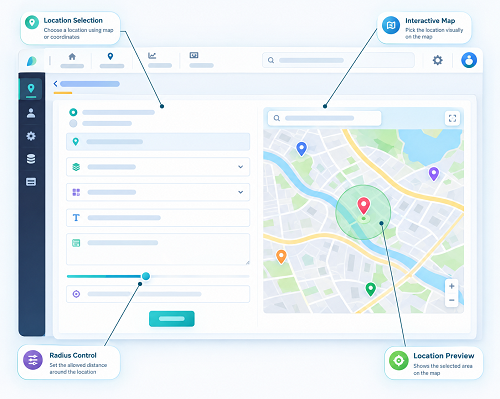
GPS tracking uses location information from a device, such as a smartphone, vehicle tracker or other GPS-enabled equipment, to estimate its geographical position.
A GPS-enabled device receives signals from satellites and calculates its approximate location. Depending on the application, this information may be transmitted to a central platform so authorised managers can view the device's location.
In employee management, GPS tracking may be used to monitor:
- The current or most recently reported employee location.
- The movement of field employees between assignments.
- Company vehicle routes.
- Travel progress between customer locations.
- Arrival and departure times at work destinations.
- Route deviations or unexpected delays.
- The distribution of mobile teams across service areas.
For example, a company providing equipment maintenance services in Bangkok may use GPS tracking to see the reported locations of its technicians while they are carrying out assigned work.
A manager may use this information to identify which technician is closest to an urgent service request or whether a vehicle is progressing towards a customer location.
GPS tracking can operate continuously, periodically or only during specific work-related activities, depending on the software configuration and device permissions.
Importantly, GPS technology itself does not determine whether an employee is working. It provides location information that must be interpreted alongside schedules, assignments, attendance records and other operational evidence.
2. What Are Geo-Fenced Check-Ins?
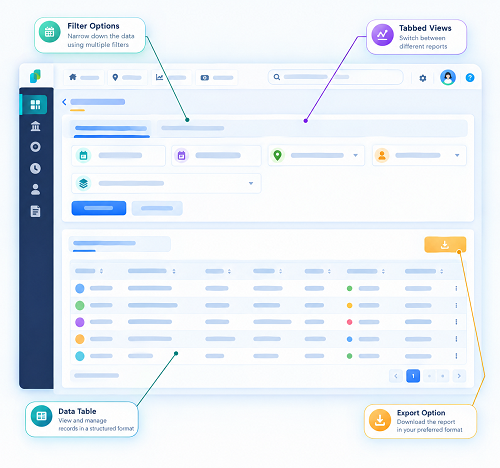
Geo-fenced check-ins use a virtual geographical boundary to verify whether an employee is at an approved location when submitting an attendance event.
A geo-fence is created around a physical location using geographical coordinates. The boundary may represent a customer office, factory, warehouse, construction project, retail outlet or service location.
When an employee reaches the designated area, the attendance application checks the device's reported location. If the employee is within the permitted boundary, the application allows the employee to submit a check-in or check-out, subject to the system's rules.
For example, a company may create geo-fences around five customer sites in Bangkok and assign a technician to visit three of them during a particular day.
When the technician arrives at each assigned site, the application can allow a location-verified attendance event.
Geo-fenced check-ins are generally designed to answer a specific question:
Was the employee's device within an approved geographical area when the attendance event was submitted?
They do not necessarily show the employee's movement between locations.
3. How Do GPS Tracking and Geo-Fenced Check-Ins Work Differently?
The main difference is the purpose for which location information is collected and used.
GPS tracking focuses on location visibility over time, while geo-fenced check-ins focus on verifying attendance at predefined locations.
| Comparison area | GPS tracking | Geo-fenced check-ins |
|---|---|---|
| Primary purpose | Monitor device or vehicle location | Verify attendance at approved locations |
| Location collection | Continuous, periodic or event-based | Usually when an employee checks in or checks out |
| Main information | Location history and movement | Attendance event and location verification |
| Movement visibility | Can show movement over time | Does not normally show the full route |
| Virtual boundaries | May use geofences as alerts | Uses geofences as attendance conditions |
| Employee action | May operate automatically under configured rules | Usually requires an employee to submit an attendance event |
| Common users | Delivery, logistics and field operations teams | HR, attendance administrators and field supervisors |
| Typical reports | Routes, location history and vehicle movement | Check-in times, site attendance and exceptions |
| Privacy considerations | Can involve more extensive location collection | Can limit collection to attendance-related events |
| Main limitation | Continuous location data may be unnecessary for some roles | Cannot provide a complete picture of movement between sites |
The technologies can also be used together. A business may use GPS tracking for fleet operations and geo-fenced check-ins for employee attendance.
4. What Is the Difference Between Location Monitoring and Attendance Verification?
Location monitoring and attendance verification are related but separate activities.
Location monitoring
Location monitoring helps managers understand where a device or vehicle is located during a particular period.
For example, a delivery manager may check whether a company vehicle is travelling towards a customer destination or has stopped unexpectedly.
The information supports route coordination, dispatching and operational planning.
Attendance verification
Attendance verification confirms that an employee has submitted an attendance event at an approved location.
For example, a technician may check in after reaching a customer's factory. The system records the attendance event and relevant location information.
The purpose is to support attendance administration rather than continuously observe the employee's movement.
Why the distinction matters
A GPS location does not automatically prove that an employee is working. A vehicle may be parked while the employee is taking an approved break, attending a meeting or completing a work assignment.
Similarly, a geo-fenced check-in does not prove that the employee worked continuously throughout the day. It only records a particular attendance event.
Employers should therefore use location information alongside schedules, work orders, timesheets, customer confirmations and other appropriate records.
5. How Does GPS Tracking Work for Thailand Field Employees?
GPS tracking can support businesses that need location visibility for employees or vehicles operating across different locations.
A typical process includes the following steps:
- The employee uses a GPS-enabled smartphone or an assigned tracking device.
- The device obtains its location using available positioning services.
- The application collects location information according to configured settings.
- The device transmits information through a mobile data connection when available.
- The central platform displays the latest reported location.
- Managers review the location information through a map or operational dashboard.
- The system may generate alerts when predefined conditions occur.
For example, a field service company may use GPS tracking to coordinate technicians travelling between customer sites in Bangkok, Samut Prakan and Nonthaburi.
A supervisor can review the latest reported locations and allocate urgent service requests to available technicians.
GPS tracking may also support vehicle management by helping businesses review routes, travel times and operational delays.
However, location accuracy and update frequency depend on the device, application, network connection, satellite visibility and software configuration.
6. How Do Geo-Fenced Check-Ins Work for Thailand Businesses?
Geo-fenced attendance follows a more event-based process.
A typical workflow includes:
- Register approved locations: HR or administrators add customer sites, branches, factories and project locations.
- Create geographical boundaries: The software defines a virtual perimeter around each approved location.
- Assign employees: Employees are linked to their relevant sites and work schedules.
- Configure attendance rules: The company defines check-in, check-out and exception procedures.
- Employee arrives: The employee opens the attendance application at the assigned location.
- Verify location: The application checks whether the device is within the permitted boundary.
- Record attendance: The employee submits the check-in or check-out.
- Review exceptions: Supervisors investigate failed location verification or missing attendance events.
- Process approved records: HR reviews the attendance information before payroll processing.
For example, a construction company may create separate geo-fences around project sites in Chonburi, Rayong and Bangkok.
Employees assigned to each project can record attendance through their mobile devices without having to report to the company's head office.
7. What Are the Main Benefits of GPS Tracking?
GPS tracking can be useful when businesses need visibility into field operations rather than only attendance records.
A. Better route visibility
Managers can review the reported movement of employees or company vehicles between assigned destinations.
This may help identify delays, unnecessary travel or route changes that require attention.
B. Improved service coordination
When a customer requests urgent assistance, managers can identify which field employee may be closest to the required location.
C. Delivery and fleet management
Businesses can monitor vehicle movement and coordinate delivery assignments across different areas.
D. Operational planning
Location information can help managers understand travel patterns, service coverage and the geographical distribution of field teams.
E. Location-based alerts
Depending on the system, managers can receive notifications when a device enters or leaves a defined area or when a configured location condition occurs.
F. Support for field operations
GPS information may help businesses coordinate mobile employees who regularly move between customer premises, project sites and service areas.
However, these benefits depend on having a clear operational purpose and an appropriate location collection policy.
8. What Are the Main Benefits of Geo-Fenced Check-Ins?
Geo-fenced check-ins are particularly useful when the main requirement is to record attendance at approved locations.
A. Verify arrival at customer sites
Employees can record attendance when they reach assigned customer premises without returning to a central office.
B. Reduce manual attendance reporting
Businesses can replace many paper-based registers, messaging-based confirmations and manual timesheet entries with a consistent mobile process.
C. Support multiple work locations
Employees can be assigned to different customer sites, branches, factories and project locations.
D. Improve attendance records
The system can associate check-in events with timestamps and location-verification information.
E. Simplify supervisor reviews
Supervisors can review missing check-ins, failed location verification and attendance correction requests through a central dashboard.
F. Support payroll preparation
Approved attendance information can be transferred to payroll software for further review and calculation.
G. Limit unnecessary location collection
When configured for event-based verification, geo-fenced attendance may collect less location information than continuous GPS monitoring.
This can help businesses align the technology with a narrower attendance-related purpose.
9. Which Technology Is Better for Different Business Operations in Thailand?
The right option depends on what the business needs to manage.
| Business type | GPS tracking | Geo-fenced check-ins | Suggested approach |
|---|---|---|---|
| Delivery companies | Useful for vehicle and route visibility | Useful for recording attendance at depots or delivery locations | Both may be appropriate |
| Field service providers | Helps coordinate technicians between jobs | Verifies arrival at customer sites | Often useful together |
| Sales teams | May be useful for specific route or visit operations | Supports customer visit attendance | Geo-fenced check-ins may be sufficient |
| Construction companies | Can support selected vehicle or equipment operations | Helps record worker arrival at project sites | Primarily geo-fenced attendance where appropriate |
| Retail businesses | Useful for selected mobile operations | Helps verify attendance across outlets | Geo-fenced check-ins |
| Maintenance companies | Supports technician dispatching | Records attendance at maintenance sites | Both may be useful |
| Security service providers | Can support patrol coordination where justified | Records attendance at assigned sites | Depends on patrol and attendance requirements |
| Logistics businesses | Supports fleet and route management | Records attendance at warehouses and depots | Both may be appropriate |
| Consulting and inspection teams | May help coordinate specific field assignments | Confirms arrival at approved customer locations | Often geo-fenced check-ins |
A company should not select continuous GPS tracking simply because employees work outside the office. The system should address a clearly defined operational need.
10. How Do GPS Tracking and Geo-Fenced Check-Ins Affect Employee Privacy?
Employee privacy is one of the most important considerations when choosing location-based workforce technology in Thailand.
The Personal Data Protection Act B.E. 2562 (2019), commonly known as the PDPA, regulates the collection, use and disclosure of personal data relating to identifiable individuals.
Location information linked to an employee can be personal data. Employers should therefore assess the purpose, legal basis, transparency, access controls and retention arrangements for both technologies.
Privacy considerations for GPS tracking
GPS tracking may collect location information repeatedly throughout the working day. If tracking continues outside working hours, it may also reveal information about an employee's personal activities.
Employers should consider:
- Whether continuous or frequent tracking is genuinely necessary.
- Whether tracking can be restricted to working hours.
- Whether location collection can be paused during approved breaks or outside work.
- Whether only relevant managers can access location history.
- Whether detailed route history needs to be retained.
- Whether employees understand the purpose and scope of monitoring.
Privacy considerations for geo-fenced check-ins
Geo-fenced check-ins can often be configured to collect location information only when an employee submits an attendance event.
This may reduce unnecessary collection, but it does not remove the employer's PDPA obligations.
Employers should explain:
- Why location verification is required.
- When location information is collected.
- Whether the information is stored with attendance records.
- Who can access the information?
- How long the information is retained.
- How employees can request access or exercise other applicable rights.
Legal basis and employee consent
Employers should identify an appropriate lawful basis for processing employee location data under the PDPA. Consent should not automatically be treated as the only possible legal basis, nor should employers assume that consent is always freely given in an employment relationship.
The employer should assess the actual purpose and circumstances and obtain appropriate Thai data protection advice where necessary.
Data security
Both technologies should use appropriate safeguards, including:
- Role-based access permissions.
- Secure employee authentication.
- Encryption where appropriate.
- Controlled data exports.
- Vendor security assessments.
- Defined retention and deletion procedures.
- Incident-response arrangements.
The key principle is to collect and use location information in a way that is proportionate to the business purpose.
11. What Thailand Labour Law Considerations Should Employers Review?
GPS tracking and geo-fenced check-ins are management tools. Neither replaces the employer's obligations under Thailand's Labour Protection Act B.E. 2541 (1998).
Working hours
Section 23 generally provides that normal working hours should not exceed eight hours per day and 48 hours per week. Certain hazardous work is subject to lower limits of seven hours per day and 42 hours per week.
Employers should not calculate working hours solely from GPS movement or the time an employee's device remains inside a geo-fence.
They should consider actual work performed, schedules, breaks, assignments and applicable employment arrangements.
Overtime
Section 24 generally requires prior employee consent for overtime on a normal working day on each occasion, subject to statutory exceptions.
GPS tracking may help identify when a field employee is still travelling or working beyond a scheduled time. A geo-fenced check-out may also identify a later departure from a customer site.
Neither event automatically establishes that overtime was approved or that all additional time qualifies for overtime payment.
Rest periods
Section 27 establishes daily rest-period requirements. Employers should manage and record applicable rest periods independently of location monitoring.
Employment and wage records
Sections 112–115 establish employee and wage-related recordkeeping requirements for employers with at least 10 employees. Relevant wage records include working days and working time, as well as wage and overtime payment information.
Attendance software should support accurate records and preserve correction histories. Employers should ensure that the complete recordkeeping process meets statutory requirements.
These rules apply to attendance administration regardless of whether the business uses GPS tracking, geo-fenced check-ins or a combination of both.
12. Can GPS Tracking and Geo-Fenced Check-Ins Be Used Together?
Yes. Businesses can combine the two technologies when they have separate, clearly defined purposes for each.
For example, a field service company in Thailand may use:
- GPS tracking to coordinate technicians travelling between customer locations.
- Geo-fenced check-ins to record attendance when technicians arrive at approved service sites.
- Work-order software to record the task performed.
- Attendance software to compare scheduled and actual working time.
- Payroll software to process approved attendance and overtime information.
A combined system can provide operational visibility while maintaining a separate attendance record.
However, businesses should avoid collecting duplicate or excessive location information. If a geo-fenced check-in already meets the attendance requirement, continuous GPS tracking should only be added when there is a separate and justified operational need.
The company should also explain the different purposes in its employee privacy notice and internal policies.
13. What Should Businesses Check Before Choosing GPS Tracking Software?
If GPS tracking is required, businesses should evaluate the following capabilities:
| Feature | Why it matters |
|---|---|
| Location update frequency | Determines how often the platform receives location information |
| Live map dashboard | Helps authorised managers review reported locations |
| Route history | Supports review of journeys and operational movement |
| Working-hours configuration | Helps restrict tracking to appropriate periods |
| Location alerts | Identifies selected location-based events |
| Mobile compatibility | Ensures employees can use supported devices |
| Offline data handling | Helps manage temporary connectivity problems |
| Battery optimisation | Reduces excessive device battery consumption |
| Access controls | Restricts location information to authorised users |
| Data retention settings | Supports appropriate storage and deletion practices |
| Reporting | Helps managers review operational patterns |
| Integration | Connects location information with dispatch or field service systems |
Businesses should also test how the application behaves when employees enter buildings, travel through areas with poor connectivity or disable device-location permissions.
14. What Should Businesses Check Before Choosing Geo-Fenced Check-In Software?
For attendance-focused requirements, businesses should evaluate a different set of features.
| Feature | Why it matters |
|---|---|
| Multiple geo-fences | Supports different customer sites and project locations |
| Adjustable boundary size | Accommodates different site layouts |
| Employee-site assignment | Restricts attendance to approved locations |
| Mobile check-in and check-out | Allows employees to record attendance remotely |
| GPS verification | Provides location information at attendance events |
| Shift scheduling | Supports different employee working patterns |
| Overnight shift support | Handles shifts that cross midnight |
| Missed-punch corrections | Provides a process for incomplete attendance records |
| Supervisor approvals | Supports review of exceptions |
| Audit trail | Preserves original records and changes |
| Payroll integration | Reduces repeated attendance data entry |
| Employee self-service | Allows employees to review records and request corrections |
| Privacy controls | Helps limit access and unnecessary collection |
Businesses should test geo-fence boundaries at actual work locations before full deployment. A boundary that works outdoors may not provide reliable verification inside a large factory or commercial building.
15. How Can Businesses Implement These Technologies Successfully?
A structured implementation process can help Thailand employers avoid unnecessary monitoring and attendance disputes.
Step 1: Define the business requirement
Determine whether the business needs route visibility, attendance verification, vehicle coordination or a combination of these functions.
Step 2: Identify employee groups
Separate employees who need continuous or periodic location visibility for a genuine operational purpose from those who only need to record arrival at approved work locations.
Step 3: Select the appropriate technology
Choose GPS tracking, geo-fenced check-ins or both according to the identified requirements.
Step 4: Establish written policies
Explain when location information is collected, why it is required, how it is used and who can access it.
Step 5: Review PDPA obligations
Identify the appropriate lawful basis, prepare privacy notices and assess the vendor's data processing and security arrangements.
Step 6: Configure working schedules and locations
Set up employee assignments, shifts, approved locations, geo-fence boundaries and tracking periods.
Step 7: Conduct practical testing
Test the application at customer sites, industrial buildings, warehouses, remote project locations and areas with weak connectivity.
Step 8: Train employees and supervisors
Explain how to use the application, how to report technical problems and how to request attendance corrections.
Step 9: Integrate with other systems
Connect approved attendance records with HR, payroll, dispatch or field service software where required.
Step 10: Review performance
Monitor attendance accuracy, application reliability, employee feedback, privacy complaints and administrative improvements.
Conclusion
GPS tracking and geo-fenced check-ins both use location technology, but they solve different workforce management problems.
GPS tracking helps businesses understand the reported location and movement of employees or vehicles over time. It is particularly useful for logistics, delivery, dispatching and mobile field operations.
Geo-fenced check-ins focus on verifying attendance at approved locations. They are useful for businesses that need employees to record arrival and departure at customer premises, construction sites, factories, warehouses and regional branches.
For Thailand employers, the best choice depends on the purpose of location collection, the nature of field operations, attendance requirements and employee privacy considerations under the PDPA. Businesses should also ensure that their attendance procedures support working-hour, overtime, rest-period and recordkeeping obligations under the Labour Protection Act.
In many cases, geo-fenced check-ins are sufficient for attendance administration, while GPS tracking is better suited to operations that genuinely require route or location visibility. Some organisations may benefit from using both, but only when each function has a clear purpose.
By selecting the right technology, limiting unnecessary location collection and establishing transparent policies, Thailand businesses can manage field employees more effectively without making attendance monitoring unnecessarily intrusive.
GPS tracking shows movement over time; a geo-fenced check-in tests an attendance event against a defined location. InnBuilt field tools can help Thailand employers evaluate which evidence suits each workflow.