How to Test Planned-versus-Actual Visit Tracking Before Buying Beat Plan Software
How to Test Planned-versus-Actual Visit Tracking Before Buying Beat Plan Software
Introduction
For businesses with field sales teams, creating a daily beat plan is only the first step toward improving customer coverage and sales productivity. Sales managers also need to know whether field representatives are following their assigned schedules, visiting the right customers, and completing planned activities within the expected time.
This is where planned-versus-actual visit tracking becomes important. It allows businesses to compare scheduled customer visits with the visits that field employees actually complete. By identifying missed visits, delayed arrivals, additional visits, and route deviations, managers can understand how effectively their teams execute their beat plans.
However, not all beat plan software offers the same level of visit-tracking accuracy. Some systems record GPS check-ins, while others provide route histories, visit duration, customer-level activity records, and automated deviation reports.
Before purchasing beat plan software, businesses should test how reliably the system captures planned and actual field activities. A structured evaluation helps confirm whether the software can support real-world sales operations, provide meaningful reports, and improve accountability.
This guide explains how to test planned-versus-actual visit tracking during a beat plan software evaluation, particularly for businesses managing field sales teams across the UAE.
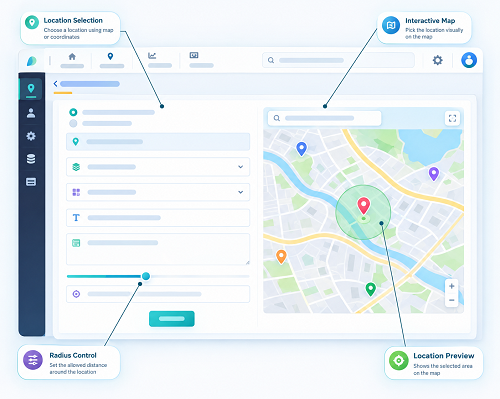
1. Understand What Planned-versus-Actual Visit Tracking Means
Planned-versus-actual visit tracking compares the customer visits scheduled in a beat plan with the activities recorded by field representatives during the working day.
A planned visit typically includes:
- Customer or outlet name
- Assigned sales representative
- Scheduled visit date
- Planned visit sequence
- Expected arrival time or time window
- Customer location
- Visit frequency
- Expected visit duration, where applicable
Actual visit information may include:
- GPS-based arrival and departure records
- Employee check-in and check-out timestamps
- Actual visit duration
- Customer interaction or activity records
- Sales orders or other transaction details
- Visit status, such as completed, missed, or postponed
- Reasons for deviations from the planned schedule
The software should make it easy to compare these two sets of information.
For example, a sales representative may have ten customers scheduled for a particular day but complete only eight visits. The system should identify the two missed visits and show whether the representative completed additional unplanned visits elsewhere.
A good solution should provide more than a simple completed-versus-pending count. It should explain what happened during the working day and help managers understand why the actual schedule differed from the planned schedule.
2. Check Whether the Software Records Every Planned Visit Correctly
The first test is to confirm that the software accurately captures all visits included in the approved beat plan.
During the demo, create a sample schedule for a field sales representative with multiple customer locations. Include different visit frequencies, appointment windows, and customer categories.
Check whether the system displays:
- All scheduled customers for the selected date
- Correct customer names and outlet details
- Assigned employee information
- Planned visit sequence
- Scheduled arrival times, if supported
- Accurate customer addresses and map locations
- Changes made after the plan was approved
Next, compare the schedule with the original beat plan to confirm that no customer has been omitted, duplicated, or assigned to the wrong employee.
What to test: Change a customer's assigned representative or reschedule a visit. Check whether the updated plan appears correctly in the employee's mobile application and the manager's dashboard.
This test is particularly important for UAE businesses managing multiple sales territories, distributors, retail outlets, and customer accounts.
3. Test GPS-Based Check-In and Check-Out Accuracy
GPS tracking is an important component of planned-versus-actual visit monitoring. It helps managers understand whether a representative reached the assigned customer location and when the visit started and ended.
During the software demonstration, ask the vendor to show how employees check in and check out at customer locations.
Test the following:
| Test area | What to verify |
|---|---|
| GPS check-in | Whether the system records the employee's location at check-in |
| GPS check-out | Whether the departure location and time are recorded |
| Timestamp | Whether arrival and departure times are captured accurately |
| Location accuracy | Whether the recorded location is reasonably close to the customer address |
| Geofencing | Whether the system supports configurable location boundaries |
| Manual check-in | Whether manual entries are permitted and properly identified |
| Location exceptions | Whether inaccurate or unavailable GPS readings are flagged |
Do not assume that a GPS check-in automatically proves that a customer visit was completed. A representative may reach a location without meeting the customer or carrying out the expected sales activity.
The software should allow businesses to combine location records with other visit information, such as customer feedback, notes, order details, or visit outcomes.
Also test GPS performance in different environments. In the UAE, field representatives may work around high-rise commercial buildings, shopping malls, warehouses, industrial areas, and outdoor retail locations. GPS accuracy can vary across these environments.
What to ask the vendor: Can the system distinguish between a verified location event, a manual check-in, and a visit that has been marked complete without sufficient location evidence?
4. Compare Planned Arrival Times with Actual Arrival Times
A field sales representative may complete all scheduled visits but still experience delays that affect customer service and route efficiency.
For this reason, the software should compare planned arrival times with actual check-in times.
For example:
| Customer | Planned arrival | Actual arrival | Difference |
|---|---|---|---|
| Customer A | 9:00 AM | 9:05 AM | 5 minutes late |
| Customer B | 10:00 AM | 10:20 AM | 20 minutes late |
| Customer C | 11:30 AM | 11:25 AM | 5 minutes early |
| Customer D | 1:00 PM | 1:40 PM | 40 minutes late |
During testing, check whether the software automatically calculates arrival-time differences and highlights late or early arrivals.
Important capabilities include:
- Configurable arrival-time tolerances
- Planned and actual arrival comparisons
- Late-arrival notifications
- Customer appointment time windows
- Delayed visit identification
- Historical arrival-time reports
- Filters by employee, territory, customer, and date
Ask whether managers can configure different delay thresholds for different customer categories. For example, a business may require strict appointment adherence for key accounts while allowing more flexibility for routine retail outlet visits.
The system should also distinguish between a late arrival and a visit that was rescheduled or approved by a manager.
5. Verify Whether Actual Visit Duration Is Captured Correctly
Arrival time alone does not provide a complete picture of field activity. Managers also need to understand how long employees spend at customer locations.
Visit duration can help identify whether representatives are spending enough time with customers, experiencing unnecessary delays, or managing their schedules inefficiently.
During the demo, test whether the software records:
- Check-in time
- Check-out time
- Total visit duration
- Planned versus actual duration, if configured
- Visits that remain open without check-out
- Visits with unusually short or long durations
- Employee-entered visit notes and outcomes
For example, a sales representative may have a planned visit duration of 30 minutes but spend only five minutes at the outlet. The manager should be able to identify this difference and review the recorded visit outcome.
However, visit duration should not be treated as a standalone performance indicator. A short visit may be appropriate for order collection, while a longer visit may be necessary for product demonstrations or customer negotiations.
What to test: Complete a sample visit using the mobile application, record check-in and check-out times, and confirm whether the dashboard calculates the duration correctly.
Also check how the system handles interruptions, forgotten check-outs, and visits that cross scheduled working hours.
6. Test How the Software Identifies Missed and Incomplete Visits
One of the most important purposes of planned-versus-actual tracking is identifying customers who were scheduled but not visited.
During the evaluation, deliberately leave some planned visits incomplete and check whether the software identifies them correctly.
Test these scenarios:
- A representative does not visit a scheduled customer.
- A representative visits the customer but forgets to check in.
- A representative checks in but does not record a visit outcome.
- A representative postpones the visit with a reason.
- A manager cancels or reschedules the visit.
- A customer is unavailable when the representative arrives.
The software should distinguish between different visit statuses rather than classifying every incomplete record as a missed visit.
Useful statuses may include:
- Completed
- Missed
- Pending
- Postponed
- Cancelled
- Partially completed
- Awaiting verification
Check whether employees can enter reasons for missed or postponed visits and whether managers can review or approve those explanations.
For example, a representative may be unable to visit a retail outlet because the store is temporarily closed. Recording this reason provides more useful operational information than simply marking the visit as missed.
7. Check Whether Unplanned Visits Are Recorded Separately
Field representatives sometimes visit customers who are not included in their original beat plan. These additional visits may occur because of urgent customer requests, sales opportunities, manager instructions, or nearby business opportunities.
The software should record unplanned visits separately from scheduled visits.
During testing, ask the vendor to demonstrate how a representative adds an additional customer visit through the mobile application.
Verify whether the system records:
- Customer or outlet name
- Actual visit location
- Visit date and time
- Employee responsible
- Reason for the additional visit
- Visit outcome
- Whether manager approval is required
- Whether the visit is included in actual activity reports
The system should not automatically treat an unplanned visit as a replacement for a missed scheduled visit.
For example, if a representative has ten planned visits, misses two, and completes three additional visits, the reporting dashboard should show the difference clearly.
| Visit category | Number of visits |
|---|---|
| Planned visits | 10 |
| Completed planned visits | 8 |
| Missed planned visits | 2 |
| Additional unplanned visits | 3 |
| Total actual visits | 11 |
This distinction helps managers evaluate both schedule adherence and additional field activity.
8. Evaluate Route Deviation and Visit Sequence Tracking
A beat plan normally includes an intended sequence of customer visits. Actual field movements may differ because of traffic, road closures, customer requests, or operational changes.
The software should help managers compare planned and actual visit sequences without treating every route change as an operational failure.
During the demo, ask the vendor to display the planned customer route alongside the actual visit records.
Test whether the system can:
- Show planned and completed customer locations on a map
- Display actual visit sequence
- Identify skipped customer locations
- Highlight visits completed out of sequence
- Record route deviations
- Display available route history
- Compare planned and actual routes
- Support approved changes to the schedule
For UAE field operations, test realistic routes involving different areas, such as Dubai, Abu Dhabi, Sharjah, or other locations where the business operates.
Ask whether the system uses live traffic information for route recommendations and whether route changes can be communicated to employees in real time.
Remember that a route deviation is not necessarily a problem. A representative may have taken an alternative route because of traffic congestion or an urgent customer requirement. The software should provide enough context for managers to evaluate the reason.
9. Test Offline Visit Tracking and Data Synchronisation
Field sales representatives may work in locations where mobile internet connectivity is inconsistent. A reliable beat plan solution should explain what happens when an employee records a visit without an active internet connection.
During the evaluation, switch off mobile data or use an appropriate test environment to simulate an offline visit.
Check whether the mobile application can:
- Display the assigned beat plan offline
- Record check-in and check-out events
- Save visit notes and outcomes
- Capture available location information
- Store sales activity records
- Synchronise information after connectivity returns
Pay particular attention to timestamps.
The software should distinguish between the time an event occurred and the time the event was uploaded to the server. Otherwise, a visit completed offline may appear to have happened later than it actually did.
For example, a representative may check in at 10:00 AM but regain internet connectivity at 10:45 AM. The system should preserve the original event time and separately record the synchronisation time.
Also test what happens when the same visit is edited on two devices or when a manager changes the schedule while the employee is offline.
A clear conflict-resolution process is important to avoid duplicated, overwritten, or missing visit records.
10. Examine Planned-versus-Actual Visit Reports
Reporting is where planned-versus-actual tracking becomes valuable for sales managers.
A software platform may collect accurate GPS and check-in information, but managers also need reports that convert those records into useful operational insights.
During the demo, request sample reports covering daily, weekly, and monthly field activities.
Important reporting metrics include:
| Metric | What it tells managers |
|---|---|
| Planned visits | Total visits assigned to employees |
| Actual completed visits | Visits recorded as completed |
| Visit completion rate | Percentage of planned visits completed |
| Missed visits | Scheduled visits not completed |
| Additional visits | Unplanned customer visits completed |
| On-time arrival rate | Percentage of visits started within the defined time window |
| Average visit duration | Average time spent at customer locations |
| Route adherence | How closely actual visits followed the planned sequence |
| Territory coverage | Customer coverage within assigned territories |
| Visit outcome | Results or activities recorded after each visit |
Ask whether reports can be filtered by:
- Employee
- Sales team
- Manager
- Territory
- Customer
- Date range
- Visit status
- Customer category
- Planned or unplanned visit type
Also verify whether managers can export reports to Excel or PDF and whether the software provides dashboards with drill-down capabilities.
A useful reporting system should allow managers to move from an overall performance summary to individual customer visit records without manually combining multiple spreadsheets.
11. Verify Notifications and Exception Alerts
Managers should not need to review every employee's visit history continuously to identify important problems.
Beat plan software should provide configurable alerts for significant differences between planned and actual field activity.
During the demo, test alerts for:
- Missed scheduled visits
- Late arrivals
- Visits that exceed expected duration
- Customer visits outside defined location boundaries
- Unplanned visits
- Incomplete check-outs
- Schedule changes
- Employees who have not started their assigned route
Check whether notifications can be sent through the manager dashboard, mobile application, email, or other supported channels.
Ask whether alerts are configurable by role, territory, employee, and visit priority.
For example, a missed visit to a high-priority customer may require an immediate notification, while a minor delay at a routine outlet may only need to appear in the daily report.
The goal is to provide useful exception management without overwhelming managers with unnecessary notifications.
12. Test Mobile Application Usability for Field Representatives
Planned-versus-actual tracking depends heavily on the quality of the employee mobile application.
If check-in, check-out, and visit reporting require too many steps, employees may avoid using the system consistently or enter incomplete information.
During the pilot, ask actual field representatives to use the application rather than relying only on the vendor's demonstration.
Evaluate whether employees can:
- View their daily beat plan
- Open customer locations on a map
- Navigate to the next customer
- Check in and check out easily
- Record visit outcomes
- Add customer notes
- Report missed visits
- Add approved or permitted unplanned visits
- View updated schedules
- Access the application offline, where supported
Check whether the application performs reliably on the devices used by the sales team.
Also review language support, ease of navigation, battery consumption, location permissions, and mobile data usage.
A system that is technically powerful but difficult to use may result in inaccurate visit records and poor adoption.
13. Evaluate Data Security and Employee Location Privacy
Planned-versus-actual visit tracking may involve employee location data, customer information, and business activity records. Businesses should evaluate how the software collects, stores, processes, and protects this information.
Before purchasing, ask the vendor about:
- Data encryption during transmission and storage
- Role-based access controls
- Employee and manager permissions
- Audit logs for schedule and visit-record changes
- Data retention and deletion policies
- Backup and recovery arrangements
- Hosting locations and cross-border data transfers
- Security incident response procedures
- Data export and account termination procedures
For UAE businesses, assess the applicable data protection requirements, including the UAE Personal Data Protection Law where applicable, as well as separate regimes that may apply in financial free zones such as DIFC and ADGM.
Businesses should establish clear employee notices and internal policies explaining when location data is collected, why it is needed, who can access it, and how long it is retained. Monitoring should be proportionate to legitimate business requirements and should be configured consistently with applicable law.
Also verify whether the system can restrict location tracking to appropriate working activities instead of collecting unnecessary employee location information outside the intended monitoring period.
Conclusion
Planned-versus-actual visit tracking is an important capability to evaluate when purchasing beat plan software. It helps businesses understand whether field sales representatives are completing assigned customer visits, arriving within expected time windows, following planned routes, and recording additional customer activities.
However, an effective evaluation should go beyond checking whether the software displays GPS locations or visit completion percentages. Businesses should test schedule accuracy, arrival-time comparisons, visit duration, missed visits, unplanned visits, route deviations, offline synchronisation, reporting, and employee privacy controls.
A structured vendor demonstration followed by a realistic field pilot can reveal whether the platform delivers accurate and actionable information. By testing these capabilities before purchasing, UAE businesses can select beat plan software that improves field visibility, strengthens customer coverage, supports sales management, and helps teams use their working time more effectively.
Compare planned calls with completed visits and inspect how cancellations and exceptions are recorded. Request an InnBuilt report using a sample UAE territory before purchase.