How Can UAE Cleaning Companies Assign and Monitor Mobile Teams?
How Can UAE Cleaning Companies Assign and Monitor Mobile Teams?
UAE cleaning companies often manage mobile teams that travel between offices, residential buildings, hotels, retail outlets, hospitals, construction sites, and other customer locations. Coordinating these teams can become difficult when schedules change frequently, employees work across multiple sites, and supervisors need visibility into attendance and service completion.
A mobile workforce management system can help cleaning companies assign employees, monitor site attendance, track task completion, manage replacements, and maintain service records from a centralized platform.
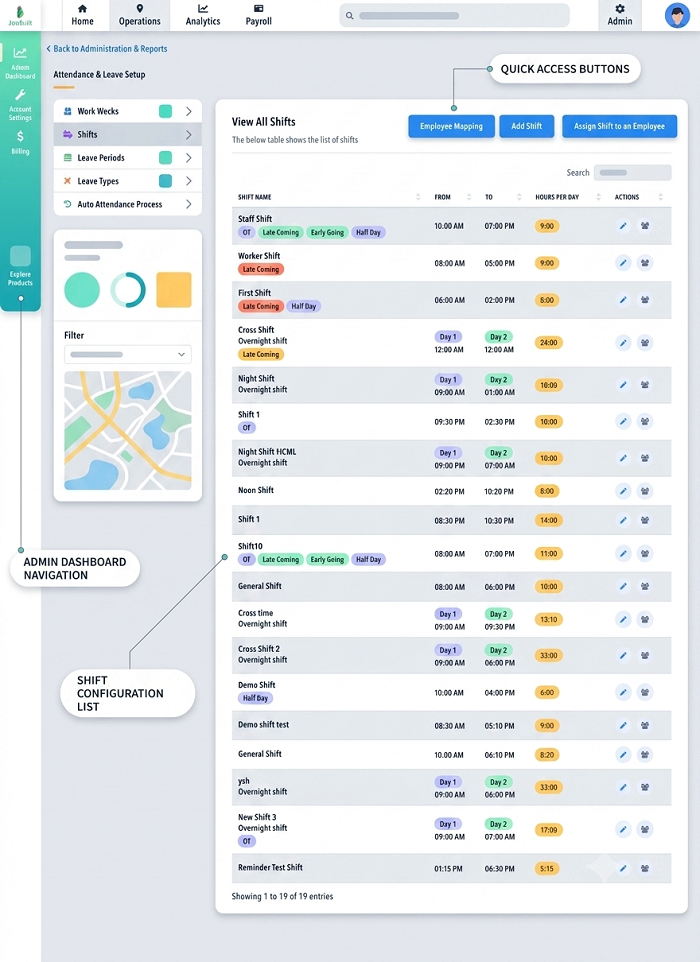
1. Create a Centralized Cleaning Schedule
The first step is to create a digital schedule containing all cleaning assignments.
Each assignment can include:
- Customer and site name
- Location
- Cleaning requirements
- Assigned employees
- Shift start and end time
- Cleaning frequency
- Required equipment
- Special instructions
- Supervisor
- Service deadline
For recurring contracts, the system can automatically generate daily, weekly, or monthly assignments based on the agreed cleaning schedule.
2. Assign Employees Based on Location and Skills
Cleaning teams should not be assigned based only on who is available.
Managers can consider:
- Employee location
- Shift availability
- Cleaning skills
- Experience
- Required certifications or training
- Current workload
- Site requirements
- Team size
- Travel time
For example, a specialized cleaning assignment may require employees with appropriate training, while a large commercial site may require a larger team.
A centralized system makes it easier for managers to identify suitable employees before assigning the job.
3. Use Mobile Attendance for Field Teams
Cleaning employees may begin their shifts directly at customer locations instead of reporting to a central office.
A mobile attendance system can allow employees to:
- Check in at the assigned site
- Check out after completing work
- Record attendance remotely
- Submit attendance corrections
- View their assigned schedules
A typical workflow is:
Shift Assignment → Employee Arrival → Mobile Check-In → Cleaning Work → Mobile Check-Out
This creates a digital attendance record for employees working across multiple locations.
4. Verify Site Attendance With Location Information
Where appropriate, companies can use GPS or geo-fenced attendance to verify that employees checked in at the assigned customer site.
For example, a cleaning company can configure an approved location around a commercial building. When an employee checks in, the system can compare the recorded location with the configured site.
GPS accuracy can vary because of buildings, network availability, device settings, and other environmental conditions. Therefore, companies should provide a process for reviewing legitimate location exceptions rather than automatically treating every failed location check as misconduct.
5. Assign Cleaning Tasks Digitally
Attendance alone does not confirm that the required cleaning work was completed.
Managers can create digital task lists for each site.
For example:
Office Cleaning Checklist
- Reception area cleaned
- Workstations cleaned
- Floors cleaned
- Washrooms serviced
- Waste removed
- Pantry cleaned
- Supplies replenished
Employees or supervisors can update the status of each task from a mobile device.
This creates a clearer connection between attendance and actual service delivery.
6. Monitor Team Progress
Managers can use a dashboard to monitor mobile teams throughout the working day.
Typical statuses can include:
- Scheduled
- Not checked in
- Checked in
- Cleaning in progress
- Task completed
- Delayed
- Site issue reported
- Waiting for customer access
- Completed
This helps supervisors identify problems early instead of waiting for end-of-day reports.
7. Manage Multiple Customer Sites
Cleaning companies may have dozens or hundreds of customer locations.
A centralized system can organize assignments by:
- Customer
- Emirate
- Area
- Site
- Team
- Shift
- Service type
- Contract
Managers can quickly identify which sites have been completed and which still require attention.
This is especially useful for companies operating across Dubai, Abu Dhabi, Sharjah, Ajman, and other Emirates.
8. Handle Employee Absences and Replacements
Mobile cleaning teams can be affected by unexpected absences, leave, transportation issues, or changes in customer requirements.
A replacement workflow can help managers quickly identify available employees.
For example:
Employee Absent → Manager Alert → Available Employee Identified → Replacement Assigned → Site Check-In → Service Completed
The system can retain a record of both the original assignment and replacement employee.
This helps prevent customer sites from being left without the required cleaning coverage.
9. Track Cleaning Supplies and Equipment
Some cleaning assignments require specific equipment or consumables.
A mobile workforce system can include information about:
- Cleaning materials
- Equipment
- Machines
- Protective equipment
- Supplies required at each site
- Items issued to employees
If a team reports that a required item is unavailable, the supervisor can create an exception and arrange replenishment.
Connecting workforce scheduling with inventory information can reduce delays caused by missing supplies.
10. Use Supervisor Inspections
Supervisors can use mobile checklists to inspect completed cleaning work.
A supervisor inspection may include:
- Site arrival
- Cleaning quality checklist
- Task completion
- Equipment condition
- Supply availability
- Customer complaints
- Corrective actions
- Photos where appropriate
- Supervisor approval
This gives managers an independent quality check instead of relying entirely on employee-reported completion.
11. Record Customer Feedback
Customer feedback can be connected to the relevant site and service assignment.
For example, customers may report:
- Missed cleaning area
- Insufficient cleaning quality
- Late arrival
- Missing supplies
- Employee absence
- Request for additional cleaning
- Damage or maintenance concern
The system can assign the issue to a supervisor and track its resolution.
This creates a complete service history for each customer location.
12. Track Planned Versus Actual Work
Managers can compare the scheduled assignment with actual service activity.
For example:
| Metric | Planned | Actual |
|---|---|---|
| Cleaning staff | 5 | 5 |
| Site arrival | 7:00 AM | 7:08 AM |
| Tasks | 12 | 12 |
| Completion | 10:00 AM | 10:12 AM |
| Customer issues | 0 | 1 |
This allows managers to investigate delays and recurring service issues.
A delay should not automatically be treated as employee underperformance. Customer access, traffic, equipment availability, or additional work may affect completion time.
13. Support Offline Mobile Workflows
Cleaning employees may work in buildings or areas where mobile connectivity is unreliable.
If the software supports offline functionality, employees may be able to record attendance and task updates while offline and synchronize them when connectivity returns.
A useful offline workflow should aim to:
- Preserve original event times where supported
- Prevent duplicate records
- Identify unsynchronized records
- Synchronize automatically when connectivity returns
- Alert users if important information remains pending
The exact offline capabilities depend on the software platform.
14. Connect Cleaning Attendance With Payroll
Cleaning companies can connect approved attendance information with payroll processes.
A typical workflow is:
Mobile Check-In → Working Hours → Approved Attendance → Overtime/Exceptions → Payroll
This can reduce manual attendance calculations for employees working across multiple customer sites.
However, attendance and task data should be reviewed according to company policies before payroll adjustments are made. A task taking longer than expected does not automatically mean that all additional time should be treated as approved overtime.
15. Monitor Mobile Team KPIs
Cleaning companies can use operational KPIs to measure workforce and service performance.
Useful metrics include:
- Site coverage rate
- On-time check-in rate
- Cleaning task completion rate
- Missed task rate
- Employee attendance compliance
- Replacement frequency
- Average service duration
- Customer complaint rate
- Corrective action rate
- Supervisor inspection completion
- Customer satisfaction
- Repeat service issues
These metrics help managers identify whether problems are related to scheduling, staffing, training, equipment, or customer requirements.
16. Protect Employee and Customer Information
Mobile cleaning systems may collect employee attendance, location, customer information, service records, and photographs.
Companies should establish appropriate controls, including:
- Clearly defined business purposes
- Role-based access
- Secure data transmission
- Secure storage
- Appropriate retention periods
- Access and audit logs
- Vendor and cloud-service reviews
- Employee transparency about relevant monitoring practices
For UAE businesses, applicable UAE privacy and data-protection requirements should be considered when implementing workforce location and monitoring systems.
Best Practices for UAE Cleaning Companies
Cleaning companies can improve mobile workforce management by following these practices:
- Maintain one digital schedule for all customer sites.
- Assign employees based on availability, location, skills, and workload.
- Use mobile attendance for employees working directly at customer locations.
- Use geo-fenced check-ins where site verification is operationally necessary.
- Provide digital cleaning checklists.
- Monitor service progress through meaningful work events.
- Create automatic alerts for missing attendance and incomplete tasks.
- Maintain a formal employee replacement process.
- Use supervisor inspections to verify cleaning quality.
- Record customer complaints and corrective actions.
- Support offline workflows where connectivity is unreliable.
- Connect approved attendance records with payroll.
- Review exceptions rather than automatically penalizing employees.
- Protect employee location and customer data.
- Use service and workforce KPIs to improve scheduling and customer satisfaction.
Conclusion
UAE cleaning companies can manage mobile teams more effectively by connecting employee scheduling, mobile attendance, site verification, cleaning checklists, supervisor inspections, customer feedback, and payroll processes.
A connected workflow can provide visibility from team assignment → site check-in → cleaning tasks → supervisor inspection → customer feedback → site completion → attendance and payroll.
The goal should not be continuous employee surveillance. Instead, companies should capture the attendance, service, and exception information needed to manage customer contracts effectively while giving employees clear schedules, practical mobile tools, and appropriate privacy controls.
InnBuilt Field Management can assign cleaning crews to UAE client properties, show arrival and completion updates and help coordinators respond when a site needs extra coverage.