How Can UAE Delivery Teams Track Driver Attendance and Route Progress?
How Can UAE Delivery Teams Track Driver Attendance and Route Progress?
UAE delivery companies often manage drivers across multiple routes, customer locations, warehouses, and delivery schedules. When attendance and route information are maintained separately, managers may struggle to determine whether drivers started their shifts on time, reached assigned delivery areas, or completed their routes as planned.
A mobile workforce management system can connect driver attendance with route progress, delivery status, and operational reporting. Instead of depending on paper registers, phone calls, or manually prepared spreadsheets, delivery teams can capture important information directly from a mobile application.
1. Record Driver Attendance Digitally
The first step is to create a reliable digital attendance process for drivers.
A driver can use a mobile application to:
- Start the shift
- Check in at an approved location
- Record break periods where required
- Check out at the end of the shift
- Submit attendance corrections
- View assigned schedules
The system can automatically record the date and time of each attendance event.
For delivery businesses, mobile attendance is particularly useful because drivers may not begin their workday at a traditional office.
2. Connect Attendance With Driver Schedules
Driver attendance should be compared with the scheduled shift rather than viewed as an isolated record.
For example:
Scheduled Shift → Driver Check-In → Route Assignment → Delivery Activity → Driver Check-Out
Managers can identify:
- Early check-ins
- Late arrivals
- Missing check-ins
- Early departures
- Extended working hours
- Unapproved attendance changes
This creates a clearer connection between workforce availability and daily delivery operations.
3. Use Location Verification for Check-In
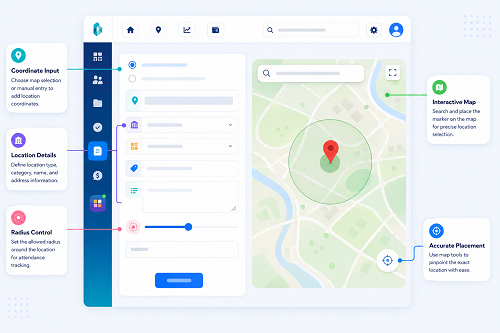
Delivery companies may use GPS or geo-fenced check-ins to verify where a driver started a shift.
For example, a company may create approved check-in locations around a warehouse or distribution center. When the driver arrives, the mobile application can record the attendance event along with location information.
However, GPS accuracy can vary because of device settings, network conditions, buildings, and other environmental factors. Companies should provide an exception process for legitimate location errors rather than automatically treating every failed location check as misconduct.
4. Assign Routes Digitally
Once attendance is recorded, drivers can receive their daily routes through a mobile application.
A route assignment may include:
- Route number
- Delivery sequence
- Customer addresses
- Delivery time windows
- Contact details
- Package or order information
- Special delivery instructions
- Priority deliveries
- Return or collection requirements
Digital assignments reduce confusion and allow dispatchers to update routes when operational conditions change.
5. Track Route Progress Through Delivery Events
Route progress does not always require continuous driver surveillance.
A company can track progress through meaningful events such as:
Route Started → Customer Stop 1 → Delivery Completed → Customer Stop 2 → Delivery Completed → Final Stop → Route Completed
Each delivery event can record:
- Arrival time
- Delivery status
- Location where appropriate
- Proof of delivery
- Customer confirmation
- Exception reason
This event-based approach can provide useful operational visibility while reducing unnecessary location monitoring.
6. Compare Planned and Actual Routes
Managers can compare the driver's planned route with actual delivery activity.
For example:
| Metric | Planned | Actual |
|---|---|---|
| Deliveries | 25 | 24 |
| Route start | 8:00 AM | 8:10 AM |
| Route completion | 5:00 PM | 5:25 PM |
| Missed deliveries | 0 | 1 |
| Major delays | 0 | 2 |
This helps managers determine whether delays were caused by traffic, customer availability, route changes, vehicle issues, or other operational factors.
7. Track Delivery Exceptions
Not every route deviation indicates poor performance. Drivers may need to change their route because of traffic, road restrictions, customer requests, urgent deliveries, or failed delivery attempts.
A mobile system should allow drivers to select appropriate exception reasons, such as:
- Customer unavailable
- Incorrect address
- Traffic delay
- Vehicle issue
- Delivery rescheduled
- Customer requested new time
- Package damaged
- Access restricted
- Route changed by dispatcher
Recording these reasons creates useful operational data and prevents managers from interpreting every route deviation as a performance problem.
8. Monitor Driver Status
Dispatchers can use a dashboard to see the operational status of drivers.
Typical statuses include:
- Not checked in
- Available
- Route assigned
- En route
- At customer location
- Delivery completed
- Delivery exception
- Returning to warehouse
- Route completed
- Offline
This allows dispatchers to identify drivers who need assistance without repeatedly calling every driver.
9. Support Offline Delivery Workflows
Drivers may experience poor network connectivity during deliveries. A mobile application can support offline workflows where the software allows it.
For example, delivery events may be recorded locally and synchronized when connectivity is restored.
A robust workflow should aim to:
- Preserve the original event time where supported
- Prevent duplicate delivery records
- Clearly identify unsynchronized records
- Sync automatically when connectivity returns
- Alert users if important data cannot be uploaded
The exact offline capabilities depend on the delivery software being used.
10. Connect Route Progress With Attendance
Connecting route and attendance data gives managers a better view of the driver's working day.
For example:
Driver Check-In → Route Start → Delivery Stops → Route Completion → Driver Check-Out
This can help identify situations such as:
- Driver checked in but did not start the assigned route
- Route started significantly late
- Route extended beyond scheduled hours
- Delivery activity continued after recorded check-out
- Driver missed a scheduled delivery
- Route required reassignment
These records can then be reviewed before attendance or payroll adjustments are made.
11. Use Proof of Delivery
Proof of delivery can strengthen route completion records.
Depending on the delivery operation, proof may include:
- Digital signature
- Delivery confirmation
- Photograph where appropriate
- Order number
- Customer confirmation
- Timestamp
- Location information
Companies should collect only information that is necessary for the delivery process and apply appropriate security and retention controls.
12. Track Route Completion and Productivity
Delivery managers can use dashboards to monitor route performance.
Useful KPIs include:
- Deliveries completed per route
- On-time delivery rate
- Failed delivery rate
- Average stop duration
- Route completion rate
- Route deviation frequency
- Average delivery time
- Customer wait time
- Driver attendance compliance
- Average route completion time
These metrics can help managers identify operational bottlenecks without relying on a single performance indicator.
13. Review Driver Attendance Exceptions
A good attendance system should highlight exceptions instead of requiring managers to manually review every record.
Examples include:
- Missing check-in
- Late check-in
- Missing check-out
- Unusual working duration
- Location mismatch
- Repeated attendance corrections
- Route activity without corresponding attendance
- Attendance without assigned route
Managers can investigate the underlying reason before making corrections.
14. Integrate Delivery Data With Payroll
For companies that calculate working hours, overtime, or other payroll inputs based on attendance, delivery data can support the payroll process.
A typical workflow is:
Mobile Attendance → Route Activity → Working Hours → Approved Exceptions → Payroll
However, route duration should not automatically be treated as payable working time without considering the company's policies and applicable employment requirements. Attendance and route records should be reviewed and approved according to the organization's payroll process.
15. Protect Driver Location and Attendance Data
Driver location and attendance information can be sensitive operational data. Companies should establish clear controls around how such information is collected and used.
Important controls include:
- Define the business purpose of location tracking
- Limit tracking to necessary operational periods where possible
- Use role-based access
- Protect data during transmission and storage
- Establish appropriate retention periods
- Maintain access logs
- Explain relevant tracking practices to employees
- Review third-party software and cloud data handling
For UAE businesses, organizations should consider applicable UAE privacy and data-protection requirements when designing location and workforce-monitoring processes.
Best Practices for UAE Delivery Teams
Delivery companies can improve driver attendance and route visibility by following these practices:
- Use mobile attendance for drivers who work away from fixed offices.
- Connect driver schedules with route assignments.
- Use GPS or geo-fenced check-ins where operationally necessary.
- Track meaningful route events instead of relying only on continuous tracking.
- Give drivers digital access to route and delivery instructions.
- Record clear reasons for failed deliveries and route deviations.
- Support offline workflows for areas with weak connectivity.
- Use proof-of-delivery records to confirm completed stops.
- Create exception dashboards for managers.
- Connect approved attendance information with payroll.
- Protect location, customer, and employee data with appropriate access controls.
- Measure route performance using several KPIs rather than visit counts alone.
Conclusion
UAE delivery teams can improve operational visibility by connecting driver attendance with route assignments, delivery events, exceptions, and completion records. A mobile workforce system can provide a single workflow from driver check-in → route assignment → delivery progress → proof of delivery → route completion → attendance and payroll.
The most effective approach is not simply to track where drivers are at every moment. Instead, companies should capture the operational events that matter, provide clear exception handling, protect employee and customer information, and use route and attendance data to improve scheduling, delivery reliability, and workforce planning.
InnBuilt Employee Tracking App can bring driver check-ins and route updates into the same daily view, helping UAE delivery supervisors spot late starts and track assigned runs.