How Can UAE Businesses Choose Between Face Attendance, GPS, and Geo-Fencing?
How Can UAE Businesses Choose Between Face Attendance, GPS, and Geo-Fencing?
Choosing the right employee attendance system is important for UAE businesses that manage office employees, field technicians, construction workers, retail staff, and teams working across multiple locations. Traditional attendance registers and manual timesheets can create errors, while modern attendance systems help businesses capture working hours more consistently.
Three common options are facial recognition attendance, GPS-based attendance, and geo-fencing. Although all three can support attendance management, they solve different problems. Facial recognition helps verify who is clocking in, GPS records the device's geographical location, and geo-fencing checks whether an employee is within a defined virtual boundary.
The right choice depends on where employees work, how attendance needs to be verified, the company's operational requirements, and how employee data will be protected.
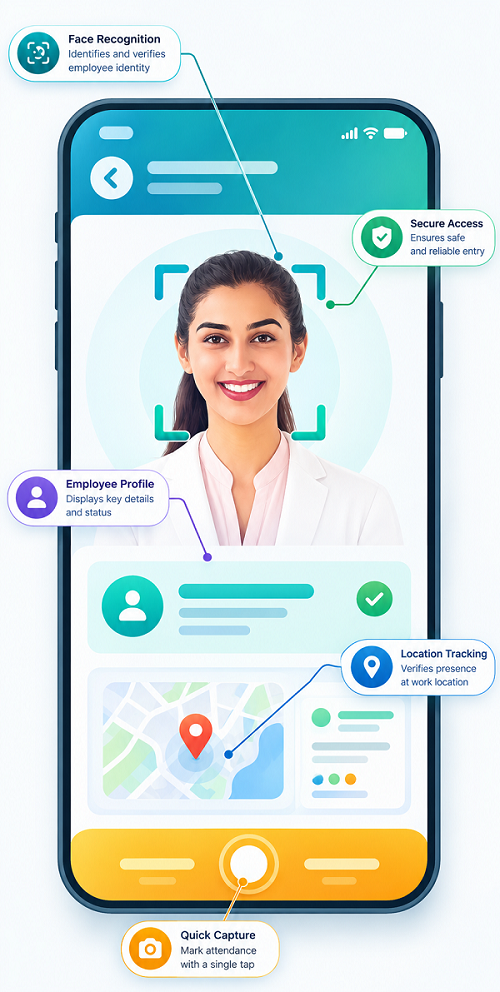
1. What Is Face Recognition Attendance?
Face recognition attendance uses a camera and facial recognition technology to verify an employee's identity during clock-in or clock-out. Depending on the system, employees may use a dedicated attendance terminal, tablet, or mobile application.
Key benefits
- Helps verify the identity of the person recording attendance.
- Reduces the risk of one employee clocking in on behalf of another.
- Creates digital attendance records.
- Can support access-controlled office or facility attendance processes.
- May integrate with shift scheduling and payroll software.
Limitations
Facial recognition systems require suitable cameras, reliable lighting, and accurate employee enrolment. They may also encounter difficulties when image quality is poor or a verification attempt fails.
Businesses should evaluate the system's security, accuracy, alternative verification methods, and handling of biometric information before implementation.
Best suited for
- Corporate offices.
- Warehouses and manufacturing facilities.
- Retail outlets.
- Fixed-location service centres.
- Workplaces where verifying employee identity is a priority.
Example: A company with 150 employees working at its Dubai office can install a facial recognition terminal at the entrance. Employees verify their identity when starting and ending their shifts, and approved attendance records are transferred to the HR system.
2. What Is GPS-Based Attendance?
GPS-based attendance uses location information from a mobile device to record or validate where an employee clocks in or out. It is particularly useful when employees work away from a fixed office.
Depending on the software, GPS may capture the location only when an employee submits an attendance event or may support additional location tracking for specific operational purposes.
Key benefits
- Supports attendance recording at customer locations and project sites.
- Helps verify that field employees are at the expected location when clocking in.
- Can support mobile sales, maintenance, delivery, and service teams.
- Creates location-linked attendance records for management review.
- Can connect attendance with job assignments or customer visits.
Limitations
GPS accuracy may vary because of buildings, device settings, network conditions, and environmental obstacles. A recorded location also does not independently prove that an employee completed a task or worked for the entire recorded period.
GPS attendance depends on compatible devices and appropriate location permissions. Employers should avoid unnecessary location collection, especially outside working hours.
Best suited for
- Field service teams.
- Sales representatives.
- Delivery and logistics staff.
- Employees visiting multiple customer sites.
- Mobile maintenance and inspection teams.
Example: A field technician assigned to visit three customer locations in Abu Dhabi can clock in through a mobile application. The system records the location associated with each attendance event, helping the supervisor review attendance against the assigned schedule.
3. What Is Geo-Fencing Attendance?
Geo-fencing creates a virtual geographical boundary around a specified location. The boundary may cover an office, warehouse, construction site, retail branch, or customer facility.
When an employee attempts to clock in or out, the attendance system checks whether the recorded device location falls within the configured boundary. Some systems can generate alerts when a device enters or leaves a zone, but these features depend on the product and its permissions.
Key benefits
- Restricts attendance submissions to approved geographical areas.
- Helps manage attendance across multiple branches or project sites.
- Supports location-based clock-in rules.
- Can flag attendance attempts outside a defined boundary.
- Reduces the need for managers to manually verify every work location.
Limitations
Geo-fencing depends on location accuracy and correct boundary configuration. Small boundaries may produce false rejections when GPS accuracy is poor, while large boundaries may allow clock-ins from unintended areas.
Geo-fencing alone does not verify the employee's identity. A business may need additional authentication, such as a personal account, device verification, or facial recognition, depending on its risk requirements.
Best suited for
- Construction sites.
- Multiple retail outlets.
- Warehouses and distribution centres.
- Fixed customer locations.
- Businesses that need attendance limited to approved work zones.
Example: A construction company creates separate geo-fences for two Dubai project sites and one Abu Dhabi site. Employees assigned to each project can record attendance within the relevant boundary, while exceptions are sent to a supervisor for review.
4. Face Attendance vs GPS vs Geo-Fencing: Key Differences
| Feature | Face recognition | GPS attendance | Geo-fencing |
|---|---|---|---|
| Main purpose | Verify employee identity | Record or validate location | Check location against a virtual boundary |
| Common device | Terminal, tablet, or mobile phone | GPS-enabled mobile device | GPS-enabled device or compatible location system |
| Best environment | Fixed workplaces | Mobile and field work | Defined offices and work sites |
| Identity verification | Yes, through facial matching | Not by GPS alone | Not by geo-fencing alone |
| Location validation | Depends on system configuration | Yes, when location is captured | Yes, against a defined boundary |
| Multi-site support | Requires terminals or suitable mobile support at each site | Strong for mobile teams | Strong for businesses with defined work zones |
| Main limitation | Biometric privacy and verification failures | Variable location accuracy | Boundary errors and location inaccuracies |
| Payroll integration | Depends on the software | Depends on the software | Depends on the software |
No single method is ideal for every business. The most effective choice is the one that matches the company's attendance risks, employee work patterns, and privacy requirements.
5. How Should UAE Businesses Choose the Right Method?
Before purchasing attendance software, businesses should evaluate five important factors.
A. Where do employees work?
The workplace is often the strongest indicator of which system to choose.
- Fixed office: Facial recognition may be appropriate when identity verification is important.
- Field assignments: GPS-based attendance may be more practical.
- Construction or customer sites: Geo-fencing can help restrict clock-ins to approved locations.
- Hybrid workforce: A combination of mobile attendance, location rules where justified, and manager approvals may work better than a single method.
B. What problem needs to be solved?
Identify the primary attendance problem before selecting the technology.
If employees clock in on behalf of colleagues, consider stronger identity verification. If employees report attendance from the wrong site, consider GPS or geo-fencing. If managers struggle to reconcile attendance across several branches, prioritise centralised reporting and multi-location configuration.
C. How many locations must be managed?
A company operating from one office may need a straightforward attendance terminal. A business with multiple branches or project sites may benefit from centralised attendance software that supports different locations, schedules, and approval rules.
Consider whether the system can manage employee transfers between locations, temporary assignments, shift changes, and authorised exceptions.
D. Does the system integrate with payroll?
Attendance technology should help produce reliable payroll inputs, not simply collect clock-in records.
Check whether the system can transfer approved working hours, overtime, shift information, and attendance corrections to payroll. It should also flag missing punches and unresolved exceptions rather than automatically treating every missing record as absence.
For UAE employers, working hours and overtime calculations should be reviewed against applicable employment rules and contractual arrangements. The UAE Government provides guidance on working hours and overtime for the private sector.
E. What are the privacy and security implications?
Facial recognition involves biometric information, while GPS and geo-fencing involve location data. Businesses should determine what information is collected, why it is needed, who can access it, and how long it is retained.
The UAE's Personal Data Protection Law establishes a framework for protecting personal information and governing its processing, subject to the law's scope and applicable exceptions. Certain financial free zones and other regimes may have separate data protection requirements.
Employers should review the applicable rules, inform employees about the system, apply appropriate safeguards, and collect only the data needed for legitimate operational purposes.
6. When Should Businesses Combine Attendance Methods?
Some businesses benefit from using more than one method.
A combination can improve verification, but it should not add unnecessary complexity or collect more employee information than required.
| Business scenario | Suggested approach |
|---|---|
| Office with fixed working hours | Face recognition or another secure attendance method |
| Mobile sales team | GPS-linked clock-in with manager review |
| Construction project | Geo-fencing with employee authentication |
| Field service company | GPS attendance linked to job assignments |
| Multi-branch retail business | Geo-fencing or site-based attendance with centralised reporting |
| High-security facility | Identity verification plus authorised-location controls |
| Hybrid workforce | Flexible attendance rules based on approved work arrangements |
For example, a field service company could use employee authentication and GPS at clock-in, while a construction site could use geo-fencing to validate the location. A fixed office may use facial recognition at an attendance terminal.
The key is to choose a combination that addresses a specific business need and has a clear exception-handling process.
7. How Can Attendance Data Improve Payroll Accuracy?
Attendance systems are most valuable when they connect to the wider HR and payroll process.
A well-configured system can help businesses:
- Capture clock-in and clock-out records consistently.
- Compare attendance with assigned shifts.
- Flag missing or unusual punches.
- Route corrections to authorised managers.
- Identify overtime entries that require verification.
- Reconcile attendance with approved leave.
- Transfer validated attendance data to payroll.
- Maintain an audit trail of corrections and approvals.
For example, if an employee's GPS-based clock-in falls outside the assigned work zone, the system can flag the record for review. A supervisor can verify whether the employee was assigned to another location before the record is finalised.
Location exceptions should not automatically result in salary deductions or disciplinary action. Businesses should review the circumstances, confirm the facts, and follow applicable employment requirements.
8. Implementation Checklist for UAE Employers
Before deploying a new attendance system, use the following checklist:
- Identify the attendance problems the business needs to solve.
- Classify employees by workplace and working arrangement.
- Decide whether identity verification, location validation, or both are necessary.
- Test accuracy at actual offices and project sites.
- Define procedures for poor GPS signals, failed facial verification, and forgotten clock-ins.
- Configure employee schedules, shifts, and approved locations.
- Establish data access, retention, and security controls.
- Explain the system and attendance policy to employees.
- Test integration with HR and payroll software.
- Run a pilot before deploying across all locations.
- Review exceptions and employee feedback after implementation.
A pilot involving one office team and one field team can help identify technical problems before a company commits to a full rollout.
Frequently Asked Questions
1. Which attendance method is best for UAE companies?
The best option depends on the workforce. Facial recognition can suit fixed workplaces, GPS can support mobile employees, and geo-fencing can validate attendance within approved locations.
2. Is GPS attendance enough to verify an employee?
No. GPS records or validates location, but it does not independently establish the identity of the person using the device. Businesses may need additional authentication.
3. What is the difference between GPS and geo-fencing?
GPS provides location information. Geo-fencing uses a virtual boundary to determine whether a recorded location falls within a defined area. Many geo-fencing attendance systems rely on GPS or other location services.
4. Can geo-fencing be used for construction workers?
Yes. Employers can configure virtual boundaries around approved project sites, subject to system capabilities and location accuracy. They should provide a process for workers to report technical problems or legitimate attendance exceptions.
5. Is facial recognition attendance suitable for every workplace?
Not necessarily. It may be useful where identity verification is important, but businesses should assess accuracy, accessibility, alternative verification methods, security, and applicable privacy requirements before adopting it.
6. Can these attendance systems integrate with payroll software?
Many systems support payroll integration, but features vary. Businesses should verify that approved attendance records, overtime, shifts, and corrections can be transferred accurately to their payroll platform.
Conclusion
UAE businesses should choose attendance technology based on their workforce, workplace locations, identity verification needs, payroll requirements, and data protection responsibilities.
Facial recognition is useful for verifying identity at fixed locations, GPS supports mobile attendance, and geo-fencing helps validate attendance within approved work zones. For companies with a mix of office and field employees, a carefully configured combination may deliver the best results.
By integrating attendance with HR and payroll software, establishing clear exception workflows, and protecting employee information, businesses can improve attendance accuracy, reduce administrative effort, and support more reliable payroll processing.
The right check-in method depends on where work happens. InnBuilt Face Attendance Software and Employee Tracking App can help UAE employers compare fixed-site identity checks with mobile GPS and geo-fenced attendance.