What Reports Help UAE Businesses Audit Field Attendance and Location Exceptions?
What Reports Help UAE Businesses Audit Field Attendance and Location Exceptions?
For UAE businesses with mobile employees, field technicians, sales teams, construction workers, consultants, and service staff, attendance records can come from multiple locations throughout the working day. While mobile attendance, GPS, and geo-fencing can improve visibility, HR teams also need reliable reports to identify unusual records and resolve exceptions.
A good field attendance reporting system should help businesses answer simple questions: Was the employee at the assigned location? When did they arrive and leave? Were there unusual location events? Were attendance records changed manually?
The right reports can make these checks easier while avoiding unnecessary monitoring of employees.
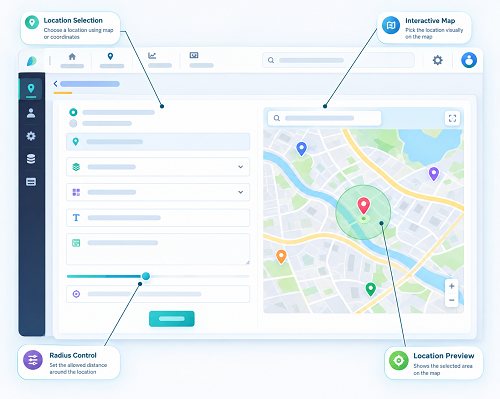
1. Daily Field Attendance Report
The daily attendance report provides a basic overview of employee attendance for a particular day.
It can include:
- Employee name or ID
- Assigned location
- Check-in time
- Check-out time
- Total working hours
- Attendance status
- Late arrival
- Early departure
- Missing punches
- Approved exceptions
For field teams, the report can also show the location associated with each attendance event.
This gives HR managers a starting point for identifying attendance records that require further review.
2. Location Exception Report
A location exception report is particularly useful when employees use geo-fenced attendance.
It can identify events such as:
- Check-in outside the assigned geo-fence
- Check-out outside the approved location
- Attendance recorded at an unexpected site
- Location unavailable during check-in
- Repeated location mismatches
- Attendance from a temporary or unassigned location
For example, an employee assigned to Client A may check in several kilometres away. Instead of automatically marking the employee absent, the system can flag the event for review.
The employee or supervisor can then provide an explanation.
3. Geo-Fence Violation Report
A geo-fence report provides more detail about employees who attempted to check in or check out outside an approved geographical boundary.
Useful fields can include:
| Field | Example |
|---|---|
| Employee | Field Technician |
| Assigned Site | Client A |
| Scheduled Time | 9:00 AM |
| Check-In | 9:08 AM |
| Location Status | Outside Geo-Fence |
| Exception Reason | Temporary client location |
| Approval | Supervisor Approved |
This report helps managers identify recurring location problems and determine whether the geo-fence itself needs adjustment.
4. Late Check-In and Early Check-Out Report
Late and early attendance reports help businesses identify patterns rather than isolated incidents.
For example, the report may show:
- Scheduled start time
- Actual check-in time
- Minutes late
- Scheduled end time
- Actual check-out time
- Minutes early
- Number of occurrences
If an employee is late once because of a legitimate reason, the issue may require no further action.
However, repeated exceptions may indicate a scheduling, transportation, location, or attendance-management problem.
5. Missing Check-In/Check-Out Report
Field employees may sometimes forget to check in or check out.
A missing-punch report can identify:
- Missing check-ins
- Missing check-outs
- Incomplete attendance
- Multiple punches
- Unclosed work sessions
- Manually corrected records
HR can then request clarification before finalizing attendance.
This is especially useful before payroll processing because incomplete attendance records can affect working hours and overtime calculations.
6. Multiple Location Attendance Report
Field employees may visit several client or project locations in one day.
A multi-location report can show the sequence of approved attendance events.
For example:
Office → Client A → Client B → Client C → Office
The report can show the check-in and check-out times associated with each location.
This helps managers understand whether the employee's attendance pattern is consistent with the assigned schedule.
It can also help identify unexpected locations without requiring managers to continuously monitor employee movements.
7. Travel-Time Exception Report
When employees travel between client appointments, businesses may want to review unusually long gaps between locations.
A travel-time report could include:
- Previous client
- Previous check-out
- Next client
- Next check-in
- Recorded travel interval
- Expected travel range
- Exception status
- Employee explanation
- Manager approval
For example:
Client A check-out: 11:00 AM
Client B check-in: 12:15 PM
Travel/appointment gap: 75 minutes
The system can flag the record for review if it exceeds the company's defined threshold.
However, route estimates should not automatically be treated as proof of employee misconduct because traffic, parking, road conditions, client delays, and other factors can affect travel time.
8. Attendance Correction Audit Report
Manual attendance changes should be visible to HR administrators.
An attendance correction report can show:
- Original attendance record
- Updated record
- Person who made the change
- Date and time of change
- Reason for correction
- Approval status
For example:
Original check-in: 9:42 AM
Corrected check-in: 9:05 AM
Changed by: Supervisor
Reason: Mobile network failure
Approval: HR approved
This audit trail can help prevent unauthorized changes and improve payroll accountability.
9. Location Override Report
Sometimes an employee may legitimately need to work at a location outside the normal assigned area.
A location override report can track:
- Employee
- Original assigned site
- Temporary site
- Start and end date
- Approving manager
- Reason
- Attendance records generated under the override
This is useful for businesses that frequently move employees between client sites, construction projects, or service locations.
It also prevents legitimate temporary assignments from appearing as unexplained geo-fence violations.
10. Offline Attendance Report
Mobile attendance systems may encounter connectivity problems at construction sites, remote locations, basements, or areas with weak network coverage.
An offline attendance report can identify:
- Attendance captured offline
- Original check-in time
- Synchronization time
- Location information available at capture
- Sync failures
- Duplicate records
- Manual corrections
The original event time should be preserved when the system supports offline attendance so that synchronization later does not incorrectly appear to be the actual check-in time.
Exact offline functionality depends on the attendance software and device.
11. Repeated Exception Report
A single exception may be harmless. Repeated exceptions deserve more attention.
A recurring exception report can identify employees with repeated:
- Out-of-zone check-ins
- Late arrivals
- Missing punches
- Early departures
- Manual corrections
- Unusual travel gaps
- Attendance from unassigned locations
Managers can then investigate patterns rather than spending time reviewing every normal attendance event.
12. Attendance-to-Payroll Reconciliation Report
Attendance information often feeds payroll calculations.
A reconciliation report can compare:
Attendance → Working Hours → Overtime → Leave → Payroll
It can identify differences between approved attendance and payroll inputs.
For example, HR may discover that overtime was approved in the attendance system but did not flow correctly into payroll.
This type of report can reduce payroll errors and provide a final review before salary processing.
13. Employee Location Data Access Report
Businesses should also consider auditing who accesses employee location information.
A location-data access report can record:
- User accessing the information
- Date and time
- Employee or group viewed
- Type of information accessed
- Administrative activity
This can support internal privacy and security controls.
Employers should establish clear access permissions and avoid giving every manager unrestricted access to detailed employee location history.
14. How Often Should UAE Businesses Review These Reports?
Different reports can be reviewed at different intervals.
| Report | Suggested Review |
|---|---|
| Daily attendance | Daily |
| Location exceptions | Daily or weekly |
| Geo-fence violations | Weekly |
| Missing punches | Before payroll |
| Travel-time exceptions | Weekly |
| Manual corrections | Weekly/monthly |
| Payroll reconciliation | Every payroll cycle |
| Location-data access | Periodically |
| Repeated exceptions | Monthly |
The exact frequency should depend on workforce size, operational risk, and company policy.
15. Use Exception-Based Auditing
The objective of reporting should not be to create unnecessary surveillance.
A more practical model is:
Normal Attendance → Automatically Approved
Unusual Event → Exception Report
Manager Review → Employee Explanation
Approved Exception → Attendance Updated
Final Attendance → Payroll
This allows HR teams to concentrate on records that actually need attention.
16. Protect Attendance and Location Reports
Field attendance reports may contain sensitive employee and operational information.
Businesses should consider:
- Role-based access
- Secure data storage
- Limited retention
- Audit trails
- Strong authentication
- Restricted export permissions
- Defined purposes for location collection
- Employee transparency
- Appropriate vendor controls
- Procedures for correcting inaccurate records
Location information should not automatically be used for unrelated performance monitoring simply because it is available.
Conclusion
UAE businesses can improve field attendance auditing by using a combination of daily attendance reports, location exception reports, geo-fence reports, missing-punch reports, travel-time reports, correction audit reports, offline attendance reports, and attendance-to-payroll reconciliation reports.
The most effective approach is exception-based auditing. Instead of reviewing every employee movement, HR teams can allow normal attendance records to flow automatically while directing unusual events to supervisors for review.
When these reports are integrated with mobile attendance, geo-fencing, and payroll software, businesses can improve attendance accuracy, reduce manual reconciliation, identify recurring problems, and maintain a clearer audit trail while applying appropriate privacy and access controls.
Useful audit reports connect a shift, site, employee and manager decision. InnBuilt Field Management can consolidate these UAE attendance and location exceptions for practical follow-up.