How Can UAE Field Sales Teams Record Customer Visits and Daily Routes?
How Can UAE Field Sales Teams Record Customer Visits and Daily Routes?
Field sales teams in the UAE often visit several customers, prospects, distributors, retailers, and business locations during a single working day. Without a structured system, it can be difficult for managers to confirm which customers were visited, when visits occurred, and whether employees followed their planned schedules.
Mobile attendance and field-sales software can help businesses record customer visits and daily routes digitally. By combining appointment schedules, mobile check-ins, geo-fencing, visit notes, and attendance records, employers can improve visibility without requiring employees to maintain multiple manual reports.
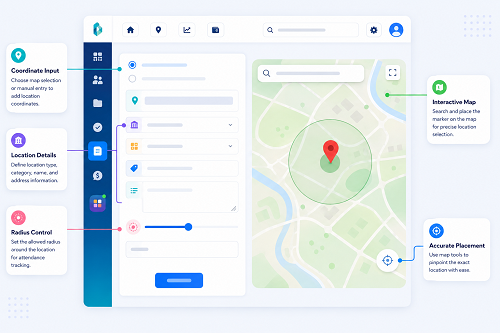
1. Create a Digital Customer Directory
The first step is to maintain a central customer directory.
Each customer record can contain:
- Customer name
- Business location
- Contact information
- Assigned salesperson
- Customer category
- Visit frequency
- Working hours
- Geo-location
- Sales territory
- Visit history
This allows managers to assign customer visits based on territories and employee responsibilities.
For example, a salesperson responsible for Dubai can have a daily schedule covering customers in Business Bay, Deira, Jumeirah, and other assigned areas.
2. Plan Daily Customer Visits
Sales managers can create daily or weekly visit schedules before employees start their field work.
A schedule might look like:
| Visit | Customer | Planned Time |
|---|---|---|
| 1 | Customer A | 9:30 AM |
| 2 | Customer B | 11:00 AM |
| 3 | Customer C | 1:00 PM |
| 4 | Customer D | 3:30 PM |
The employee can view the assigned visits through a mobile application.
This creates a clear connection between the planned route and actual customer visits.
3. Use Mobile Check-In for Customer Visits
When the salesperson reaches the customer location, they can check in through their mobile device.
Depending on the system, the check-in can record:
- Employee identity
- Date
- Time
- Customer
- Location
- Visit status
- Appointment information
This creates a digital record of the visit instead of relying entirely on manually submitted statements.
A typical workflow is:
Assigned Customer → Travel → Customer Location → Mobile Check-In → Customer Visit → Check-Out
4. Use Geo-Fencing to Verify Customer Locations
Geo-fencing can provide an additional layer of verification.
Businesses can define an approved geographical area around each customer location. When an employee checks in, the application can verify whether the device is within the configured area.
This can help reduce inaccurate visit records.
For example:
Customer A Geo-Fence → Salesperson Arrives → Check-In → Visit Recorded
However, GPS accuracy can vary depending on the device, building environment, network conditions, and other factors. Businesses should therefore provide an exception process rather than automatically rejecting every location mismatch.
5. Record the Actual Daily Route
Field sales software can maintain a record of customer visits throughout the day.
For example:
Office → Customer A → Customer B → Customer C → Customer D → Home/Office
The objective should be to understand the employee's business activity rather than unnecessarily monitor every movement.
For many businesses, recording verified customer check-in and check-out locations is sufficient. Continuous live GPS tracking should only be used where there is a genuine operational need and appropriate privacy controls.
6. Compare Planned and Actual Visits
Managers can compare the employee's scheduled route with actual customer visits.
For example:
| Planned | Actual | Status |
|---|---|---|
| Customer A | Customer A | Completed |
| Customer B | Customer B | Completed |
| Customer C | Customer D | Changed |
| Customer D | Customer D | Completed |
If a salesperson changes the order of visits because of traffic, customer availability, or an urgent request, the system can record the change.
This is more useful than treating every deviation from the original route as a problem.
7. Capture Customer Visit Details
A customer visit record should contain more than just a location and timestamp.
Depending on the sales process, employees may record:
- Purpose of visit
- Customer discussion
- Products discussed
- Customer requirements
- Order information
- Follow-up date
- Competitor information
- Sales opportunity
- Next action
This converts attendance information into useful sales intelligence.
For example:
Customer Visit → Discussion → Opportunity → Follow-Up Task → Sales Pipeline
8. Record Unplanned Customer Visits
Field sales employees may receive urgent requests from customers during the day.
The system should allow employees to create an unplanned visit while maintaining an audit trail.
For example:
- Customer contacts salesperson.
- Employee accepts an urgent meeting.
- New customer visit is created.
- Employee checks in at the location.
- Visit details are recorded.
- Manager can review the additional visit later.
This prevents employees from having to choose between ignoring the customer and violating a rigid pre-planned schedule.
9. Manage Multiple Sales Territories
UAE businesses may have sales teams operating across Dubai, Abu Dhabi, Sharjah, Ajman, Ras Al Khaimah, Fujairah, and other locations.
A field-sales system can assign customers according to:
- Geographic territory
- Salesperson
- Product category
- Customer type
- Branch
- Sales potential
- Visit frequency
Managers can then review customer coverage by territory.
This can help identify areas where customers are being visited too frequently or where important accounts are not receiving sufficient attention.
10. Record Travel Time Between Customer Visits
Travel time can be useful for understanding the efficiency of daily field schedules.
For example:
Customer A Check-Out: 10:30 AM
Customer B Check-In: 11:05 AM
The system can record the 35-minute interval between the two visits.
Managers can compare this with reasonable route expectations while recognizing that traffic, parking, road conditions, and customer delays can affect actual travel time.
Travel information should therefore support operational planning rather than automatically being treated as an employee performance measure.
11. Integrate Customer Visits With Attendance
Customer visits and employee attendance can be connected.
A typical workflow is:
Mobile Attendance → Customer Visit → Location Verification → Working Hours → Daily Timesheet
This allows HR to understand where field employees began and ended their working day while allowing sales managers to focus on customer activity.
The same attendance information can potentially support payroll processing where working hours, approved overtime, or other payroll inputs depend on verified attendance.
12. Use Daily Route and Visit Reports
Managers can use reports to review field activity.
Useful reports include:
Customer Visit Report
Shows customers visited, visit times, salesperson, and visit status.
Daily Route Report
Shows the sequence of recorded customer visits during the day.
Missed Visit Report
Identifies scheduled customers who were not visited.
Location Exception Report
Shows check-ins that occurred outside approved customer locations.
Visit Duration Report
Shows the approximate time between customer check-in and check-out.
Territory Coverage Report
Shows customer visits by geographic area or salesperson.
These reports help managers identify trends without manually contacting every employee.
13. Protect Customer and Employee Data
Customer visit records may contain both business information and employee location data.
Businesses should consider:
- Role-based access
- Secure authentication
- Limited access to location history
- Appropriate data retention
- Audit logs
- Secure transmission
- Clear employee policies
- Vendor security controls
- Restrictions on exporting customer and location data
Employers should also distinguish between information needed to verify customer visits and unnecessary continuous location monitoring.
14. Best Practices for UAE Field Sales Teams
Businesses can improve customer visit tracking by:
- Maintaining an accurate customer directory.
- Assigning customers to appropriate sales territories.
- Creating daily or weekly visit schedules.
- Using mobile check-ins.
- Applying geo-fencing where appropriate.
- Allowing legitimate schedule changes.
- Recording visit notes and follow-up actions.
- Tracking missed and exceptional visits.
- Comparing planned and actual customer coverage.
- Integrating field attendance with payroll where relevant.
- Giving managers access only to information they need.
- Clearly communicating location and attendance policies to employees.
Conclusion
UAE field sales teams can record customer visits and daily routes more effectively by combining mobile attendance, customer scheduling, geo-fenced check-ins, visit records, route information, and field-sales reports.
The best system does more than prove that an employee visited a location. It connects the visit with customer activity, follow-up tasks, working hours, and sales performance.
By using verified customer check-ins and exception-based reporting instead of unnecessary continuous monitoring, UAE businesses can improve field-team accountability while maintaining a practical and transparent approach to employee location data.
InnBuilt Field Management can capture scheduled customer visits, check-ins and route progress, giving UAE field sales managers a clearer view of activity across assigned territories.