How to Test Multi-Entity Payroll and Employee Self-Service for UAE Businesses
How to Test Multi-Entity Payroll and Employee Self-Service for UAE Businesses
Managing payroll across multiple legal entities can be challenging for businesses operating in the UAE. Companies with subsidiaries, branches, free zone establishments, mainland entities, or multiple business units often need to process payroll separately while maintaining centralised control over employee information, reporting, and approvals.
At the same time, employees expect convenient access to payslips, leave balances, salary information, attendance records, and personal details through self-service portals or mobile applications.
Payroll software must therefore support two important capabilities: multi-entity payroll management and employee self-service (ESS). However, simply confirming that these features exist is not enough. Businesses should test how they work in realistic situations before selecting a payroll solution.
This guide explains how UAE businesses can evaluate multi-entity payroll and employee self-service features, what scenarios to include in software demonstrations, and which issues to identify during testing.
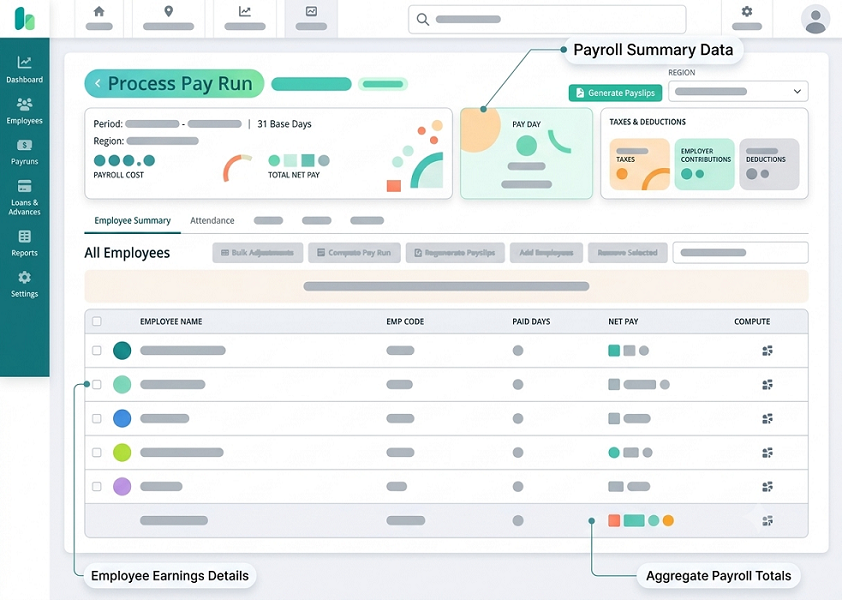
1. Understand Multi-Entity Payroll Requirements
Before testing payroll software, businesses should identify how their legal entities operate and which payroll activities need to be managed independently.
For example, a UAE-based business may operate through:
- A mainland company in Dubai.
- A free zone company in Abu Dhabi.
- A subsidiary in Sharjah.
- A separate legal entity for manufacturing operations.
- A regional headquarters managing employees across several locations.
Although these entities may belong to the same corporate group, they may have different employee records, payroll calendars, approval structures, bank accounts, and compliance requirements.
The software should support independent payroll processing without creating unnecessary duplication of administrative work.
Key requirements to identify
| Requirement | What to evaluate |
|---|---|
| Entity configuration | Can each legal entity be created and maintained separately? |
| Employee assignment | Can employees be assigned to the correct legal employer? |
| Payroll processing | Can payroll be calculated independently for each entity? |
| Salary structures | Can different salary components and policies be configured? |
| Bank details | Can each entity maintain its own payment and bank information? |
| Approval workflows | Can payroll approvals differ between entities? |
| Reporting | Can businesses generate entity-wise and consolidated reports? |
| Access permissions | Can users access only the entities they are authorised to manage? |
Documenting these requirements helps businesses develop realistic test cases instead of relying entirely on vendor presentations.
2. Test Legal Entity Creation and Configuration
The first stage of multi-entity payroll testing is to verify whether the software can represent the organisation's actual legal structure.
Ask the vendor to demonstrate how a new legal entity is created and configured.
The system should ideally allow administrators to maintain separate information for each entity, including:
- Registered legal name.
- Trade licence or registration details.
- Establishment information, where relevant.
- Registered address.
- Payroll currency.
- Payroll processing calendar.
- Bank and payment configuration.
- Authorised payroll users.
- Applicable payroll policies.
- Relevant statutory and reporting settings.
For UAE businesses, it is important to verify that the system can accommodate different employment and regulatory arrangements where applicable.
For example, a mainland entity and a DIFC entity may operate under different employment frameworks. The software should allow the organisation to configure the appropriate policies instead of applying one set of assumptions to every employee.
Practical test scenario
Ask the vendor to create two sample entities:
Entity A: Dubai Mainland Company
- Monthly payroll cycle.
- Separate payroll administrator.
- Dedicated salary payment configuration.
Entity B: Abu Dhabi Free Zone Company
- Separate employee database.
- Different approval workflow.
- Independent payroll reports.
Check whether both entities can be maintained within the same software environment while keeping their records and transactions appropriately separated.
3. Verify Employee Assignment Across Multiple Entities
Employee assignment is one of the most important areas to test.
A multi-entity payroll system should allow administrators to assign employees to the correct legal employer and maintain accurate employment information.
During testing, verify whether the software captures:
- Legal employer or employing entity.
- Employee ID.
- Department and designation.
- Work location.
- Date of joining.
- Employment contract details.
- Salary structure.
- Reporting manager.
- Payroll eligibility.
- Employment status.
The system should also prevent employees from being included in the wrong entity's payroll.
Test employee transfers between entities
Businesses sometimes transfer employees from one group company to another. The software should support a controlled process for recording these changes.
For example, an employee may move from a Dubai mainland entity to an Abu Dhabi free zone entity.
Ask the vendor to demonstrate:
- How the transfer request is initiated.
- Whether the new employing entity can be selected.
- How the effective transfer date is recorded.
- Whether salary and employment details can be updated.
- How payroll responsibility changes.
- How historical payroll records are retained.
- Whether the transfer requires approval.
The system should preserve the employee's historical information and maintain a clear record of which entity was responsible for payroll during each employment period.
Also test whether the software supports employees with multiple assignments or cross-entity cost allocations, where these arrangements are genuinely required. Do not assume that accounting cost allocation automatically changes the employee's legal employer.
4. Test Independent Payroll Processing for Each Entity
One of the main reasons businesses purchase multi-entity payroll software is to process payroll separately for different legal employers.
During the demonstration, ask the vendor to run payroll for at least two entities using different employee groups.
Check whether the software supports:
- Separate payroll periods.
- Different salary structures.
- Entity-specific allowances and deductions.
- Separate overtime and attendance inputs.
- Independent payroll approvals.
- Entity-specific payroll summaries.
- Separate payment instructions.
- Payroll locking and finalisation.
Example testing scenario
Assume a business operates two UAE entities:
| Payroll detail | Dubai entity | Abu Dhabi entity |
|---|---|---|
| Employees | 50 | 30 |
| Monthly payroll | AED 350,000 | AED 210,000 |
| Payroll administrator | User A | User B |
| Approval manager | Finance Manager A | Finance Manager B |
| Payment account | Bank Account A | Bank Account B |
Ask the vendor to process both payrolls independently.
Verify that:
- Employees are included only in the correct payroll.
- Salary calculations use the appropriate employee records.
- Payroll totals are shown separately.
- One entity's payroll cannot accidentally overwrite another's.
- Each payroll can be reviewed and approved independently.
- A consolidated report can be generated after processing.
A useful test is to change one employee's salary in the Dubai entity and confirm that the change does not affect an employee with a similar name or ID in the Abu Dhabi entity.
5. Evaluate UAE Payroll Compliance Across Entities
Different entities within the same corporate group may have different compliance requirements depending on their jurisdiction, establishment type, workforce, and applicable employment arrangements.
The software should allow businesses to configure and manage relevant payroll requirements without assuming that every employee follows identical rules.
Areas to test
Salary calculations: Verify whether basic salary, allowances, overtime, deductions, and other salary components are calculated using the correct employee-specific settings.
End-of-service benefits: Test whether the software can apply the relevant end-of-service benefit rules to each employee group. Where alternative schemes or different legal arrangements apply, confirm that the system can represent them correctly.
Leave and final settlement: Check whether leave balances, unused leave payments, outstanding salary, and final settlement calculations are handled according to the applicable employment framework.
Wage Protection System (WPS): If applicable, verify whether the software can generate the required salary information or payment files for each eligible establishment. Test the relevant file format and validation rules for the specific payment channel and authority.
Employment jurisdiction: Confirm whether the software can distinguish employees covered by different employment frameworks, including applicable free zone arrangements.
Important compliance consideration
A payroll platform may automate calculations and generate reports, but it does not independently guarantee legal compliance. Employers should validate configurations, statutory interpretations, payment processes, and filing requirements with appropriate compliance professionals and relevant authorities.
6. Test Entity-Wise Payroll Approval Workflows
Multi-entity businesses often have different management and finance teams responsible for approving payroll.
The software should support approval workflows based on entity, role, department, or organisational hierarchy.
For example:
- The Dubai payroll administrator prepares payroll.
- The Dubai HR manager reviews employee-related changes.
- The finance manager validates payroll totals.
- An authorised approver provides final approval.
The Abu Dhabi entity may follow a different approval structure.
What to test
| Approval feature | Testing requirement |
|---|---|
| Entity-specific approvals | Can each entity have its own approval hierarchy? |
| Role-based permissions | Can users be assigned different responsibilities? |
| Multi-level approval | Can payroll pass through several approval stages? |
| Rejection workflow | Can approvers return payroll for corrections? |
| Approval history | Are approver names, dates, and actions recorded? |
| Payroll locking | Can approved payroll be locked against unauthorised changes? |
| Exception alerts | Are unusual salary changes or payroll differences flagged? |
Practical demonstration
Ask the vendor to submit payroll for both entities.
Approve the Dubai payroll while rejecting the Abu Dhabi payroll because of an incorrect salary component.
Check whether the system:
- Updates the approval status separately.
- Allows corrections to the rejected payroll.
- Retains the original submission history.
- Prevents rejected payroll from being treated as final.
- Sends notifications to the relevant users.
This test helps establish whether the software provides sufficient control over payroll processing.
7. Evaluate Consolidated Payroll Reporting
Businesses need both entity-level reporting and group-wide visibility.
A payroll system should allow authorised users to review individual entity performance while generating consolidated reports for management.
Important reports to test
- Entity-wise payroll register.
- Consolidated payroll summary.
- Employee headcount by legal entity.
- Salary component breakdown.
- Overtime and allowance reports.
- Leave liability reports.
- End-of-service benefit reports.
- Payroll variance reports.
- Department-wise payroll costs.
- Payment and bank file summaries.
- Payroll approval status reports.
Test consolidated reporting
Suppose a company has three entities with different payroll totals.
| Entity | Employee count | Monthly payroll |
|---|---|---|
| Dubai | 50 | AED 350,000 |
| Abu Dhabi | 30 | AED 210,000 |
| Sharjah | 20 | AED 140,000 |
| Group total | 100 | AED 700,000 |
Ask the vendor to generate a consolidated report showing all three entities.
Then check whether authorised users can drill down into individual entity records without exposing restricted information to users who should only see their own entity.
Also verify whether reports can be exported in Excel, PDF, or other required formats and whether the exported figures match the approved payroll records.
8. Understand Employee Self-Service Requirements
Employee self-service allows employees to access and manage selected HR and payroll information without contacting HR for every routine request.
For businesses with multiple UAE entities, ESS should provide a consistent employee experience while displaying information relevant to each employee's employing entity.
The platform may provide ESS through:
- Web portals.
- Mobile applications.
- Employee HR dashboards.
- Integrated HRMS applications.
The software should be easy to use for employees with different levels of technical experience.
Essential employee self-service features
| ESS feature | What employees should be able to do |
|---|---|
| Payslip access | View and download monthly payslips |
| Personal information | View and request updates to personal details |
| Leave management | Apply for leave and check balances |
| Attendance | Review attendance records and submit corrections |
| Salary information | View relevant salary details and components |
| Documents | Access authorised employment documents |
| Expense claims | Submit and track eligible reimbursement requests |
| Requests | Submit HR-related queries and track progress |
| Notifications | Receive updates about approvals and payroll activities |
During testing, do not evaluate ESS only from the administrator's screen. Ask the vendor to demonstrate the actual employee experience using a test employee account.
9. Test Employee Login and Entity-Specific Access
Security is particularly important when a company operates several legal entities.
Employees should only be able to access information that belongs to them or that they are authorised to view.
During testing, verify:
- Whether each employee has a unique login.
- Whether employees can access their own payslips.
- Whether one employee can view another employee's information.
- Whether entity-specific documents are displayed correctly.
- Whether employee access is removed or adjusted after termination.
- Whether login permissions can be managed centrally.
- Whether multi-factor authentication is supported.
- Whether access activity is recorded.
Practical access-control test
Create three test accounts:
- An employee belonging to the Dubai entity.
- An employee belonging to the Abu Dhabi entity.
- An HR administrator authorised to manage both entities.
Log in using each account.
The Dubai employee should not be able to view another employee's salary information or confidential documents from the Abu Dhabi entity. The HR administrator should have access according to the permissions granted.
Also test whether employees can access the ESS portal through mobile devices and whether security controls remain effective across devices.
10. Test Payslip Access and Salary Transparency
Payslip access is one of the most frequently used employee self-service functions.
Employees should be able to view their salary information clearly and understand the components used in monthly payroll calculations.
During testing, check whether payslips display relevant information such as:
- Employee name and ID.
- Employing entity.
- Payroll period.
- Basic salary.
- Allowances.
- Overtime payments.
- Applicable deductions.
- Other salary adjustments.
- Net salary payable.
- Payment date or status, where supported.
Ask the vendor to demonstrate how payslips are generated for employees belonging to different entities.
Important test cases
Test 1: Correct entity information
Verify that the employee's payslip displays the correct employing entity.
Test 2: Salary calculation accuracy
Compare the payslip against the approved payroll register.
Test 3: Historical payslip access
Check whether employees can retrieve previous months' payslips.
Test 4: Download functionality
Download payslips in PDF format and check whether the document is readable and complete.
Test 5: Restricted information
Confirm that employees cannot access confidential payroll information belonging to colleagues or other entities.
11. Evaluate Leave and Attendance Self-Service
Leave and attendance features are often closely connected to payroll calculations.
An employee may apply for annual leave, sick leave, or another eligible leave category through the ESS portal. The request should follow the organisation's approval workflow and update relevant leave records.
Leave management tests
Ask the vendor to demonstrate whether employees can:
- View available leave balances.
- Submit leave requests.
- Select leave dates.
- Upload supporting documents where required.
- Track approval status.
- Cancel or modify requests, subject to policy.
- Review historical leave applications.
Test whether leave entitlements and policies can differ between entities when necessary.
For example, employees in two legal entities may follow different leave policies. The software should apply the correct policy based on the employee's assignment.
Attendance self-service tests
Employees should be able to review attendance records and report discrepancies.
Test the following:
- Daily attendance visibility.
- Missing punch notifications.
- Late arrival records.
- Early departure records.
- Overtime information.
- Shift schedules.
- Attendance correction requests.
- Manager approval of corrections.
Also check whether approved attendance adjustments are transferred correctly to payroll.
For example, if an employee's overtime is approved after a correction request, verify whether the approved amount is reflected in the appropriate payroll period.
12. Test Employee Data Changes and Approval Controls
ESS portals often allow employees to request changes to personal information.
However, sensitive information should not necessarily be updated automatically without verification or approval.
The system should support appropriate controls for employee-submitted changes.
Information employees may request to update
- Residential address.
- Contact number.
- Personal email address.
- Emergency contact details.
- Bank account information.
- Identification document details.
- Other employment-related information.
What to test
Ask an employee to submit a bank account change request.
Check whether:
- The employee can submit the request securely.
- The system records the old and proposed details.
- HR receives a notification.
- Supporting documents can be attached if required.
- An authorised person can review and approve the change.
- The approval decision is recorded.
- The updated information is reflected in the appropriate employee record.
- Payroll users are notified where the change affects salary payments.
Bank account changes deserve particular attention because unauthorised modifications can result in salary payment errors or fraud.
The software should maintain a clear audit trail and apply stronger controls to sensitive information.
13. Test Notifications and Employee Communication
An effective ESS system should keep employees informed about important HR and payroll activities.
Notifications reduce routine queries and help employees understand the status of their requests.
During testing, ask the vendor to demonstrate notifications for:
- Payslip availability.
- Leave application submission.
- Leave approval or rejection.
- Attendance correction requests.
- Missing attendance records.
- Personal information updates.
- Document expiry reminders.
- HR announcements.
- Payroll processing updates, where supported.
Check whether notifications are available through email, mobile push notifications, or in-app messages.
Also verify whether notification rules can be configured separately for different employee groups or legal entities.
14. Evaluate Mobile App Usability
Employees may access self-service tools more frequently through smartphones than desktop computers.
For UAE businesses with office-based, retail, manufacturing, construction, and field employees, mobile accessibility can be particularly important.
Test the mobile application using different employee roles and devices.
Mobile testing checklist
- Simple login and authentication.
- Payslip viewing and downloading.
- Leave application submission.
- Attendance viewing.
- Attendance correction requests.
- Notifications and reminders.
- Document access.
- Profile update requests.
- Language support, if required.
- Performance under ordinary mobile network conditions.
- Accessibility and ease of navigation.
If employees work in locations with limited connectivity, ask whether the application supports offline attendance capture or other offline functions. Confirm which actions require an active internet connection and how synchronisation works.
Do not assume that a mobile application provides the same functionality as the desktop portal. Test the specific functions employees need.
15. Test Integration Between Multi-Entity Payroll and ESS
Payroll and ESS should operate as connected parts of the HR management process.
When employee information or approved requests change, the relevant records should be updated consistently.
For example:
- An approved leave request should update the employee's leave balance.
- An approved attendance correction should update attendance records.
- An authorised salary revision should be reflected in the relevant payroll cycle.
- A change in employee status should affect payroll eligibility appropriately.
- A transfer between entities should update the employee's legal employer and relevant access permissions.
Integration testing scenarios
| Test scenario | Expected result |
|---|---|
| Employee joins a new entity | Employee appears in the correct entity records |
| Leave request is approved | Leave balance is updated |
| Attendance correction is approved | Attendance records are corrected |
| Salary revision is approved | Updated salary is used in the applicable payroll cycle |
| Employee transfers entities | Employment and payroll assignment records are updated |
| Employee is terminated | Access and payroll status follow the approved offboarding process |
| Payslip is generated | Employee can access the correct payslip through ESS |
Where the system integrates with accounting software, attendance devices, banking platforms, or other HR applications, test whether entity identifiers and employee records remain consistent across systems.
Conclusion
Testing multi-entity payroll and employee self-service is an important part of selecting payroll software for UAE businesses. A suitable platform should support separate legal entity configurations, accurate employee assignments, independent payroll processing, entity-specific approvals, and consolidated reporting.
At the same time, employee self-service should make it easy for employees to access payslips, submit leave requests, review attendance, and manage authorised personal information.
Businesses should evaluate both capabilities together rather than treating them as separate software features. A payroll platform may offer strong multi-entity reporting but limited employee access controls, or an attractive ESS application without reliable integration with payroll processing.
A structured evaluation using realistic test cases, employee-level access checks, payroll comparisons, and a controlled pilot can help businesses identify these limitations before implementation.
Ultimately, the right payroll software should provide accurate entity-wise payroll processing, secure employee self-service, reliable reporting, and clear administrative control across the organisation.
Pilot separate entities with distinct approvers and sample employee self-service requests. Confirm which InnBuilt multi-entity and self-service capabilities suit your UAE organisation.