How Should Night Shift Attendance and Overtime Be Tracked in the UAE?
How Should Night Shift Attendance and Overtime Be Tracked in the UAE?
Night shifts are common in UAE businesses that operate around the clock, including hospitals, hotels, security services, logistics, manufacturing, aviation, retail, and oil and gas operations. Because a night shift often starts on one calendar day and ends on another, employers need accurate attendance and overtime tracking to avoid payroll errors.
A good system should connect shift scheduling, clock-in and clock-out records, breaks, overtime approvals, leave, and payroll.
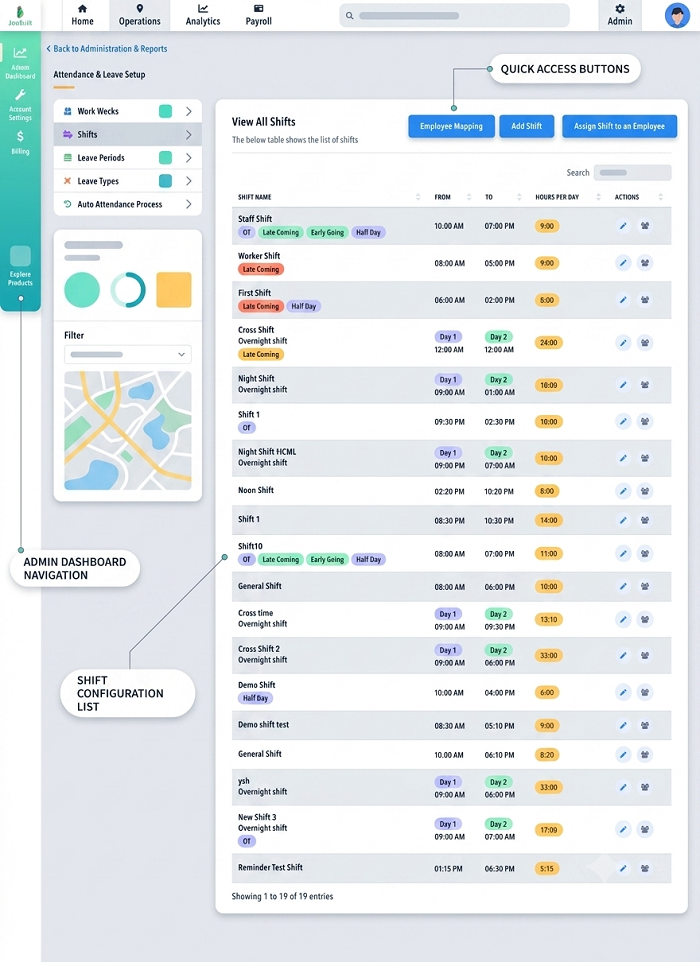
1. Create a Separate Night Shift Schedule
Employers should define night shifts clearly in the workforce-management system.
For example:
Night shift: 10:00 PM to 6:00 AM
The system should recognize that the employee's shift starts on one date and finishes on the following date. This prevents the attendance system from incorrectly treating the second part of the shift as a separate workday.
2. Record Actual Clock-In and Clock-Out Times
The attendance system should capture the employee's actual working times.
For example:
| Attendance Item | Time |
|---|---|
| Scheduled start | 10:00 PM |
| Actual clock-in | 9:56 PM |
| Scheduled end | 6:00 AM |
| Actual clock-out | 6:12 AM |
The system can then compare scheduled and actual hours according to the employer's attendance policy.
3. Treat an Overnight Shift as One Shift
Consider:
Monday 10:00 PM → Tuesday 6:00 AM
The system should link the entire period to the employee's Monday night shift. This is particularly important for:
- Payroll
- Overtime
- Break calculation
- Attendance reports
- Shift allowances
- Weekly working-hour calculations
4. Track Breaks Separately
Employees should have applicable rest and meal breaks during their shifts.
The UAE Labour Law generally provides that employees should not work more than five consecutive hours without a break or breaks for rest, meals, or prayer, with the total break periods generally being at least one hour. These breaks are generally not counted as working hours.
For example:
- Shift: 10:00 PM–6:00 AM
- Break: 1:00 AM–2:00 AM
- Working time: 7 hours
The attendance system should record the break according to the employer's applicable policy and legal requirements.
5. Calculate Daily Working Hours
The system should calculate actual working time after applicable breaks.
For example:
- Clock-in: 9:55 PM
- Clock-out: 6:10 AM
- Elapsed time: 8 hours 15 minutes
- Break: 1 hour
- Working time: 7 hours 15 minutes
Payroll should use the applicable company and statutory rules when determining payable working time.
6. Monitor Weekly Working Hours
Night shifts should also be included in the employee's weekly working-hour calculation.
For employees subject to the ordinary working-hour rules, UAE Labour Law generally establishes 8 hours per day or 48 hours per week, subject to statutory exceptions and specific rules. An automated system can total hours across shifts that cross midnight.
7. Identify Overtime Automatically
Overtime should be identified by comparing actual working hours with the applicable scheduled and statutory limits.
For example:
- Scheduled: 10:00 PM–6:00 AM
- Actual: 10:00 PM–7:30 AM
If the additional time qualifies as overtime under the applicable rules and has been authorized, the system should identify the additional working period for payroll processing.
8. Obtain Overtime Approval
Employers should establish a clear overtime approval workflow.
For example:
Manager schedules overtime → Employee works → Attendance captures actual time → Manager verifies → Payroll processes
This helps prevent unauthorized overtime from being automatically added to payroll.
9. Distinguish Overtime From Early Clock-In
An employee may clock in before the scheduled start time.
For example:
- Scheduled: 10:00 PM
- Clock-in: 9:30 PM
The additional 30 minutes should not automatically be treated as payable overtime. The employer's policy and applicable legal requirements should determine whether the time qualifies as working time or overtime. This distinction helps prevent payroll overpayments.
10. Handle Late Clock-Outs
Similarly, an employee may remain at work beyond the scheduled end.
For example:
- Scheduled end: 6:00 AM
- Actual clock-out: 6:45 AM
The additional 45 minutes should be reviewed under the company's overtime authorization process and applicable UAE requirements.
11. Track Night Shifts Across Weekly Rest Days
Overnight shifts can sometimes cross into an employee's weekly rest day.
For example:
Saturday 10:00 PM → Sunday 6:00 AM
The system should identify the employee's scheduled shift and weekly rest arrangement before determining the appropriate attendance and payroll treatment. This prevents automatic misclassification of the entire shift.
12. Manage Public-Holiday Night Shifts
A night shift can also cross a public holiday.
For example:
Holiday begins at midnight.
Employee works: 11:00 PM Monday → 7:00 AM Tuesday
The system should identify which portion of the shift falls on the public holiday and apply the relevant attendance and payroll rules.
Where an employee is required to work on an official public holiday, Article 28 of the UAE Labour Law provides specific compensation arrangements. Payroll should therefore receive accurate information about the employee's actual holiday work.
13. Use Biometric or Mobile Attendance
Employers can use appropriate attendance technologies such as:
- Biometric terminals
- Mobile attendance
- QR-based attendance
- Access-control integration
- Web-based clock-in
The selected method should reliably capture the employee's actual attendance while complying with the organization's privacy and data-handling requirements.
14. Use Location-Based Attendance for Field Workers
Night-shift employees who work outside a fixed office may need mobile attendance. Examples include:
- Security guards
- Maintenance technicians
- Delivery teams
- Field engineers
- Emergency service teams
Where the employer uses location-based attendance, the system can associate the attendance record with the employee's assigned work location.
15. Connect Attendance With Payroll
The ideal workflow is:
Night shift schedule → Clock-in/out → Breaks → Actual hours → Overtime approval → Payroll
This reduces manual calculations and ensures payroll teams have access to approved attendance information.
16. Track Shift Allowances Separately
Some organizations provide contractual or company-specific night-shift allowances.
If applicable, payroll software should maintain a separate earning component for the allowance rather than incorrectly combining it with overtime.
For example:
Basic salary + Night-shift allowance + Approved overtime
The actual entitlement should be determined by the employment contract, company policy, and applicable law.
17. Monitor Fatigue and Consecutive Night Shifts
Attendance tracking should not focus only on payroll. Managers can also use the data to identify:
- Excessive consecutive night shifts
- Frequent overtime
- Short intervals between shifts
- Repeated late clock-outs
- Excessive weekly hours
This can support safer workforce planning, especially in high-risk industries.
18. Manage Shift Changes Carefully
Moving an employee from a night shift to an early morning shift can create scheduling conflicts.
For example:
- Monday: 10:00 PM–6:00 AM
- Tuesday: 7:00 AM–3:00 PM
The scheduling system should flag such patterns for managerial review rather than allowing conflicting rosters to be published automatically.
19. Integrate Leave With Night Shifts
Annual leave, sick leave, and other approved leave should be linked to the employee's actual shift schedule.
For example:
- Scheduled: Tuesday 10:00 PM–Wednesday 6:00 AM
- Approved leave: Tuesday
The system should correctly associate the leave with the applicable scheduled shift.
20. Maintain an Audit Trail
Employers should retain records of:
- Published night-shift roster
- Clock-in/out times
- Breaks
- Overtime requests
- Overtime approvals
- Shift changes
- Leave
- Public-holiday work
- Payroll adjustments
An audit trail helps HR explain how working hours and overtime were calculated.
21. Provide Employee Self-Service
Employees should be able to view:
- Current night shift
- Upcoming shifts
- Clock-in/out records
- Overtime
- Leave
- Rest days
- Approved schedule changes
If an employee notices an incorrect attendance entry, the system can provide a formal correction workflow.
Example of Night Shift Tracking
Suppose an employee is scheduled:
10:00 PM–6:00 AM
The employee records:
- Clock-in: 9:58 PM
- Break: 2:00 AM–3:00 AM
- Clock-out: 6:30 AM
The system can calculate the applicable working time, identify the additional 30 minutes for review, and send the overtime record for approval according to company policy.
Conclusion
UAE employers should track night shifts as complete overnight shifts, rather than treating the portion after midnight as an unrelated attendance record. Accurate clock-in/out records, break tracking, weekly-hour calculations, overtime approvals, and public-holiday handling are essential for reliable payroll.
An integrated system connecting shift scheduling, attendance, overtime, leave, employee self-service, and payroll can help UAE businesses manage overnight teams more accurately while maintaining clear records for compliance and payroll audits.
Overnight shifts cross calendar days, which complicates manual timesheets. InnBuilt Attendance Software can align UAE night-shift punches to the right roster for manager review and payroll preparation.