How to Assess WPS File Preparation and Validation in UAE Payroll Software
How to Assess WPS File Preparation and Validation in UAE Payroll Software
Introduction
Managing salary payments accurately and on time is an important responsibility for employers in the United Arab Emirates (UAE). Businesses must maintain reliable payroll records, calculate employee salaries correctly, and follow the applicable salary payment requirements. For employers covered by the Wage Protection System (WPS), preparing and validating salary information is an essential part of the monthly payroll process.
The Wage Protection System is an electronic salary transfer framework designed to help ensure that employees receive their wages through approved financial institutions and payment channels. Employers need to prepare the required salary information accurately and submit it through the applicable process.
Manual WPS file preparation can create challenges, particularly for businesses with large workforces, multiple salary structures, and frequent employee changes. Incorrect employee information, mismatched salary amounts, missing payment details, and formatting errors can result in file rejection or payment delays.
UAE payroll software can simplify this process by preparing WPS files, checking employee information, identifying discrepancies, and maintaining salary payment records. However, the quality of these features varies between software providers.
Before purchasing or implementing a payroll solution, employers should assess how effectively it prepares and validates WPS files. This article explains the key features to evaluate, practical tests to perform, vendor questions to ask, and common mistakes to avoid.
1. Understand the WPS Requirements Applicable to Your Business
Before assessing WPS functionality, employers should understand which salary payment requirements apply to their establishment.
The UAE WPS framework is administered through the relevant authorities and operates through approved financial institutions and payment channels. Employers should verify the requirements applicable to their establishment, including any relevant mainland or free-zone arrangements.
A payroll platform should support the appropriate WPS process rather than offering a generic salary file export feature.
During the initial assessment, identify:
- The applicable WPS requirements for the establishment.
- The relevant salary payment channel.
- The required file format and data fields.
- Employee information required for salary processing.
- Applicable salary payment deadlines.
- Procedures for correcting rejected files.
- The records employers must retain.
For example, a business employing 150 workers may need to prepare salary payment information every month. The payroll system should be able to collect the necessary employee details, calculate approved salary amounts, and prepare the file in the format required for the employer's payment arrangement.
What to check in the software:
- Does the platform support the relevant WPS requirements?
- Can it generate the required file format?
- Are the file fields configurable where necessary?
- Does the vendor provide updates when requirements change?
- Can the system support the employer's specific payment channel?
Employers should ask vendors to identify the exact WPS requirements supported by their product and demonstrate the process using a sample payroll.
2. Evaluate Automatic WPS File Generation
One of the most important features of WPS-enabled payroll software is automatic salary file generation.
After payroll has been reviewed and approved, the system should be able to use the relevant employee and salary information to prepare the required WPS file.
Look for the following capabilities:
- Automatic collection of approved payroll data.
- Employee identification information.
- Salary payment details.
- Applicable salary period information.
- Payment amounts.
- Required employer or establishment details.
- Generation in the supported WPS format.
- Secure file download and storage.
The software should generate the file using the approved payroll information rather than requiring administrators to enter the same details again.
Example:
A company processes monthly salaries for 100 employees. After payroll approval, the payroll administrator selects the relevant salary period and initiates WPS file generation.
The software should collect the approved employee payment information and prepare the required file. The administrator should then be able to review the file status and address any validation errors before submission.
Questions to ask the vendor:
- Can WPS files be generated directly from approved payroll?
- Which file formats are supported?
- Does the system support our relevant payment channel?
- Can administrators select the payroll period?
- Can the file be regenerated after corrections?
- Does the system retain previously generated files?
A good system should reduce repetitive data entry and help maintain consistency between payroll calculations and salary payment records.
3. Check Employee Information Validation
Incorrect employee information is a common source of payroll file errors. Even when salary calculations are accurate, incomplete or inconsistent employee details can affect WPS file preparation.
Payroll software should validate relevant employee information before generating the file.
Depending on the applicable WPS format and payment arrangement, employee information may include:
- Employee identification details.
- Relevant work permit or employee reference information.
- Bank account or payment destination details.
- Financial institution or payment channel information.
- Salary payment details.
- Employment-related information required by the process.
The software should identify missing, incomplete, or incorrectly formatted information before allowing the administrator to proceed.
Example:
A business is preparing its monthly WPS file for 75 employees. During validation, the system identifies that one employee's payment information is incomplete.
Instead of generating a file with an unresolved record, the system should flag the employee and explain which information needs correction.
Features to assess:
- Mandatory field validation.
- Duplicate employee identification checks.
- Incorrect account information alerts.
- Missing payment details warnings.
- Data format validation.
- Employee record completeness reports.
- Identification of inactive or incorrectly configured employees.
Questions to ask the vendor:
- Which employee fields are validated before file generation?
- Can the system identify missing information?
- Does it check for duplicate employee records?
- Can administrators view all incomplete records in one report?
- Can validation errors be corrected directly from the payroll screen?
Employers should also check whether the validation rules reflect the current requirements of their relevant WPS process.
4. Verify Salary Amount and Payroll Reconciliation
WPS file preparation must be consistent with the approved payroll records.
A payroll system should ensure that the salary amounts included in the generated file match the relevant approved payment information.
Differences may occur because of:
- Incorrect salary calculations.
- Unapproved payroll adjustments.
- Missing allowances.
- Unpaid leave deductions.
- Overtime corrections.
- Salary advances or authorised deductions.
- Incorrect employee payment details.
- Manual changes made after payroll approval.
The software should provide a reconciliation process that helps administrators identify differences before submitting the salary file.
Example:
An organisation approves payroll with a total salary payment of AED 250,000. However, the generated WPS file shows a total of AED 247,500.
The system should help administrators investigate the difference by displaying employee-level salary amounts and identifying records that do not match the approved payroll.
What to assess:
- Payroll total versus WPS file total.
- Employee-wise salary comparison.
- Approved versus generated payment amounts.
- Identification of missing employees.
- Identification of additional or duplicate records.
- Reconciliation of salary adjustments.
- Exportable discrepancy reports.
Questions to ask the vendor:
- Does the system compare approved payroll with the generated WPS file?
- Can it identify employee-level differences?
- Does it display the total payment amount?
- Can administrators investigate missing or duplicate records?
- Are reconciliation reports available?
- Can the system prevent unauthorised changes after approval?
A clear reconciliation feature helps employers identify discrepancies before the file enters the payment process.
5. Assess WPS File Format and Technical Validation
WPS files must follow the technical requirements applicable to the relevant payment arrangement. A file may contain correct salary information but still fail if its structure, formatting, or required fields are incorrect.
Payroll software should validate the generated file against the supported format before it is downloaded or submitted.
Technical validation may include:
- File structure checks.
- Required field checks.
- Data type validation.
- Character and field length checks.
- Date format validation.
- Numeric value validation.
- Required code validation.
- File naming requirements, where applicable.
- Record count and file completeness checks.
The exact technical checks depend on the current file specification and the applicable WPS process.
Example:
An administrator prepares a salary file for 200 employees. The file contains the correct salary values, but one required field is missing for a particular employee.
The payroll software should identify the missing field and provide an understandable error message rather than simply generating a file that may fail during submission.
Questions to ask the vendor:
- Is the generated file checked against the applicable technical specification?
- Does the software identify missing mandatory fields?
- Are formatting errors displayed before download?
- Can the administrator view the validation results?
- Does the vendor update the file-generation rules when specifications change?
- Can the software generate a corrected file without recreating the entire payroll?
Employers should request evidence that the software supports the relevant current file specification. A generic CSV or Excel export should not be treated as equivalent to a validated WPS file.
6. Test Error Detection and Correction Workflows
Validation is useful only when the software helps administrators understand and correct errors.
A payroll platform should provide clear error messages and a practical correction workflow.
Common issues that should be identified include:
| Potential error | What the software should do |
|---|---|
| Missing employee information | Identify the employee and missing field |
| Incorrect payment details | Flag the relevant information for review |
| Duplicate employee record | Identify possible duplicate entries |
| Incorrect salary amount | Highlight the discrepancy against approved payroll |
| Missing salary record | Identify employees expected in the payment file |
| Invalid data format | Explain the field or formatting issue |
| Inactive employee included | Flag the employee record for review |
| Incorrect payroll period | Warn the administrator before file generation |
| Unapproved payroll adjustment | Prevent or flag the unauthorised payment change |
Practical demo scenario:
Ask the vendor to create a sample payroll containing the following issues:
- One employee with missing payment information.
- One employee with an incorrect account detail.
- One employee with a salary amount that does not match the approved payroll.
- One duplicate employee record.
- One incomplete employee identification field.
Ask the vendor to run WPS validation and demonstrate how each issue is displayed.
The system should ideally provide:
- Employee name or reference.
- Error description.
- Affected field.
- Suggested corrective action.
- Validation status.
- Option to recheck the corrected record.
Questions to ask:
- Are errors displayed individually or only as a general warning?
- Can users filter records by error type?
- Does the system explain how to correct each issue?
- Can corrected records be revalidated?
- Does the system preserve the history of corrections?
Clear error handling reduces the time required to investigate and resolve WPS file problems.
7. Check Payroll Approval and WPS File Authorisation
WPS file generation should be connected to the organisation's payroll approval process.
Employers should ensure that salary information is reviewed and approved before the final payment file is prepared.
The software should support appropriate internal controls, including:
- Payroll preparation by authorised users.
- HR review of employee information.
- Finance verification of salary totals.
- Final approval by designated personnel.
- Restricted access to file generation.
- Approval history.
- Change tracking.
- Payroll locking after final approval, where supported.
Example:
A business follows a three-stage payroll process:
- The payroll administrator calculates salaries.
- The HR manager checks employee details and payroll adjustments.
- The finance manager approves the total salary payment.
After approval, the system allows an authorised user to generate the WPS file.
If any salary amount changes after approval, the system should record the modification and require the appropriate review or reapproval.
Questions to ask the vendor:
- Can WPS file generation be restricted to authorised users?
- Can the system enforce payroll approval before file generation?
- Does it record who generated the file?
- Are post-approval changes tracked?
- Can the file be regenerated after a correction?
- Does the system retain the original and revised file records?
These controls help prevent unauthorised changes and improve accountability during salary processing.
8. Evaluate File Download, Submission, and Payment Tracking
Generating a WPS file is only one part of the salary payment process. Employers also need to understand how the software supports the next steps.
Depending on the vendor's integration capabilities, the system may support file download, submission assistance, payment status recording, or direct connections with approved payment channels.
Evaluate whether the software can:
- Download the generated file securely.
- Record the file generation date and time.
- Maintain the relevant payroll period.
- Identify the employee group covered by the file.
- Record submission details.
- Store payment confirmation information.
- Track processing or rejection status where integrated.
- Reconcile payment results with payroll records.
Do not assume that generating a WPS file means the software can submit it directly or confirm successful salary payment.
Example:
A payroll administrator generates the WPS file and submits it through the applicable payment channel. After processing, the administrator receives a payment status or confirmation from the relevant institution.
The payroll system should allow the organisation to record this information and compare it with the approved payroll.
Questions to ask the vendor:
- Does the software only generate WPS files, or does it also support submission?
- Are direct integrations with payment providers available?
- Can payment confirmations be recorded?
- Can rejected transactions be identified?
- Does the system maintain a history of submitted files?
- Can payment information be reconciled against payroll?
This distinction is important when comparing vendors because file generation, submission, and payment confirmation are separate capabilities.
9. Assess WPS Record Storage and Audit Trails
Employers should maintain appropriate records of payroll calculations, salary payment files, corrections, and related approvals.
Payroll software should provide secure storage and a reliable audit trail for WPS activities.
Look for the ability to maintain:
- Generated WPS files.
- Payroll period information.
- File generation dates.
- Employee payment summaries.
- Validation reports.
- Error correction records.
- Approval history.
- Submission references.
- Payment confirmations, where available.
- Revised file versions.
Example:
A finance manager wants to review the WPS file generated for a previous payroll period. The system should allow an authorised user to retrieve the relevant file and its validation report without searching through multiple email attachments or local folders.
Questions to ask the vendor:
- Are previous WPS files stored securely?
- Can users retrieve files by payroll period?
- Are revised versions clearly identified?
- Does the system record who generated or modified a file?
- Can validation reports be downloaded?
- Can access to historical payment records be restricted?
A complete audit trail makes it easier to investigate salary discrepancies and respond to internal or external record requests.
10. Verify WPS Updates and Vendor Support
WPS requirements and technical specifications may change. Payroll software vendors should have a process for updating their products when relevant requirements are revised.
Employers should evaluate the vendor's ability to maintain the WPS functionality over time.
Check whether the vendor provides:
- Updates to supported file formats.
- Changes to validation rules.
- Notifications about relevant product updates.
- Technical support for file-generation issues.
- Assistance with rejected files.
- Documentation for new processes.
- Testing before updates are deployed.
- Support during payroll processing periods.
Questions to ask the vendor:
- How do you monitor changes to relevant WPS requirements?
- How quickly are supported software features updated?
- Are updates included in the subscription?
- Do you provide assistance with file rejection issues?
- Is technical support available during payroll processing?
- Can the vendor demonstrate its update and testing process?
Employers should also check the support contract for response times, escalation procedures, and any additional charges for specialised assistance.
WPS File Preparation and Validation: Practical Testing Checklist
Before purchasing payroll software, ask the vendor to demonstrate the complete WPS workflow using representative employee information.
Use this checklist to record the results.
| No. | Evaluation area | What to test | Result |
|---|---|---|---|
| 1 | WPS configuration | Confirm support for the applicable establishment and payment arrangement | Pass / Fail |
| 2 | File generation | Generate the required WPS file from approved payroll | Pass / Fail |
| 3 | Employee information | Check mandatory employee and payment fields | Pass / Fail |
| 4 | Salary validation | Compare file amounts with approved payroll | Pass / Fail |
| 5 | Technical validation | Check file structure and required fields | Pass / Fail |
| 6 | Error detection | Identify missing and incorrect information | Pass / Fail |
| 7 | Error correction | Correct records and rerun validation | Pass / Fail |
| 8 | Approval workflow | Verify authorisation before final file generation | Pass / Fail |
| 9 | Submission support | Check available submission or integration features | Pass / Fail |
| 10 | Payment tracking | Review available payment status and reconciliation features | Pass / Fail |
| 11 | Record storage | Retrieve historical files and validation reports | Pass / Fail |
| 12 | Audit trail | Review file generation and correction history | Pass / Fail |
| 13 | Vendor support | Review technical assistance and update arrangements | Pass / Fail |
Employers should record detailed comments alongside the results. For example, if a vendor can generate the file but cannot validate its technical structure, this limitation should be documented before making a purchasing decision.
Conclusion
Assessing WPS file preparation and validation is an essential part of selecting payroll software for businesses operating in the UAE. Employers should look beyond basic file generation and evaluate the complete process, including employee information checks, salary reconciliation, technical validation, error correction, approval workflows, submission support, payment tracking, and record management.
A reliable payroll solution should help administrators identify problems before files are submitted, reduce manual corrections, and maintain a clear record of salary payment activities.
Before purchasing software, ask shortlisted vendors to demonstrate the full WPS workflow using representative employee data. Test missing employee details, incorrect payment information, salary discrepancies, file validation, and correction procedures.
By evaluating these capabilities systematically, UAE employers can choose payroll software that supports accurate salary processing, improves internal controls, and reduces avoidable WPS file preparation errors.
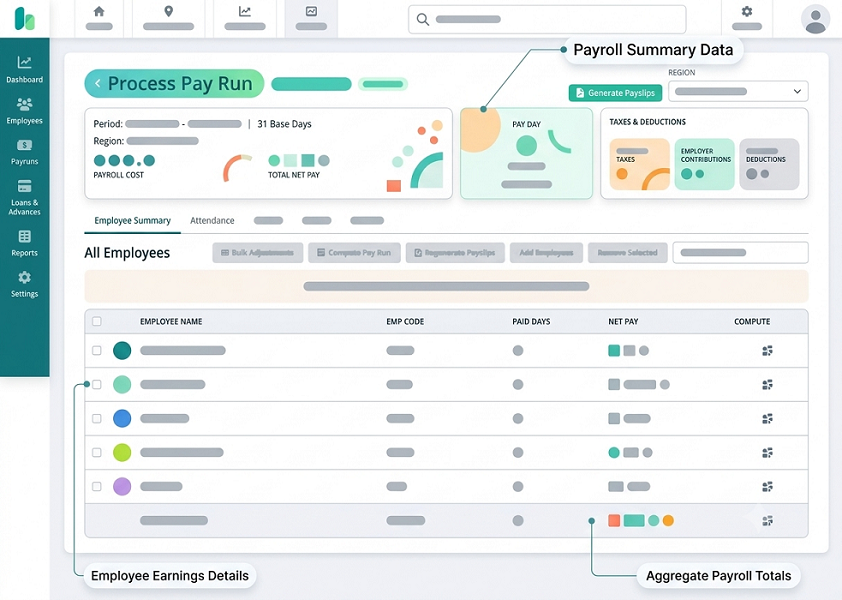
Check how the platform produces payroll data for WPS submission and flags missing or inconsistent details. Confirm InnBuilt's supported file workflow with your bank or exchange-house process.