How Can UAE Restaurants Schedule Split Shifts and Track Working Hours?
How Can UAE Restaurants Schedule Split Shifts and Track Working Hours?
Restaurants in the UAE often experience significant differences in customer demand between breakfast, lunch, dinner, weekends, and special events. As a result, restaurants may use split shifts to align employee availability with busy service periods.
A split shift allows an employee's working day to be divided into two or more separate working periods, with a break between them. While this can help restaurants manage staffing efficiently, it also makes attendance and working-hour calculations more complicated.
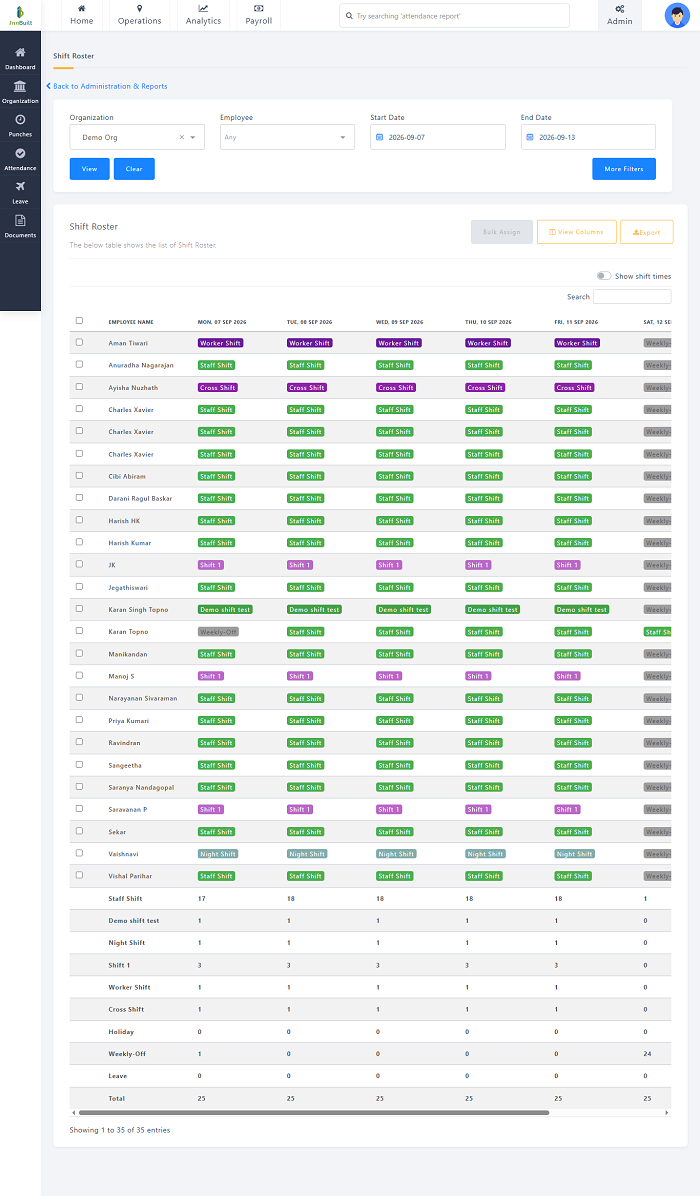
A digital scheduling and attendance system can help restaurants create split shifts, record actual working periods, calculate total hours, identify overtime, manage shift changes, and provide accurate information for payroll.
1. Understand the Restaurant's Demand Patterns
Before creating split shifts, restaurant managers should identify when staffing demand is highest.
For example:
- Breakfast service
- Lunch service
- Afternoon preparation
- Dinner service
- Late-night service
- Weekend periods
- Events and private functions
A restaurant may require more kitchen and service staff during lunch and dinner than during quieter afternoon hours.
The schedule can then be designed around actual business demand.
2. Create Structured Split-Shift Schedules
A split shift should clearly identify each working period.
For example:
| Employee | First Shift | Break | Second Shift |
|---|---|---|---|
| Server | 11 AM–3 PM | 3 PM–6 PM | 6 PM–11 PM |
| Chef | 10 AM–2 PM | 2 PM–5 PM | 5 PM–10 PM |
| Steward | 12 PM–4 PM | 4 PM–7 PM | 7 PM–11 PM |
The exact schedule should be based on operational requirements, employment arrangements, approved policies, and applicable UAE requirements.
A digital system can store both working periods under the same employee schedule.
3. Record Each Working Period Separately
Split shifts should not be treated as one continuous attendance period.
For example:
First Check-In: 11:00 AM
First Check-Out: 3:00 PM
Second Check-In: 6:00 PM
Second Check-Out: 11:00 PM
The system can calculate:
- First working period
- Second working period
- Total working hours
- Break between periods
- Late arrival
- Early departure
- Additional working time
This makes the attendance record easier to audit.
4. Use Mobile or Biometric Attendance
Restaurants can use attendance methods suitable for their environment, such as:
- Biometric devices
- Employee kiosks
- Mobile attendance
- Access-control systems
For restaurant employees working at fixed locations, a biometric or kiosk-based system may be practical.
For employees who work across different restaurant branches or event locations, mobile attendance can provide additional flexibility.
5. Compare Scheduled and Actual Hours
The system should compare the employee's planned shift with actual attendance.
For example:
Scheduled: 11:00 AM–3:00 PM
Actual: 11:10 AM–3:05 PM
The system can flag the late arrival and additional time separately.
This helps managers determine whether the difference requires correction, approval, or payroll treatment.
6. Track the Break Between Split Shifts
The gap between two working periods should be clearly recorded.
For example:
First Shift: 11:00 AM–3:00 PM
Break: 3:00 PM–6:00 PM
Second Shift: 6:00 PM–11:00 PM
The scheduling system should distinguish the planned break from actual working time.
This is important because an employee who returns early or remains working during the break may create additional working hours that require review.
7. Handle Last-Minute Schedule Changes
Restaurant operations can change quickly because of:
- Unexpected customer demand
- Large bookings
- Staff absence
- Events
- Delivery orders
- Kitchen workload
- Seasonal peaks
Managers may need to change an employee's second shift at short notice.
A digital system can record:
- Original schedule
- Revised schedule
- Time of change
- Person who made the change
- Reason, where required
- Employee acknowledgement, where supported
This provides a clear history of schedule changes.
8. Manage Employee Shift Swaps
Employees may sometimes need to exchange shifts.
A controlled digital workflow can be:
Employee Requests Swap → Eligible Employee Selected → Supervisor Approval → Schedule Updated → Attendance Updated
The system should ensure that the replacement employee is available and qualified for the role.
For example, a kitchen station requiring specific skills should not be assigned to an employee without the appropriate training.
9. Track Overtime Accurately
Split shifts can sometimes result in employees working beyond their scheduled hours.
A digital attendance system can identify:
- Additional working time
- Extended first shift
- Extended second shift
- Early return from break
- Additional shift
- Approved overtime
- Unapproved additional hours
A typical workflow is:
Attendance → Working Hours → Overtime Detection → Manager Approval → Payroll
Overtime calculations should be configured according to applicable UAE requirements, employment contracts, and company policies.
10. Monitor Attendance by Restaurant Department
Restaurants often have several teams working different schedules.
Attendance can be organized by:
- Kitchen
- Service
- Bar
- Stewarding
- Housekeeping
- Delivery
- Reception
- Management
Managers can compare staffing levels across departments and identify shortages before service begins.
For example, a restaurant may have sufficient servers but insufficient kitchen staff for a busy dinner period.
11. Plan Staffing Around Peak Hours
Restaurant scheduling software can help managers match staffing with demand.
For example:
Low Demand → Smaller Team
Lunch Peak → Increased Staffing
Afternoon Slow Period → Reduced Coverage
Dinner Peak → Increased Staffing
This can help restaurants avoid overstaffing during quiet periods while maintaining adequate coverage during busy periods.
12. Track Late Arrivals and Early Departures
Restaurants operate on precise service schedules, so employee attendance exceptions can affect operations.
Managers can monitor:
- Late check-ins
- Early check-outs
- Missing punches
- Unplanned absences
- Second-shift attendance
- Repeated attendance exceptions
Exception-based monitoring allows supervisors to focus on records that need attention instead of reviewing every employee manually.
13. Connect Attendance With Payroll
Accurate attendance data becomes especially useful when integrated with payroll.
A typical workflow is:
Shift Schedule → Check-In/Out → Working Hours → Leave/Overtime → Payroll
HR can reconcile actual working hours with approved schedules before processing salaries.
This reduces manual calculations and helps identify discrepancies between timesheets and attendance records.
14. Manage Multiple Restaurant Branches
Restaurant groups operating multiple locations may need employees to work at different branches.
For example:
Branch A → Employee's Primary Location
Branch B → Temporary Assignment
Branch C → Event Support
A centralized workforce system can record the employee's assigned branch and actual attendance location.
For mobile staff, location verification can be used where appropriate. GPS accuracy can vary, particularly inside large buildings, so exceptions should be reviewed rather than automatically treated as misconduct.
15. Use Dashboards for Workforce Visibility
Restaurant managers can use dashboards to monitor current staffing conditions.
Useful information includes:
- Employees currently working
- Upcoming shifts
- Employees late for work
- Missing attendance
- Department staffing
- Split-shift status
- Overtime
- Open shifts
- Approved leave
This gives managers a quick overview of staffing without relying on paper rosters or multiple spreadsheets.
16. Maintain an Attendance Audit Trail
A reliable system should preserve a history of attendance changes.
The audit trail can include:
- Original schedule
- Revised schedule
- Check-in and check-out times
- Attendance corrections
- Shift swaps
- Overtime approvals
- Supervisor comments
- Payroll adjustments
This makes it easier to investigate employee attendance or payroll questions.
Best Practices for UAE Restaurants
Restaurants can improve split-shift management by following these practices:
- Analyze customer demand before creating schedules.
- Define each working period clearly.
- Record both check-ins and check-outs for split shifts.
- Track scheduled and actual working hours separately.
- Record the break between working periods.
- Use controlled shift-swap approvals.
- Monitor overtime and additional hours.
- Track attendance by department and branch.
- Plan staffing around peak service periods.
- Use exception alerts for late or missing attendance.
- Connect attendance data with payroll.
- Maintain an audit trail for schedule changes.
- Give employees visibility into their schedules.
- Configure schedules according to applicable UAE requirements and company policies.
How Attendance Software Helps UAE Restaurants
A digital attendance and scheduling platform can simplify split-shift management through a workflow such as:
Create Schedule → Assign Split Shift → Employee Check-In → First Check-Out → Second Check-In → Final Check-Out → Calculate Hours → Review Overtime → Payroll
For restaurant groups, centralized scheduling can also provide branch-level visibility and make it easier to transfer employees between locations when operational requirements change.
Conclusion
Split shifts can help UAE restaurants match staffing with changing customer demand, particularly during busy lunch and dinner periods. However, they also create additional complexity when calculating working hours, breaks, overtime, attendance exceptions, and payroll.
By using digital shift scheduling and attendance software, restaurants can accurately record multiple working periods, manage schedule changes, approve overtime, monitor staffing levels, and connect attendance with payroll.
The result is a more organized approach to split-shift scheduling, working-hour tracking, employee attendance, and restaurant workforce management.
Split shifts can be difficult to reconstruct from one daily punch. InnBuilt Shift Management can align UAE restaurant staff to multiple work periods and compare scheduled versus actual hours.