How Can UAE Employers Handle Shift Swaps Without Losing Approval History?
How Can UAE Employers Handle Shift Swaps Without Losing Approval History?
Introduction
Shift swaps are common in UAE businesses that operate on rotating schedules, multiple shifts, or extended business hours. Employees may need to exchange shifts because of personal commitments, family responsibilities, appointments, or unexpected changes in availability. Allowing reasonable shift swaps can improve flexibility and employee satisfaction.
However, informal shift exchanges can create problems for HR teams and shift managers. An employee may work a different shift without an approved roster update, two employees may be assigned to overlapping shifts, or payroll may calculate working hours using an outdated schedule.
To avoid these issues, employers need a structured shift-swap process that records every request, approval, rejection, and schedule change. HR software can help preserve this history while connecting approved swaps to attendance and payroll records.
This guide explains how UAE employers can manage shift swaps efficiently without losing approval history.
1. Establish a Formal Shift-Swap Policy
The first step is to create a clear policy that explains how employees can exchange shifts and who has the authority to approve changes.
The policy should define:
- Who can request a shift swap.
- How far in advance requests should normally be submitted.
- Which employees are eligible to exchange shifts.
- Who reviews and approves requests.
- How urgent or emergency swaps are handled.
- How employees are notified of decisions.
- When a swap becomes effective.
- How approved changes are recorded for attendance and payroll.
For example, a retail employee may request to exchange a Saturday evening shift with a colleague's Sunday morning shift. The change should become official only after the required manager approval and roster update.
The policy should also make clear that an informal agreement between employees does not automatically update the official schedule.
2. Use a Centralised Shift-Swap Request System
When employees request swaps through personal messages, phone calls, or verbal conversations, HR may struggle to maintain a complete record. Important details can be missed, and managers may not know which version of the roster is correct.
A centralised HR or workforce management system gives employees a standard way to submit requests.
Each request should capture:
- Requesting employees.
- Employee accepting the proposed swap.
- Original shift dates and times.
- Proposed replacement dates and times.
- Work location and department.
- Reason for the request, where required by policy.
- Submission date and time.
- Current approval status.
The system should assign a unique request reference so the swap can be traced throughout the approval process.
Employees should be able to view whether their request is pending, approved, rejected, or cancelled. This reduces unnecessary follow-ups and helps prevent employees from acting on an unconfirmed change.
3. Preserve Approval History with an Audit Trail
An audit trail is a chronological record of the actions taken on a shift-swap request. It helps HR determine who requested a change, who approved it, when the decision was made, and what was changed.
A reliable system should retain:
| Audit field | Information recorded |
|---|---|
| Request ID | Unique reference for the shift swap |
| Original assignment | Employee's initial shift details |
| Proposed assignment | Requested replacement shift |
| Request timestamp | Date and time the request was submitted |
| Approver details | Identity and role of the person making the decision |
| Approval timestamp | Date and time of approval or rejection |
| Decision | Approved, rejected, cancelled, or returned for changes |
| Reason or comments | Explanation where required by policy |
| Roster update | Final schedule change and effective date |
| Change history | Subsequent amendments or reversals |
The system should preserve the original request and its decision history rather than simply replacing the original shift details.
For example, if a manager approves a swap and later reverses it because of a staffing shortage, the system should record both decisions. It should not erase the original approval.
This is particularly useful when HR investigates attendance discrepancies, employee complaints, or payroll differences.
4. Prevent Unauthorised Changes to Approved Swaps
Once a swap has been approved, access controls should prevent unauthorized users from changing the assignment without leaving a trace.
Recommended controls include:
- Role-based permissions for employees, managers, HR, and payroll.
- Restrictions on who can approve their own requests.
- Reapproval when a material change is made to an approved swap.
- A recorded reason for cancelling or reversing an approved change.
- Notifications when the roster changes after approval.
- Version history for published schedules.
- An audit log that records the user, timestamp, and action.
For example, if an employee changes the proposed shift date after approval, the system should not silently accept the new date. It should require the change to go through the appropriate validation and approval process.
These controls reduce the risk of employees working shifts that were never formally authorised.
5. Connect Approved Swaps with Attendance Records
Approval history is useful only if the official roster and attendance records remain consistent.
After a shift swap is approved, the system should update the employee's schedule and make the latest version available to relevant managers and employees.
Attendance systems should then compare actual clock-in and clock-out data against the approved schedule.
HR should be able to identify situations such as:
- An employee works the replacement shift but the roster still shows the original shift.
- An employee attends a shift that was never approved.
- Both employees attend the same assignment unexpectedly.
- An employee does not report for the approved replacement shift.
- A shift swap changes the location or reporting supervisor.
For example, two hotel employees may exchange their night and morning shifts. If the change is approved but not reflected in the attendance system, one employee could be incorrectly marked absent.
Integrating scheduling and attendance reduces such discrepancies and creates a consistent record of planned versus actual work.
6. Ensure Payroll Uses the Approved Schedule and Actual Hours
Shift swaps can affect overtime, night work, rest days, allowances, and other payroll calculations. Payroll teams should therefore use both the approved schedule and actual attendance data.
The system should preserve the original roster, the approved replacement, and the hours actually worked.
Before payroll is finalised, HR and payroll should check:
- Whether the swap was approved before it took effect or properly documented as an emergency exception.
- Whether the correct employee worked each shift.
- Whether the actual working hours match the attendance record.
- Whether the change affects overtime or other applicable pay items.
- Whether a rest day or public holiday is involved.
- Whether any payroll adjustment has already been processed.
Under the general UAE private-sector framework, normal working hours are generally eight hours per day or 48 hours per week, subject to applicable exceptions. Employers must also follow the relevant rules on breaks, weekly rest, and overtime. A shift swap should not be used to bypass these requirements.
Payroll should not assume that a swap automatically creates overtime or removes an existing entitlement. The actual schedule, hours worked, applicable rules, and employment terms must be considered.
7. Handle Emergency Shift Swaps Without Losing Records
Some situations require an urgent change, such as illness shortly before a shift begins. A lengthy approval process may not be practical, but the organisation should still preserve a record of the decision.
Employers can establish an emergency procedure that allows an authorised supervisor to approve a temporary replacement quickly.
The procedure should include:
- Recording the reason for the emergency change.
- Identifying the employee who will cover the shift.
- Checking that the replacement is qualified and available.
- Obtaining approval from an authorised manager.
- Recording the approval time and effective shift.
- Updating the roster and notifying affected employees.
- Completing any required follow-up review.
If the system is unavailable, the organisation can use a designated fallback process, such as a controlled form or approved communication channel. The change should then be entered into the official system as soon as practical, with the original decision time and supporting evidence retained.
Emergency handling should provide flexibility without allowing unrecorded changes to become the normal process.
8. Protect Shift-Swap Records and Employee Information
Shift-swap records contain employee names, work schedules, and approval details. Employers should restrict access to personnel who need this information for workforce planning, HR administration, or payroll.
Useful controls include:
- Role-based access to roster and approval records.
- Secure authentication for employees and managers.
- Restrictions on downloading or editing audit logs.
- Defined retention periods based on applicable legal and business requirements.
- Secure backup and recovery procedures.
- Regular access reviews.
- A process for investigating unauthorised changes.
The UAE's Personal Data Protection Law provides a framework for protecting personal information and governing its processing, subject to its scope and exceptions. Employers should ensure that shift-scheduling systems are configured in accordance with applicable privacy and security obligations.
9. Use HR Software to Automate Shift-Swap Management
HR and workforce management software can reduce manual work while preserving a reliable approval history.
Employee self-service
Employees can request swaps, select eligible colleagues, view decisions, and receive notifications from a central portal.
Automated validation
The system can identify overlapping assignments, unavailable employees, incompatible locations, and potential working-hour conflicts.
Configurable approvals
Managers can approve or reject requests based on department, shift type, location, or other business rules.
Immutable or protected audit logs
Suitable systems can preserve historical events and restrict alteration or deletion of approval records. Employers should confirm the specific audit-log capabilities offered by their software provider.
Attendance integration
Approved swaps flow into the official schedule, allowing attendance to be compared with the correct assignment.
Payroll integration
Validated scheduling and attendance records can be sent to payroll for review of hours, overtime, and applicable allowances.
Reporting and analytics
HR can report on swap frequency, approval turnaround times, emergency changes, repeated scheduling conflicts, and departments with frequent staffing gaps.
Software should support sound HR processes rather than replace them. Employers still need clear policies, appropriate approval authority, and periodic reviews of system settings.
10. Best Practices for UAE Employers
To preserve shift-swap approval history, employers should:
- Use one official system: Avoid maintaining competing rosters across spreadsheets, emails, and messaging apps.
- Require formal approval: Employees should know when a swap becomes effective.
- Preserve every decision: Retain requests, approvals, rejections, cancellations, and subsequent changes.
- Limit editing permissions: Only authorised users should update approved schedules.
- Reconcile attendance regularly: Check that the employee who worked matches the approved assignment.
- Review payroll exceptions: Investigate differences before salary processing.
- Train managers and employees: Explain the process and emergency fallback arrangements.
- Audit recurring problems: Identify departments with frequent last-minute changes or repeated unapproved swaps.
- Test system integrations: Confirm that approved changes reach attendance and payroll correctly.
- Review legal and retention requirements: Apply the rules relevant to the organisation's employment category and jurisdiction.
Frequently Asked Questions
1. Why should employers maintain shift-swap approval history?
Approval history shows who requested, approved, rejected, or changed a shift swap. It helps HR investigate disputes, correct attendance records, and verify payroll calculations.
2. Can employees exchange shifts without manager approval?
That depends on the employer's policy and any applicable requirements. Employers should define the approval process clearly and ensure the official roster is updated before the change is treated as authorised.
3. How can HR software prevent unauthorised shift changes?
Software can restrict approval permissions, require reapproval for material changes, record timestamps, and notify affected employees when a roster is updated.
4. What should a shift-swap audit trail include?
It should generally include the request reference, original and proposed shifts, requester, approver, decision, timestamps, comments where required, and the final roster change.
5. How do shift swaps affect payroll?
A swap can change the employee assigned to a shift and may affect working hours, overtime, rest days, or applicable allowances. Payroll should reconcile the approved schedule with actual attendance and the relevant pay rules.
6. How should employers handle emergency swaps?
Employers should designate authorised emergency approvers, record the reason and effective shift, update the official roster, notify affected employees, and enter any fallback approval into the system with a traceable history.
7. How long should employers retain shift-swap records?
Employers should establish a documented retention schedule based on applicable legal obligations, recordkeeping requirements, business needs, and data protection principles. The retention period should not be assumed to be identical for every organisation or record type.
Conclusion
Managing shift swaps without losing approval history requires a clear policy, centralised requests, controlled approvals, and reliable audit trails. UAE employers should ensure that every approved change is reflected in the official roster, attendance records, and payroll process.
Workforce management software can simplify these tasks by detecting conflicts, preserving approval decisions, notifying employees, and connecting scheduling with attendance and payroll. With the right controls, businesses can offer employees flexibility while maintaining accurate records and operational accountability.
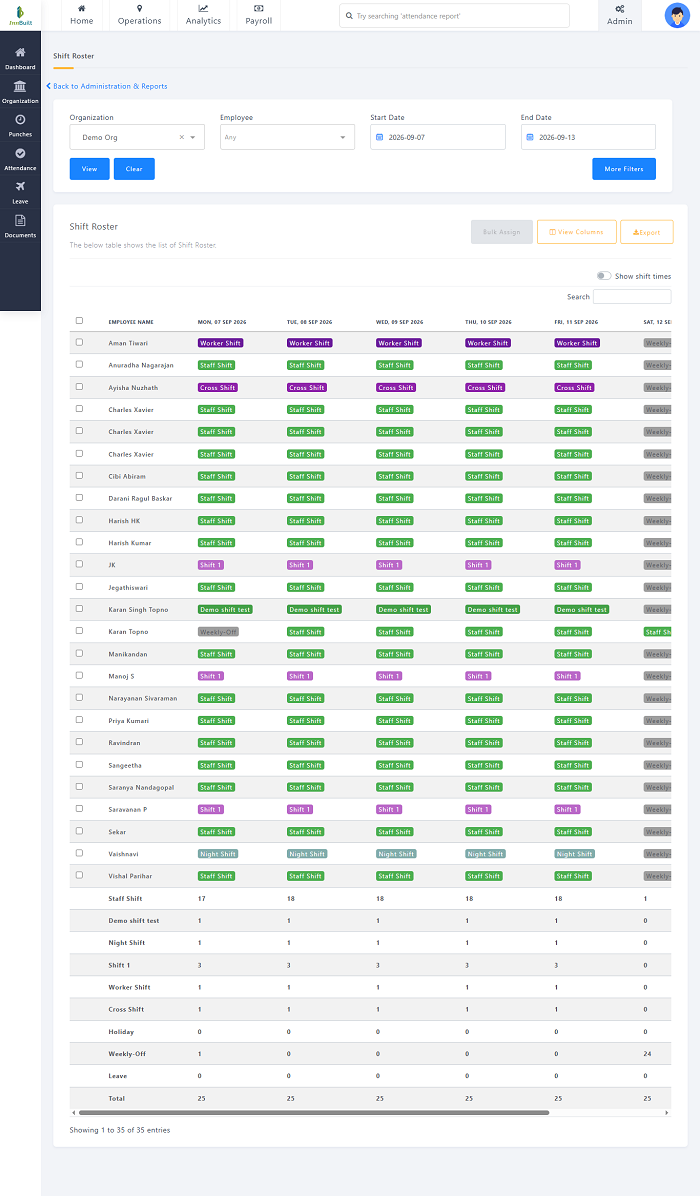
Shift swaps need more than an informal message. InnBuilt Shift Management can record who requested, accepted and approved each UAE roster change, keeping an understandable history.