How to Test UAE Shift, Overtime, Holiday, and Ramadan Rules Before Buying Attendance Software
Introduction
Choosing attendance software in the UAE requires more than checking whether employees can clock in and out. Businesses must also confirm that the system can handle different shift patterns, calculate overtime correctly, recognise public holidays and apply Ramadan working-hour arrangements.
These requirements can become complicated when an organisation employs office staff, warehouse workers, security guards, healthcare professionals, construction teams and field employees under different schedules.
A system that works for a standard office timetable may not handle overnight shifts, rotating schedules, split shifts or public-holiday attendance accurately. Similarly, software that applies one overtime formula to every employee may not reflect the employer's applicable legal requirements, employment arrangements or approved policies.
Before purchasing, UAE employers should test the software using realistic employee schedules and payroll scenarios. They should verify how rules are configured, how exceptions are approved and how the resulting attendance information reaches payroll.
This guide explains how to test UAE shift, overtime, holiday and Ramadan rules before selecting an attendance management system.
1. Start by Identifying the Applicable Working-Hour Rules
Before testing software, employers should identify which working-hour rules apply to their employees.
For private-sector employees covered by the UAE Labour Law, normal working hours are generally eight hours per day or 48 hours per week. During Ramadan, normal working hours are reduced by two hours per day. However, certain sectors and employee categories may be subject to different arrangements.
Public-sector entities may follow separate working-hour regulations. Businesses in financial free zones and other special jurisdictions should also check their applicable employment rules.
Ask the vendor whether the system can configure different working-hour policies for different employee groups.
For example, a UAE company may have:
- Office employees working fixed daytime schedules.
- Warehouse employees working rotating shifts.
- Security guards working extended site coverage schedules.
- Field technicians following customer appointment schedules.
- Healthcare employees working overnight rotations.
- Employees assigned to different legal entities or jurisdictions.
The software should allow authorised administrators to configure the relevant rules rather than forcing every employee into one standard attendance policy.
What to test: Create two employee groups with different schedules and verify that the system calculates attendance separately for each group.
2. Test Standard Daily and Weekly Working Hours
Start with the basic working-hour calculation.
For private-sector employees covered by the general UAE rules, the official UAE Government guidance identifies normal working hours as eight hours per day or 48 hours per week, subject to applicable exceptions.
The system should allow businesses to configure:
- Daily scheduled working hours.
- Weekly working-hour limits.
- Start and end times.
- Break durations.
- Weekly rest days.
- Grace periods for late arrivals.
- Flexible working arrangements.
- Different schedules by department or location.
Use a sample schedule to check whether the software calculates actual working time correctly.
| Test detail | Example |
|---|---|
| Shift start | 9:00 AM |
| Shift end | 6:00 PM |
| Break | 1 hour |
| Scheduled working time | 8 hours |
| Actual check-in | 9:05 AM |
| Actual check-out | 6:10 PM |
| Net time worked | 8 hours 5 minutes |
The system should distinguish between scheduled time, actual time worked, break time and any attendance exception.
Also test what happens when an employee arrives early, leaves late or takes a longer break than scheduled.
Important: Do not assume that every minute outside the scheduled shift automatically becomes payable overtime. The system should support approval and payroll rules that reflect the employer's applicable requirements.
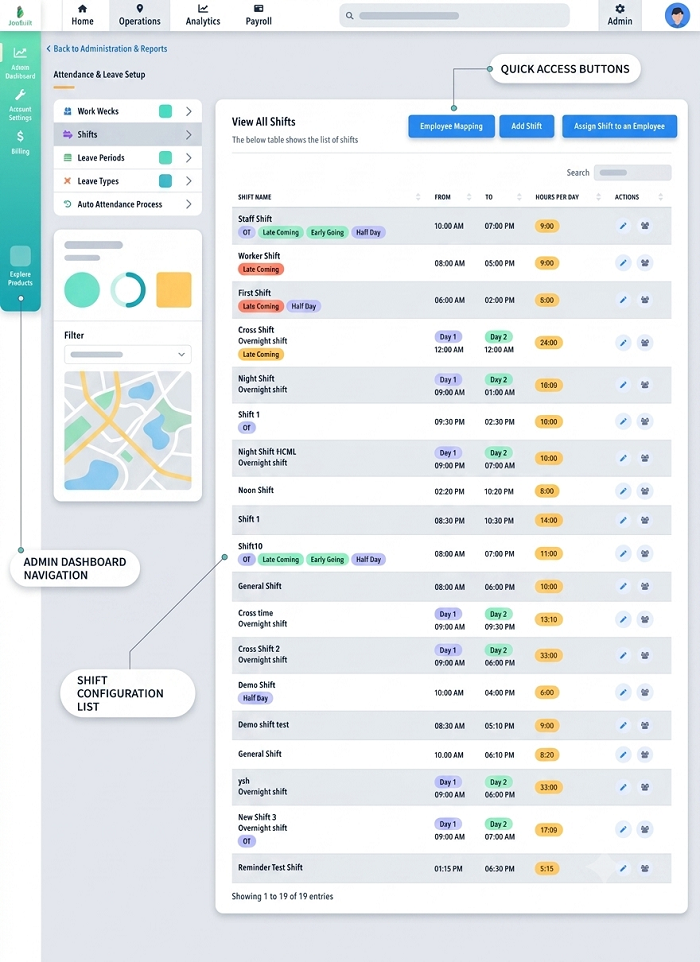
3. Test Rotating and Overnight Shifts
Businesses in security, healthcare, hospitality, manufacturing and logistics frequently operate shifts that extend beyond midnight.
A system should be able to identify which shift an employee belongs to even when the check-in and check-out occur on different calendar dates.
For example:
| Shift detail | Time |
|---|---|
| Shift date | 10 November |
| Shift start | 10:00 PM |
| Shift end | 6:00 AM |
| Check-in | 9:55 PM |
| Check-out | 6:10 AM |
| Net working time | 8 hours 15 minutes, assuming a 1-hour unpaid break |
Test whether the software:
- Recognises the overnight shift as one scheduled shift.
- Associates the check-out with the correct shift.
- Calculates breaks accurately.
- Identifies late arrivals and early departures.
- Separates regular hours from approved overtime.
- Assigns the hours to the correct payroll period.
- Avoids creating duplicate attendance records.
Also test employees who work rotating morning, evening and night shifts.
For example, a warehouse employee may follow this pattern:
| Day | Shift |
|---|---|
| Monday | 6:00 AM–2:00 PM |
| Tuesday | 2:00 PM–10:00 PM |
| Wednesday | 10:00 PM–6:00 AM |
| Thursday | Rest day |
The system should handle changes in shift assignments without confusing the employee's actual working hours.
4. Verify Break and Rest-Day Rules
Break management is another important area to test.
Under the general private-sector rules, employees should not work more than five consecutive hours without one or more breaks totalling at least one hour, subject to applicable exceptions and arrangements under the law.
The system should allow employers to configure break schedules and record actual break information where required.
Test whether it can:
- Define scheduled break periods.
- Record unpaid breaks separately.
- Identify missed or shortened breaks.
- Handle multiple breaks in one shift.
- Support different break rules for different work arrangements.
- Record weekly rest days.
- Flag attendance on scheduled rest days.
For example, a manufacturing employee may have a 30-minute lunch break and two shorter rest breaks. The employer should be able to configure the relevant attendance policy without treating every break as unpaid working time.
Also verify how the system handles employees who work on their scheduled weekly rest day.
The software should record the work and allow authorised users to identify whether the applicable compensation or substitute-rest arrangement has been approved.
5. Test Overtime Calculations and Approval Workflows
Overtime is one of the most important areas to verify before purchasing attendance software.
For private-sector employees covered by the general UAE Labour Law provisions, overtime remuneration is generally calculated using the basic wage component, with applicable additional percentages. The general framework includes:
- At least 25% additional remuneration for qualifying overtime.
- At least 50% additional remuneration for qualifying overtime performed between 10:00 PM and 4:00 AM, subject to the applicable rules.
- Different treatment for work on weekly rest days and official holidays.
- A general limit of two additional working hours per day, subject to legal exceptions.
The law also contains exceptions, including certain shift-work arrangements. Employers should therefore avoid applying one universal overtime formula to all employee groups.
Ask the vendor to demonstrate whether the software can configure overtime policies by employee category, schedule and applicable legal framework.
Test the following scenarios:
| Scenario | What the software should demonstrate |
|---|---|
| Employee works beyond scheduled hours | Extra time is identified |
| Supervisor approves overtime | Approval is recorded |
| Overtime is rejected | Rejected hours are excluded from payable approved overtime |
| Qualifying daytime overtime | Correct configured rule is applied |
| Qualifying night overtime | Relevant night-work rule is applied |
| Employee works on a rest day | Rest-day work is separately identified |
| Employee works on a public holiday | Holiday-work treatment is recorded |
| Overtime exceeds configured limits | System generates an exception or warning |
The system should also maintain an approval history showing who requested, reviewed and approved the overtime.
What to test: Enter a shift ending at 6:00 PM and record an employee check-out at 8:00 PM. Confirm that the two additional hours are flagged and routed through the configured approval process before payroll receives them.
6. Verify How Overtime Is Sent to Payroll
Attendance software may identify extra working hours, but the payroll application usually handles the monetary calculation.
The integration should transfer approved overtime information clearly enough for payroll teams to review the result.
Ask the vendor:
- Are regular and overtime hours exported separately?
- Can overtime be classified by type?
- Are night hours identified?
- Can rest-day and public-holiday work be reported separately?
- Can rejected overtime be excluded?
- Does the integration preserve approval records?
- Can payroll administrators review calculations before finalisation?
- Can overtime rules be configured by employee category?
For example, if an employee has 176 approved regular hours and 10 approved overtime hours, the payroll system should receive those figures separately.
Do not rely on a vendor's statement that it supports overtime. Request a demonstration showing the complete process from attendance capture to approved payroll input.
7. Test UAE Public Holiday Calendars
The UAE observes public holidays that apply to both public and private sectors, subject to the applicable legal framework.
The official UAE Government holiday calendar includes:
- Gregorian New Year.
- Eid Al Fitr.
- Arafah Day.
- Eid Al Adha.
- Hijri New Year.
- Prophet Mohammed's Birthday.
- National Day.
Islamic holiday dates depend on moon sighting and official announcements. Therefore, an attendance system should allow holiday calendars to be updated when the relevant dates are confirmed.
Ask the vendor:
- Does the software include a UAE public holiday calendar?
- Can administrators update holiday dates?
- Can different holiday calendars be assigned to different employee groups?
- Can branches use different operational schedules on public holidays?
- Can employees be rostered to work during holidays?
- Does the system identify attendance on an official holiday?
- Can holiday work be sent separately to payroll?
- Can managers approve substitute rest days or other applicable compensation arrangements?
For example, a retail company may remain open during Eid while its administrative office is closed. The system should be able to apply the correct schedules to both groups.
Important: A public holiday should not automatically be treated as an ordinary absence or a normal working day. The system must recognise the calendar and the employee's assigned schedule.
8. Test Public Holiday Work and Compensation Records
Some UAE businesses operate continuously and cannot close during public holidays.
Hospitals, hotels, transport companies, security providers, logistics businesses and essential service organisations may need employees to work according to planned holiday rosters.
For private-sector employees covered by the general UAE Labour Law, Article 28 provides for compensation when employees are required to work during official holidays or leave days. The general framework includes another rest day or payment for that day at the normal wage plus an additional amount of at least 50% of the basic wage, subject to the applicable provisions.
The software should help employers record the relevant work and compensation arrangements.
Test these scenarios:
| Test scenario | Expected software behaviour |
|---|---|
| Employee is not scheduled to work | Holiday is not incorrectly recorded as an absence |
| Employee is scheduled to work | Holiday shift appears in the roster |
| Employee attends the holiday shift | Actual hours are recorded |
| Employee works only part of the shift | Actual hours and exceptions are visible |
| Substitute rest day is approved | The approval is recorded |
| Holiday work is sent to payroll | Relevant hours and classifications are transferred |
The software should not assume that every employee receives the same treatment without considering the applicable employment rules and approved arrangements.
9. Test Ramadan Working-Hour Rules
Ramadan is a particularly important test case for UAE attendance software.
Under the general private-sector framework, normal working hours are reduced by two hours per day during Ramadan.
This means employers should be able to adjust working schedules for the month without creating unnecessary attendance exceptions or incorrect overtime records.
Ask vendors whether the system can:
- Activate a Ramadan schedule for a defined date range.
- Reduce normal daily working hours by the applicable amount.
- Apply the schedule across selected branches.
- Assign different Ramadan shifts to different employee groups.
- Retain the original non-Ramadan schedules.
- Handle overnight shifts during Ramadan.
- Record approved additional working hours.
- Restore normal schedules after Ramadan.
- Preserve the history of schedule changes.
For example, an employee who normally works from 9:00 AM to 6:00 PM with a one-hour break may have a Ramadan schedule configured with reduced normal working hours.
The software should calculate attendance against the adjusted schedule rather than continuing to flag the employee against the original timetable.
The applicable Ramadan arrangements can differ across employment jurisdictions and categories. Employers should confirm which rules apply before configuring the system.
10. Test Ramadan Overtime and Payroll Scenarios
A common software evaluation mistake is testing Ramadan attendance without checking how additional working hours are classified.
Employers should verify how the system handles working time beyond the adjusted Ramadan schedule.
For example:
| Test detail | Example |
|---|---|
| Normal non-Ramadan schedule | 9:00 AM–6:00 PM |
| Ramadan schedule | 9:00 AM–4:00 PM, including the configured break |
| Actual check-in | 9:00 AM |
| Actual check-out | 5:00 PM |
| Attendance result | One hour beyond the configured Ramadan schedule |
The software should flag the additional hour for review rather than automatically assuming that it is approved and payable overtime.
Test whether the system:
- Uses the adjusted Ramadan schedule.
- Identifies time beyond the configured normal hours.
- Applies the correct employee-category policy.
- Routes additional hours for approval.
- Transfers approved hours to payroll.
- Maintains an audit trail of Ramadan schedule changes.
Employers should also verify how the system handles shift workers and any other categories subject to specific legal arrangements.
Do not assume that a Ramadan schedule for one employee group should automatically apply to every worker in the organisation.
11. Test Different Ramadan Schedules Across Departments
Many UAE organisations maintain different operational hours during Ramadan.
For example:
- Office employees may follow reduced daytime schedules.
- Retail employees may work afternoon and evening shifts.
- Restaurant staff may work split shifts.
- Security guards may continue round-the-clock coverage.
- Hospital employees may follow rotating shifts.
- Logistics teams may operate according to delivery requirements.
The software should allow HR administrators to configure separate schedules for these groups.
A useful test is to create the following employee groups:
| Employee group | Sample Ramadan arrangement |
|---|---|
| Office administration | Reduced daytime schedule |
| Retail staff | Afternoon and evening shifts |
| Restaurant staff | Split shifts |
| Security guards | Rotating coverage shifts |
| Warehouse employees | Adjusted morning and night shifts |
| Field technicians | Location-based appointments and adjusted schedules |
These are sample operational arrangements, not statutory schedules. Employers should configure them according to the applicable requirements and approved work arrangements.
Check whether managers can view their own team's Ramadan schedules and whether HR can monitor all departments centrally.
12. Test Shift Changes, Swaps and Schedule Amendments
Shift changes are common in UAE businesses with large workforces.
An employee may exchange a shift with a colleague, request a different working day or receive a temporary assignment at another branch.
The software should maintain a clear record of the original and updated schedules.
Test whether it supports:
- Employee shift-swap requests.
- Supervisor approval.
- Temporary shift assignments.
- Permanent roster changes.
- Emergency schedule amendments.
- Notifications to affected employees.
- Audit history of changes.
- Recalculation of attendance against the updated schedule.
For example, if an employee's evening shift is exchanged for a morning shift, the software should use the approved replacement schedule when reviewing attendance.
It should not continue to flag the employee as absent from the original shift.
Also check whether last-minute changes are reflected in the payroll export and whether managers can identify who approved the amendment.
13. Test Grace Periods, Late Arrivals and Early Departures
Attendance systems should allow employers to configure reasonable attendance rules for different employee groups.
For example, an office may allow a 10-minute arrival grace period, while a security company may require precise shift handover times.
Test whether the software can:
- Configure different grace periods by branch.
- Record actual arrival and departure times.
- Identify late arrivals.
- Identify early departures.
- Distinguish approved schedule changes from attendance exceptions.
- Route correction requests to supervisors.
- Generate late-arrival reports.
- Prevent unauthorised edits to attendance records.
A useful test is to schedule an employee at 8:00 AM and record a check-in at 8:07 AM. Confirm whether the system applies the configured grace period and displays the actual check-in time separately.
The software should not hide the actual attendance record simply because a grace period is enabled.
14. Test Attendance Rules for Multiple UAE Locations
Businesses with branches across Dubai, Abu Dhabi, Sharjah and other emirates may have different operating hours and shift arrangements.
The system should support centralised administration while allowing location-specific schedules.
Check whether it can:
- Create separate branch calendars.
- Assign employees to different locations.
- Configure location-specific shift rules.
- Manage different weekly rest days where applicable.
- Apply the correct holiday calendar.
- Provide branch-level attendance reports.
- Transfer approved hours to central payroll.
- Maintain access permissions for local managers.
For example, a retail business may have one group of stores operating late-night shifts and another group operating standard daytime hours.
The attendance system should support both without requiring separate software installations.
15. Test the Attendance-to-Payroll Calculation
The final purpose of testing shift and attendance rules is to ensure that payroll receives accurate and approved information.
A software demonstration should include the full workflow:
- Assign an employee to a shift.
- Record check-in and check-out.
- Apply the relevant break schedule.
- Record overtime, if applicable.
- Approve or reject the overtime.
- Apply leave or public holiday information.
- Reconcile attendance exceptions.
- Lock the approved attendance period.
- Transfer the approved information to payroll.
- Review the payroll result.
Check whether the software maintains separate records for regular hours, overtime, leave, public holiday work and approved adjustments.
For UAE employers using the Wage Protection System, confirm that the payroll application can prepare the required salary information through the employer's applicable payment channel. Attendance software should not be assumed to submit WPS payments directly.
16. Use a Practical Test Matrix Before Purchasing
A structured test matrix makes it easier to compare vendors.
Ask each vendor to demonstrate the same scenarios using the same sample employee data.
| Test category | Test scenario | What to verify |
|---|---|---|
| Standard shifts | Eight-hour working day | Correct regular-hour calculation |
| Weekly hours | Employee works across six days | Correct weekly total |
| Overnight shifts | 10:00 PM to 6:00 AM | Correct shift-date assignment |
| Rotating shifts | Morning, evening and night rotation | Correct schedule matching |
| Breaks | Multiple breaks during one shift | Correct working-time calculation |
| Overtime | Employee works beyond scheduled hours | Correct exception and approval workflow |
| Night overtime | Additional work between 10:00 PM and 4:00 AM | Correct configured treatment |
| Rest-day work | Employee attends on a weekly rest day | Correct classification and approval |
| Public holidays | Employee works during Eid | Holiday attendance and compensation record |
| Ramadan | Normal schedule reduced by two hours | Correct adjusted working-hour calculation |
| Ramadan overtime | Employee works beyond adjusted hours | Correct flagging and approval |
| Shift swap | Two employees exchange shifts | Updated schedules and audit trail |
| Missed punch | Employee forgets to check out | Correction and approval workflow |
| Payroll | Approved attendance transferred | Correct payroll inputs |
| Reporting | Branch and employee reports | Accurate consolidated information |
Ask vendors to provide screenshots or sample reports showing the result of each test.
A system should not pass simply because the feature exists. It should demonstrate the correct result using the employer's intended configuration.
Frequently Asked Questions (FAQs)
1. What UAE working-hour rules should attendance software support?
For private-sector employees covered by the general UAE Labour Law, the software should support normal working hours of eight hours per day or 48 hours per week, subject to applicable exceptions. It should also support the relevant break, overtime, weekly rest and Ramadan arrangements.
2. How should attendance software handle Ramadan working hours in the UAE?
For employees covered by the general private-sector rule, normal working hours are reduced by two hours per day during Ramadan. The software should allow employers to configure adjusted schedules for the applicable employee groups and calculate attendance against those schedules.
3. Can attendance software automatically calculate UAE overtime?
Some systems can calculate overtime using configured rules. However, employers should verify that the software supports the applicable employee categories, night-work provisions, shift-work exceptions, rest-day arrangements and approval procedures.
4. How should software handle overnight shifts?
The system should associate check-in and check-out records with the correct scheduled shift even when the shift crosses midnight. It should also calculate breaks, regular hours and approved overtime accurately.
5. Can UAE attendance software manage public holidays?
Many platforms allow employers to configure public holiday calendars, schedule employees during holidays and identify holiday attendance. Buyers should check whether the system supports updates to Islamic holiday dates following official announcements.
6. What should employers test for public holiday overtime?
Employers should test whether the system identifies employees scheduled to work during public holidays, records actual hours, supports approval of the applicable compensation or substitute rest arrangement and transfers the correct information to payroll.
Conclusion
Testing UAE shift, overtime, holiday and Ramadan rules before purchasing attendance software is essential for businesses with different employee categories and working schedules.
A reliable system should support standard and overnight shifts, configurable overtime workflows, public holiday calendars, Ramadan schedule adjustments, shift swaps and payroll-ready attendance records.
Employers should not rely on general claims that a platform is suitable for UAE businesses. They should request a demonstration using realistic employee scenarios and verify the results against the rules applicable to their organisation.
A structured pilot helps identify configuration gaps before implementation, reduces manual corrections and gives HR and payroll teams greater confidence in the attendance records used for salary processing.
Use sample schedules to test configurable shifts, holidays, overtime approvals and Ramadan-hour policies. Have InnBuilt demonstrate rule setup and payroll-ready outputs against your own UAE company policy.